

A complete guide to hardware selection, CH4 wiring, configuration, nine virtual components, commissioning, diagnostics and additional registers.
This solution connects an LG KCHH020LDGC chiller to a compatible Shelly Pro device using the Shelly Pro Modbus Add-on and an RS485 connection. The script provides an operating-enable command, cooling/heating selection, temperature setpoints, water-temperature readings, a fault code and communication status.
The interface consists of nine virtual components created automatically on the Shelly device. The outdoor-temperature component has been replaced with a Modbus-address selector, allowing the script to target the configured address of the required LG controller.
LG’s original controller remains responsible for compressors, pumps, operating sequences and protective functions. Shelly sends commands through the manufacturer’s communication interface. The chiller’s mains supply does not pass through a Shelly output.
The published script uses a profile for KCHH020LDGC. The register map must be checked again before using it with a different LG model or controller revision.
Choose the hardware according to the communication and metering requirements.
|
Item |
Purpose |
|---|---|
|
LG KCHH020LDGC with an accessible CH4 interface |
The chiller and its Modbus RTU connection |
|
A compatible Shelly Pro device |
Runs the script and hosts the virtual components |
|
Shelly Pro Modbus Add-on |
Provides the RS485 physical interface |
|
Suitable shielded twisted-pair communication cable |
Connects the RS485 A and B lines |
|
Local network access |
Allows Shelly configuration and local access |
|
Internet access and a Shelly Cloud connection |
Required when using cloud-based access |
Shelly lists the add-on as compatible with Pro EM-50, Pro 3EM-120, Pro 3EM-400, Pro 1 and Pro 2. The firmware on the chosen device must also support the features this script needs: scripting, managed virtual components, persistent script storage and serial access in jsuart mode. Hardware compatibility with the add-on alone does not confirm that every required software feature is available.
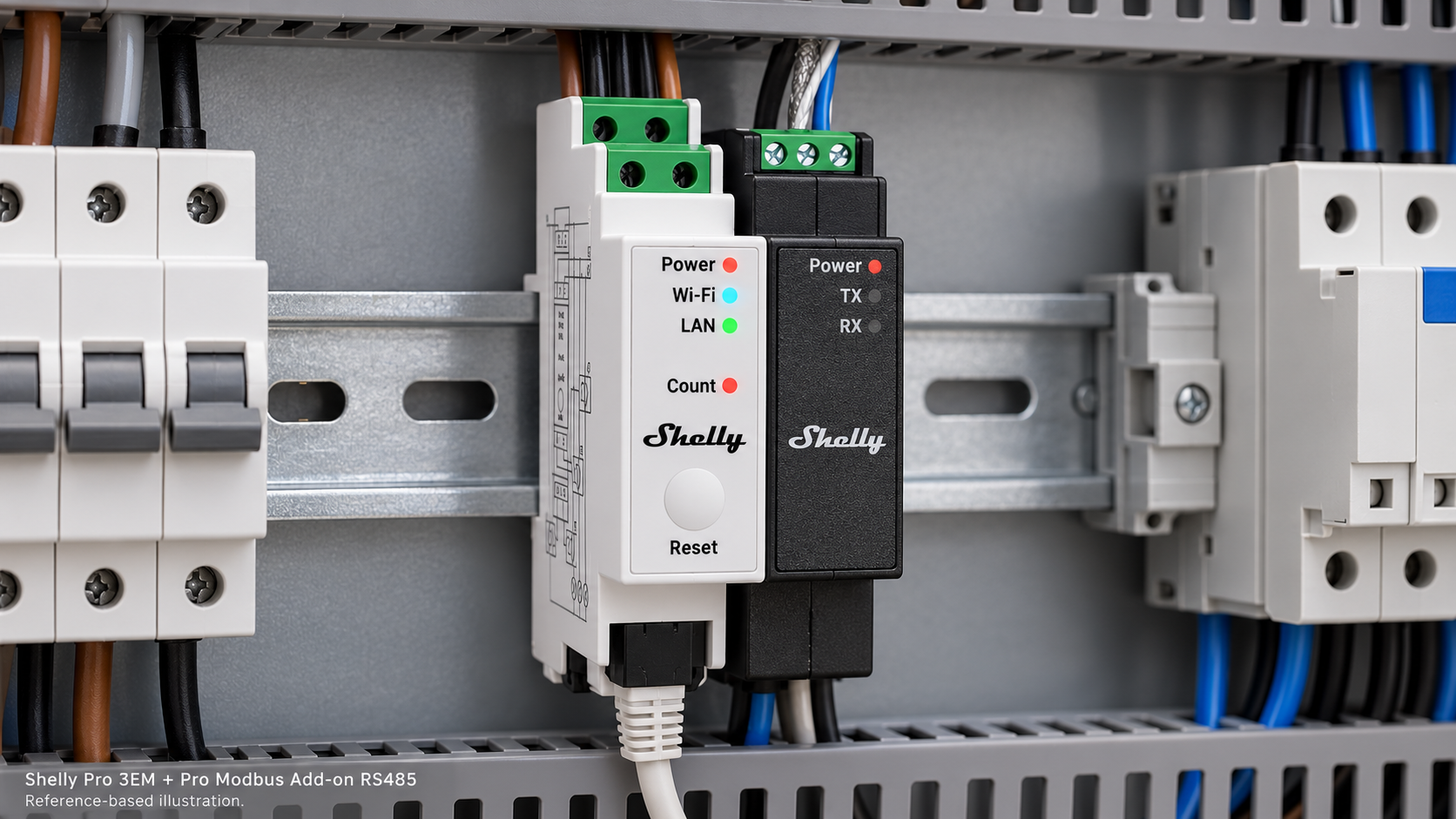
The illustrated solution uses a white Shelly Pro 3EM, three current transformers and the black Shelly Pro Modbus Add-on, fitted alongside the meter through its expansion interface. The product proportions and front panels are based on Shelly’s official images.
There is an important distinction between communication control and electrical energy measurement.
Shelly Pro EM-50 is a single-phase meter, but it can still run the communication script for a three-phase chiller. Modbus commands are exchanged over RS485, independently of the number of phases in the chiller’s supply.
For measurement of the chiller’s complete three-phase consumption, use an appropriately rated Shelly Pro 3EM with suitable current transformers. Install its metering connections according to the documentation for the exact Shelly model and the installation’s electrical design.
Pro EM-50 can therefore serve as the communication host. Pro 3EM is the option when the project also requires three-phase energy metering.
The original LG controller and display remain in the system.
The machine has a control board and an original HMI: the display used to observe and configure its operation. Shelly communicates with that automation through the external interface.
Check the label on the installed HMI to identify its exact part number. The chiller model alone is insufficient to establish the display’s part number reliably.
The relevant communication ports are:
|
LG controller port |
Purpose |
|---|---|
|
CH2 — A/B |
Central communication |
|
CH3 — A/B |
Connection to the original HMI |
|
CH4 — A/B |
External Modbus RTU communication |
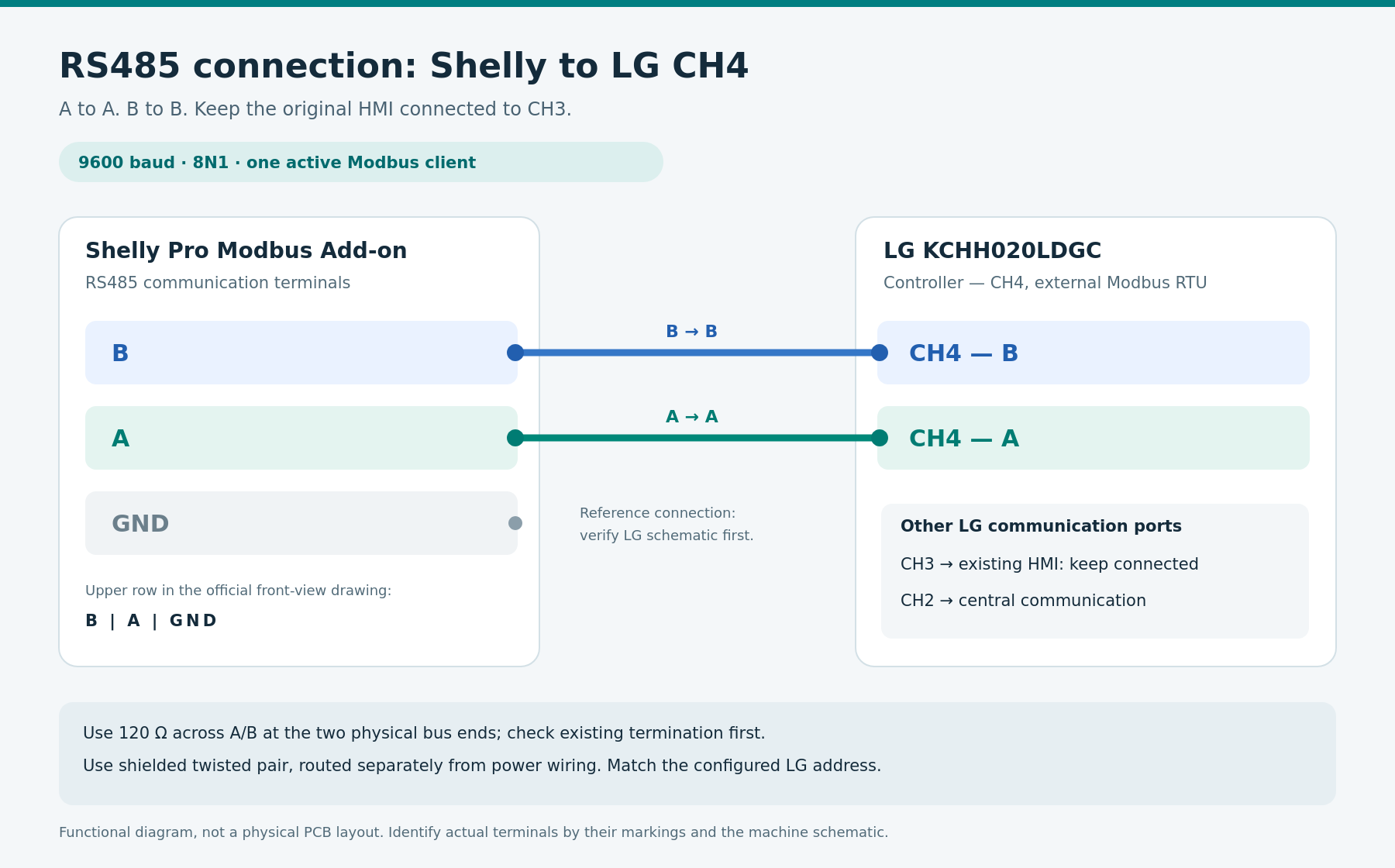
Connect Shelly to CH4. Keep the existing HMI connection to CH3.
Locate CH4 using the markings and wiring diagram for the actual machine. Do not infer its physical position from a photograph of a different board revision.
The physical connection is A to A and B to B.
A qualified technician should install the equipment with the relevant supplies isolated and verified de-energized. The A/B terminals are communication terminals and must not receive a supply voltage.
|
Shelly Pro Modbus Add-on |
LG KCHH020LDGC |
|---|---|
|
A |
CH4 — A |
|
B |
CH4 — B |
In Shelly’s official front-view drawing, the add-on’s upper terminal row is B — A — GND, from left to right. When using that row, connect the upper-left B terminal to CH4/B and the upper-middle A terminal to CH4/A. Confirm the printed markings on the actual device as well.
The add-on also provides GND. The reviewed LG CH4 description identifies A and B but does not establish a separate signal-reference terminal. Any additional reference connection must follow the exact LG board schematic. Do not connect this GND arbitrarily to neutral, protective earth or the ground of an unrelated input.
The add-on plugs into the expansion connector of the compatible Shelly Pro host and receives power through that connector.
For the communication cable:
-
Use suitable shielded twisted-pair communication cable.
-
Route it separately from power wiring.
-
Avoid sharing a conduit with compressor and other power cables.
-
Terminate the RS485 bus at its two physical ends.
-
Check for existing or integrated termination before adding resistors.
Shelly’s drawing shows 120 ohms across A and B at each end of the bus. Do not add a termination resistor at every intermediate device.
Use one active Modbus client on the physical segment. If Home Assistant, another gateway or a controller has been polling the same line, stop that client’s requests before Shelly takes over.
The separately supplied wiring illustration is a functional A/B connection diagram. The terminal markings and the machine’s wiring diagram determine the physical connection points.
Communication settings must match at both ends.
|
Parameter |
Setting for this profile |
|---|---|
|
Physical interface |
RS485 |
|
Protocol |
Modbus RTU |
|
Baud rate |
9600 bit/s |
|
Data bits |
8 |
|
Parity |
None |
|
Stop bits |
1 |
|
Modbus address |
The verified address configured in the LG controller |
The serial configuration is therefore 9600, 8N1.
The script contains a starting address of 1. This is an initial script setting, not confirmation that every KCHH020LDGC is configured at address 1.
To select external control in the LG HMI, use:
Control Mode → Modbus → Apply
In this mode, operational commands and setpoints come from the external controller. The HMI provides monitoring according to LG’s documented behavior. Select Local when returning operational control to the local interface.
Prepare Shelly, the script and the communication line before handing control over. LG’s manual also describes CH10009, a communication fault associated with loss of the external connection. This is separate from the script’s STALE status.
A communication interruption must not be treated as a guaranteed stop command. The chiller’s response depends on its own controller and configuration.
Download the complete script from ALLTERCO’s public repository.
Published file:
lg-kchh020ldgc-pro-rs485-vc.shelly.js
Direct text for copying:
To install it:
-
Open the Shelly device’s local web interface.
-
Go to Scripts.
-
Create a new script.
-
Paste the complete published file, including its first @meta line.
-
Review the configuration.
-
Save and start the script.
-
Observe startup messages and communication status.
-
Enable automatic startup after completing commissioning.
Preserve the complete first @meta line. It describes the virtual components.
The script uses managed virtual components. Firmware creates them from the script metadata, and the code accesses them by role. There is no need to create them manually with Virtual.Add or assign fixed component IDs. The device must have enough available capacity for all nine components.
When updating, use the same script slot to preserve component ownership and persistent settings. Deleting the script removes its managed components and its stored data.
The nine virtual components provide control and diagnostics.
|
Role |
Component name |
Function |
|---|---|---|
|
power |
LG Chiller Enable |
Request operating enable or stop |
|
mode |
LG Chiller Mode |
Select Cooling or Heating |
|
cool |
LG Cooling Setpoint |
Set the cooling target |
|
heat |
LG Heating Setpoint |
Set the heating target |
|
ewt |
LG Entering Water |
Read entering-water temperature |
|
lwt |
LG Leaving Water |
Read leaving-water temperature |
|
address |
LG Modbus Address |
Select the address Shelly communicates with |
|
fault |
LG Fault Code |
Read the fault code |
|
link |
LG Communication |
Observe communication and command status |
The published script provides a cooling-setpoint range of 4–25 °C and a heating-setpoint range of 30–60 °C, with commands in whole-degree steps. These are the script’s ranges. The actual machine may impose additional restrictions according to its operating mode and configuration.
LG Chiller Enable represents the operating permission read from its Modbus point. An enabled state does not prove that a compressor is running. LG may be waiting, have reached its setpoint or be executing an internal sequence.
LG Modbus Address accepts 1–247 and stores the selection persistently. It changes the destination of Shelly’s requests. It does not reprogram the address stored in the LG controller.
Changing the selected address clears queued commands and requires a fresh read before control of the newly selected controller is allowed. A command already transmitted cannot be recalled.
Start with writes to LG disabled.
The main configuration values in the published version are:
SERIAL_ID: 100,
SLAVE_ID: 1,

CONFIGURE_SERIAL: true,
ENABLE_WRITES: false,

SETPOINT_SCALE: 0.1,
SENSOR_SCALE: 0.1,
HEATING_MODE: 4,

POLL_MS: 5000,
GAP_MS: 150,
TIMEOUT_MS: 1500,
SETTLE_MS: 1000,
STALE_MS: 15000,

COMMAND_TTL_MS: 6000,
MAX_QUEUE: 4,
BACKOFF_MAX_MS: 30000
This is a configuration excerpt. Install the complete script rather than this fragment.
|
Setting |
Meaning |
|---|---|
|
SERIAL_ID |
Serial-interface identifier inside Shelly |
|
SLAVE_ID |
Fallback address when no persistent address has been selected |
|
CONFIGURE_SERIAL |
Allows the script to configure the serial port |
|
ENABLE_WRITES |
Enables or disables command writes to LG |
|
SETPOINT_SCALE |
Scale used for temperature setpoints |
|
SENSOR_SCALE |
Scale used for measured water temperatures |
|
HEATING_MODE |
Numeric value used to represent heating |
|
POLL_MS |
Nominal polling interval |
|
TIMEOUT_MS |
Response timeout |
|
STALE_MS |
Limit for the age of the last validated state |
|
MAX_QUEUE |
Maximum number of queued commands |
SERIAL_ID: 100 identifies an interface in Shelly. It is unrelated to the LG Modbus address.
With CONFIGURE_SERIAL: true, the script stores a backup of the previous port configuration in its persistent storage and configures the port for its own use. The exact device and firmware must support jsuart mode.
Pay particular attention to the two temperature scales. A raw value of 70 with a scale of 0.1 means 7.0 °C. The same raw value with a scale of 1 means 70 °C.
Verify measured-temperature scaling and setpoint scaling independently, against the HMI. Correct measured temperatures do not establish that the setpoint scale is also correct.
HEATING_MODE: 4 comes from the supplied working configuration for the installation. Confirm it by reading the register while LG is in a known mode. The reviewed manual table alone does not establish this value universally.
Keep the following setting until these checks are complete:
ENABLE_WRITES: false
This disables equipment command writes. Selecting the local destination address remains available.
Documentation addresses and request offsets are different.
References such as 40003 and 30004 also indicate the type of Modbus data. Requests use a zero-based offset within that data type.
|
Documented reference |
Offset in the request |
|---|---|
|
Coil 00001 |
0 |
|
Discrete Input 10002 |
1 |
|
Input Register 30004 |
3 |
|
Holding Register 40003 |
2 |
Do not send the number 40003 in the request’s address field to access documented holding register 40003.
The relevant Modbus functions are:
|
Function |
Purpose |
|---|---|
|
FC01 |
Read Coils |
|
FC02 |
Read Discrete Inputs |
|
FC03 |
Read Holding Registers |
|
FC04 |
Read Input Registers |
|
FC05 |
Write Single Coil |
|
FC06 |
Write Single Register |
The published script handles RTU frames directly over UART, including single-point writes using FC05 and FC06. Shelly’s documented MbRtuClient.WriteCoils method uses FC15, which differs from the single-coil FC05 operation used here. Do not switch this script’s port to another communication mode without changing and validating the implementation.
The published script uses the following core map.
|
Point |
Offset |
Functions |
Purpose |
|---|---|---|---|
|
Coil 00001 |
0 |
FC01 / FC05 |
Operating enable and stop |
|
Holding 40002 |
1 |
FC03 / FC06 |
Operating mode |
|
Holding 40003 |
2 |
FC03 / FC06 |
Cooling setpoint |
|
Holding 40004 |
3 |
FC03 / FC06 |
Heating setpoint |
|
Holding 40005 |
4 |
FC03 |
Diagnostic read of the control mode |
|
Holding 40006 |
5 |
FC03 |
Diagnostic read of the remote-control mode |
|
Input 30004 |
3 |
FC04 |
Leaving-water temperature |
|
Input 30005 |
4 |
FC04 |
Entering-water temperature |
|
Input 30010 |
9 |
FC04 |
Fault code |
The script reads 40005 and 40006 but does not write them. Select Modbus control through LG’s intended configuration interface.
The profile uses LG manual MFL67262630, Rev.00_011025, KCHH Series. Consult its communication and register sections, including pages 161–163 and 167:
Do not combine this map with maps for other LG series. A point documented for an older ACHH controller does not automatically apply to KCHH020LDGC.
Commission the integration through a controlled sequence.
-
Record LG’s initial state.
Note its operating mode, setpoints, water temperatures, faults and verified Modbus address. Use these as the comparison baseline. -
Check the physical line.
Confirm CH4, A/B connections, cable routing, termination and the absence of another active client. -
Prepare Shelly with writes disabled.
Install the complete script and leave ENABLE_WRITES: false. -
Hand control to Modbus at a planned time.
Use LG’s setting once the external communication is prepared and the machine is in an appropriate state for commissioning. -
Wait for validated readings.
The script synchronizes first. Initial virtual-component defaults are not automatically sent to LG as commands. -
Compare the values with the HMI.
Check both water temperatures, both setpoints, operating mode and fault code. Verify the two scales and the heating-mode value separately. -
Observe communication stability.
One successful response is insufficient. Watch several cycles for missing or invalid replies. -
Enable writes after confirming the map.
Set ENABLE_WRITES: true, save and restart the script. -
Perform a planned, permitted command.
Check the subsequent readback and LG’s actual response. Avoid rapid start/stop cycling; LG’s internal delays and interlocks remain active. -
Check recovery after a restart.
Confirm the persistent address, communication and component behavior. Enable automatic script startup after the checks pass.
The script validates responses and reads back after a command.
Received frames are checked for device address, function, length and CRC. Command writes are restricted to the allowlisted operating-enable point, mode and two temperature setpoints.
The script reads back after a write attempt. This matters even if the write acknowledgement is lost: the controller may already have executed the command.
It does not blindly retry command writes. The command queue is limited, commands expire, and old queued commands are cleared during communication recovery.
The nominal polling interval is 5 seconds. A complete cycle can take longer because of response times, inter-request gaps and read retries.
Read LG Communication together with the numeric values.
|
Status |
Meaning |
|---|---|
|
READ ONLY - verify map/scales |
Synchronization is available, but writes are disabled |
|
ONLINE |
A fresh synchronized state is available and writes are enabled |
|
STALE |
There is no sufficiently recent validated state |
|
STOP: … |
The script has halted for the stated reason |
Additional text may describe a command or the last successful read.
ONLINE describes communication. It does not mean that a compressor is running.
The last numeric readings may remain visible after communication is lost. Always interpret a temperature or fault code together with communication status. An old fault-code value of zero does not establish the present condition of an unreachable controller.
LG documents additional points that can extend diagnostics.
The following are extension candidates. They are not implemented in the current published script. Adding them requires changes to polling, response processing and presentation.
Useful discrete inputs include:
|
Point |
Offset |
Meaning |
Potential use |
|---|---|---|---|
|
10002 |
1 |
Flow Switch |
Observe the flow-switch signal |
|
10004 |
3 |
Load Water Pump Output |
Observe the controller’s pump output |
|
10119 |
118 |
Compressor 1, cycle 1 — On/Off |
Additional compressor-state information |
|
10120 |
119 |
Compressor 2, cycle 1 — On/Off |
Additional compressor-state information |
These points use FC02. The current script would need the corresponding request and response handling.
Combining the pump output and flow-switch signal can help diagnosis. An active pump output with no flow-switch signal after the permitted startup delay is a mismatch worth investigating.
It does not by itself prove that the pump has failed. Possible causes include hydraulic conditions, valves, air, the switch or electrical equipment. An active pump output also does not independently prove that the motor is turning.
Additional input registers include:
|
Register |
Offset |
Content |
Check before use |
|---|---|---|---|
|
30001 |
0 |
Controller version |
Data format |
|
30002 |
1 |
Overall operating current |
Unit and scale |
|
30003 |
2 |
Outdoor-air temperature |
Temperature scale |
|
30008 |
7 |
Unit-failure information |
LG’s decoding table |
|
30009 |
8 |
Affected-cycle information |
Context for the fault |
|
30011 |
10 |
Start waiting time |
Unit and scale |
|
30013 |
12 |
Upper part of accumulated operating time |
Combine with 30014 using the confirmed format |
|
30014 |
13 |
Lower part of accumulated operating time |
Word format and unit |
Outdoor temperature remains available as an extension through 30003, even though its virtual component has been replaced by the address selector.
Do not present current register 30002 directly as power or energy. Its interpretation requires the correct unit and scale; power and energy require the appropriate electrical measurements.
Do not simply add the two accumulated-time words together. Confirm how they combine, their order and the unit first.
The combination 30008 + 30009 + 30010 can provide more fault context: the unit, cycle and fault code.
Additional command points need a separate implementation.
|
Point |
Offset |
Documented purpose |
|---|---|---|
|
Holding 40008 |
7 |
Maximum operating-frequency setting |
|
Coil 00002 |
1 |
Alarm-clear command |
|
Coil 00003 |
2 |
Delete accumulated operating time |
LG’s table uses coded options for 40008:
|
Written code |
Setting in the table |
|---|---|
|
0 |
120 |
|
1 |
110 |
|
2 |
100 |
|
3 |
90 |
|
4 |
80 |
|
5 |
70 |
|
6 |
60 |
Do not write an arbitrary value of 120 to select the first option. The implementation needs the correct conversion between the option code and the setting.
This is a maximum-frequency setting, not a measurement of current compressor frequency. Limiting frequency also does not guarantee an electrical power limit expressed in kilowatts.
Do not automatically clear every alarm. Establish its cause and follow LG’s reset procedure.
Coil 00003 has a different purpose: it deletes accumulated operating time. It must not be confused with alarm clearing.
None of these additional command points is included in the current script’s write allowlist.
Nine virtual components do not limit the script to nine data points.
An extension can read more registers and present some of the information in an aggregate field. A future diagnostic field might show:
Link: OK · Compressors: 1/2 · Flow Switch: ON
This is an example of a future presentation, not an existing feature.
Add new requests to the script’s existing UART exchange sequence. Do not start a second independent script issuing requests simultaneously on the same port.
The address range of 1–247 does not make this script a cascade controller. It communicates with one selected chiller at a time. Multiple-machine operation requires additional state, command and sequencing logic.
Verify local operation and Shelly Smart Control separately.
There are four distinct parts:
-
The script runs on Shelly.
-
Shelly communicates locally with LG over RS485.
-
Shelly may connect to Shelly Cloud.
-
The application provides remote access according to its support for the device and virtual components.
A working local Modbus link does not automatically establish every application capability.
After local commissioning, verify which components appear in the installed version of Shelly Smart Control, which are controllable and which can participate in scenes. Do not assume support for histories, charts, notifications or a dedicated thermostat card without checking the actual setup.
Troubleshoot the layer where the symptom appears.
|
Symptom |
Checks |
|---|---|
|
The script will not start |
Complete file, @meta line, API support and error message |
|
Virtual components are missing |
Available capacity and managed-component support |
|
LG does not respond |
CH4, A/B, address, 9600/8N1 and another active client |
|
Measured temperatures differ by a factor of ten |
SENSOR_SCALE |
|
Measured temperatures are correct but setpoints are wrong |
SETPOINT_SCALE, checked independently |
|
Reads work but control does not |
ENABLE_WRITES, LG’s mode and command readback |
|
STALE appears |
Interruptions, interference, termination and missing replies |
|
Enable is accepted but a compressor does not start |
Internal waiting times, satisfied setpoint, interlocks and LG faults |
|
The application shows old temperatures |
Communication status and data freshness |
|
LG shows CH10009 |
External communication and LG’s recovery procedure |
Do not begin troubleshooting with arbitrary writes to unverified registers. Establish whether the fault is physical, communication-related, an addressing issue or a control-mode issue.
Energy metering adds context to LG’s operating states.
With Pro 3EM, electrical consumption can be compared with chiller data to help observe starts, operating periods and consumption.
Future additions might include schedules, notifications for prolonged communication loss or consumption analysis by operating mode. These require additional implementation and validation.
Electrical power and the water-temperature difference alone are insufficient to calculate thermal output and COP. Reliable flow measurements and the heat-transfer fluid’s properties are also required.
Stop and update the script with LG’s intended state established first.
Stopping the script stops communication. It is not a confirmed OFF command to the chiller.
Before servicing or removing the integration:
-
Bring LG to the required state using a verified command or the manufacturer’s procedure.
-
Return control to the local HMI when required.
-
Stop the script.
-
Apply the required electrical isolation before work in the cabinet.
Before an update, retain the current code and settings. Install the new version in the same slot and verify operation again after startup.
The initial serial-port configuration is stored in script storage under a key such as lgser100. Restore it only when the port is no longer being used by this script or another process.
Validation of the published version has a defined scope.
The solution has 44 deterministic simulation checks, including communication and interface-failure scenarios. Syntax and repository requirements were also checked.
The author reported a physical-installation test on 19 October 2026. This applies to that installation. Exact firmware versions for every component and exhaustive hardware coverage of each function were not recorded.
The additional registers described as extension candidates above must not be treated as implemented or tested through the current script.
The code was included in ALLTERCO/shelly-script-examples through pull request #232. Publication as an example does not replace commissioning checks on the actual machine before writes are enabled.
Files and documentation