
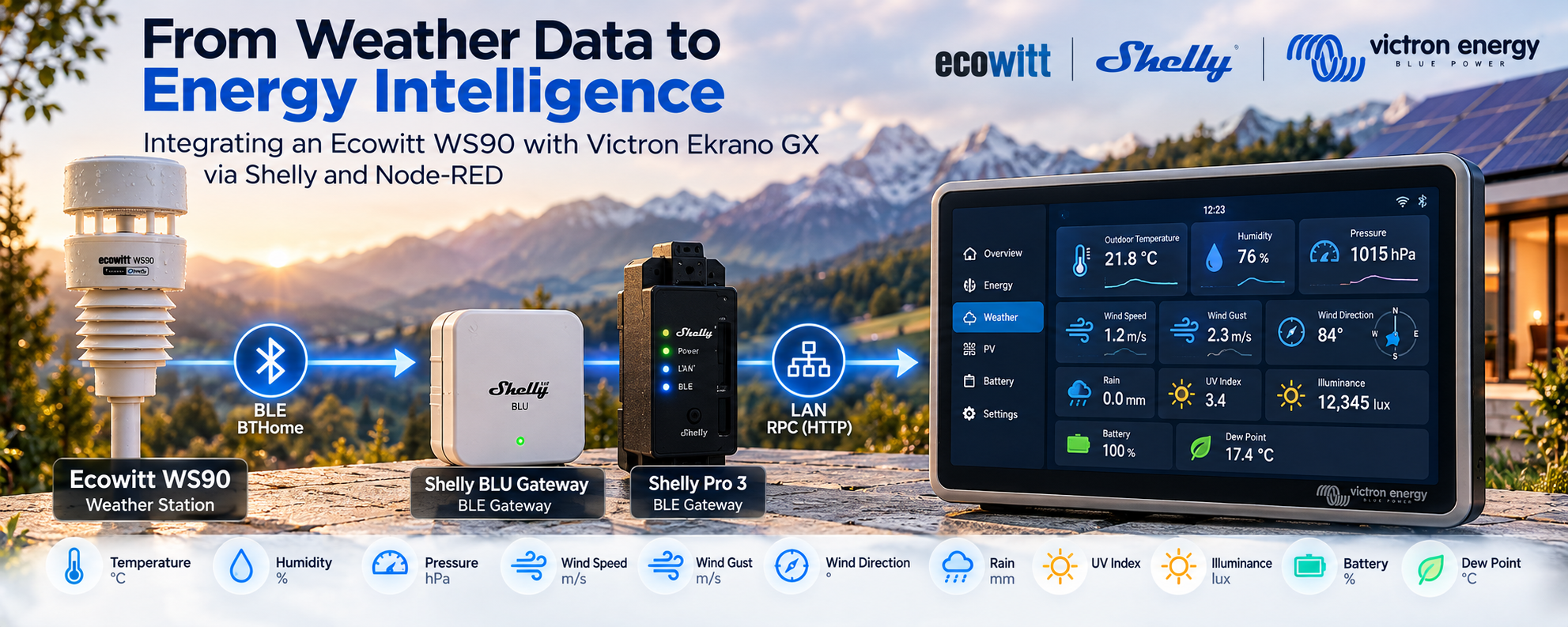
Turn an Ecowitt WS90 into a native data source for Victron GX by using Shelly devices as redundant BLE-to-IP gateways. This Node-RED architecture selects the freshest BTHome observation, merges the WS90’s alternating weather packets, and makes environmental data available locally for Victron, VRM and energy-aware automation.
The idea
The objective was straightforward:
-
Receive the WS90 Bluetooth advertisements.
-
Use Shelly devices to bridge those advertisements from BLE to the IP network.
-
Process and normalize the data in Node-RED.
-
Expose compatible measurements as native Victron virtual devices.
-
Keep the remaining WS90 measurements available for automation logic.
This avoids the need for an additional Raspberry Pi, dedicated BLE-to-MQTT bridge or separate weather server.
The Ekrano GX already runs the automation layer, and the Shelly devices already have BLE and network connectivity.
So rather than adding another computer, the architecture reuses the hardware that is already present.
The Ecowitt WS90
The WS90 is a compact outdoor weather station capable of providing a broad set of environmental measurements.
Shelly's technical documentation describes the device as SBWS-90CM and documents its BTHome advertisements. The station broadcasts a measurement packet approximately every 8.8 seconds.
The available measurements include:
-
outdoor temperature;
-
relative humidity;
-
atmospheric pressure;
-
dew point;
-
wind speed;
-
wind gust;
-
wind direction;
-
precipitation;
-
rain status;
-
illuminance;
-
UV index;
-
battery percentage;
-
capacitor voltage.
This already provides enough information for much more than a simple weather display.
It can become an input to energy management, HVAC control and building automation.
Why Shelly is used as the BLE gateway
The WS90 communicates using Bluetooth Low Energy and BTHome.
Instead of requiring the Ekrano GX itself to scan and decode BLE advertisements, nearby Shelly devices receive them.
Shelly's BLE subsystem supports BTHome and its Cloud Relay functionality can expose information received from managed BLE devices. The RPC method used by this integration is:
BLE.CloudRelay.ListInfos
This method returns extended information about BLE devices seen by the Shelly, including their service data and last_seen information.
An RPC request can therefore be made locally over the LAN:
GET /rpc/BLE.CloudRelay.ListInfos
Conceptually, the Shelly becomes a:
BLE → IP bridge
This separation is useful.
The Shelly handles the radio layer.
Node-RED handles the data layer.
Victron handles the energy-management layer.
Using two Shelly gateways
The integration was designed around two Shelly BLE gateways instead of one.
For example:
WS90
 │
 ├──── BLE ────► Shelly Gateway A
 │
 └──── BLE ────► Shelly Gateway B
In the original installation the gateways were reachable at:
192.168.1.106
192.168.1.107
The addresses are simply configuration values and should be replaced for another installation.
Using two receivers improves BLE coverage and gives the system redundancy.
If the weather station is temporarily not visible from one Shelly because of distance, interference or a restart, another Shelly may still receive the advertisement.
But using two gateways introduces another problem.
Both devices may receive the same advertisement.
We therefore need source selection.
Selecting the freshest BLE observation
Every time Node-RED polls a Shelly gateway using BLE.CloudRelay.ListInfos, it searches the returned devices for the configured WS90 MAC address.
The public example flow uses a placeholder:
aa:bb:cc:dd:ee:ff
which must be replaced with the MAC address of the real station.
For each Shelly gateway, the flow stores:
gateway
last_seen
BTHome service data
If both gateways currently see the WS90, Node-RED compares their last_seen values.
The newest observation wins.
Conceptually:
Shelly A ───► WS90 observation ──┐
                                 │
                                 ├──► Compare last_seen
                                 │
Shelly B ───► WS90 observation ──┘
                                 │
                                 ▼
                         Freshest observation
This is better than permanently assigning one Shelly as the primary gateway.
The preferred source can change automatically based on which receiver currently has the freshest data.
The most important WS90 detail: alternating packets
A weather station has many measurements, but BLE advertisements need to remain compact.
The WS90 therefore does not transmit every weather value in one single BTHome frame.
Its data is divided into multiple packet types.
Packet Type 1
The first weather packet contains:
|
Measurement |
Unit |
|---|---|
|
Illuminance |
lux |
|
Rain status |
binary |
|
Wind speed |
m/s |
|
Wind gust |
m/s |
|
UV index |
— |
|
Wind direction |
degrees |
Packet Type 2
The second contains:
|
Measurement |
Unit |
|---|---|
|
Battery |
% |
|
Atmospheric pressure |
hPa |
|
Dew point |
°C |
|
Capacitor voltage |
V |
|
Relative humidity |
% |
|
Temperature |
°C |
|
Precipitation |
mm |
There is also a third packet type for button events.
This is a crucial implementation detail.
If Node-RED simply replaced its complete weather state every time an advertisement arrived, approximately half of the measurements would continuously disappear.
For example:
Packet A:
Wind speed
Wind gust
Rain
UV
Illuminance
Wind direction
followed by:
Packet B:
Temperature
Humidity
Pressure
Dew point
Battery
Precipitation
Replacing state B with state A would lose temperature.
Replacing state A with state B would lose wind.
The correct solution is persistent state merging.
Persistent state merging
Node-RED keeps a state object containing the latest known value of every WS90 measurement.
Imagine that the current state is:
{
  "wind_speed": 1.23,
  "wind_gust": 2.34,
  "wind_direction": 84.5,
  "rain": false,
  "uv_index": 3.4,
  "illuminance": 12345
}
The next BTHome frame contains:
{
  "temperature": 21.8,
  "humidity": 76,
  "pressure": 1015.25,
  "dew_point": 17.37
}
Node-RED does not replace the object.
It merges the new measurements:
{
  "temperature": 21.8,
  "humidity": 76,
  "pressure": 1015.25,
  "dew_point": 17.37,

  "wind_speed": 1.23,
  "wind_gust": 2.34,
  "wind_direction": 84.5,

  "rain": false,
  "uv_index": 3.4,
  "illuminance": 12345
}
This creates one stable logical weather station even though the physical device sends alternating BLE packets.
The example flow stores that merged object in Node-RED flow context.
Decoding BTHome locally
Shelly exposes the WS90's BTHome service data through the RPC response.
The Node-RED Function node decodes the relevant BTHome object IDs.
For example, according to the WS90 specification:
0x04 → atmospheric pressure
0x05 → illuminance
0x08 → dew point
0x20 → rain status
0x2E → humidity
0x44 → speed
0x45 → temperature
0x46 → UV index
0x5E → wind direction
0x5F → precipitation
One interesting detail is that the WS90 uses BTHome object ID 0x44 twice in Packet Type 1:
first 0x44  → wind speed
second 0x44 → wind gust
The decoder therefore keeps track of the occurrence instead of assuming that every BTHome ID appears only once. The IDs, scaling factors and byte lengths are documented in Shelly's WS90 technical specification.
Running everything on Ekrano GX
Node-RED runs directly on the Victron Ekrano GX under Venus OS.
There is therefore no additional automation server between Shelly and Victron.
The processing chain becomes:
┌─────────────────┐
│  Ecowitt WS90   │
└────────┬────────┘
         │ BLE / BTHome
         │
     ┌───┴───┐
     │       │
     ▼       ▼
 Shelly A  Shelly B
     │       │
     └───┬───┘
         │ LAN / RPC
         ▼
┌─────────────────────┐
│ Node-RED on Ekrano  │
│                     │
│ • source selection  │
│ • BTHome decoding   │
│ • deduplication     │
│ • state merging     │
│ • data mapping      │
└──────────┬──────────┘
           │
           ▼
     Victron D-Bus
           │
     ┌─────┴─────┐
     ▼           ▼
   GX UI        VRM
That makes the Ekrano GX both the energy controller and the processing engine for the weather integration.
Publishing the data as Victron virtual devices
Recent versions of Victron's Node-RED package provide Virtual Devices.
Virtual devices create simulated Victron devices that can appear in the GX ecosystem and VRM. They accept Node-RED messages containing the properties that should be updated.
For this integration, two different virtual devices are useful.
Virtual Temperature Sensor
The WS90 outdoor temperature data is published using a Victron virtual Temperature Sensor.
The current implementation can also expose:
Temperature
Humidity
Pressure
This means three important WS90 values can live together under one virtual outdoor sensor.
The flow configures its temperature type as:
Outdoor
so the resulting device has the correct semantic role in the GX system.
Virtual Meteo device
The second virtual device is a Victron Meteo device.
The flow sends:
WindSpeed
WindDirection
to this device.
That provides wind telemetry to the Victron environment while keeping the remaining WS90 measurements available inside Node-RED for automation.
A small but important engineering detail: lux is not W/m²
The Victron Meteo virtual device contains an Irradiance property expressed in:
W/m²
The WS90, however, measures illumination in:
lux
Those two quantities are not equivalent.
It would therefore be incorrect to do:
WS90 illuminance → Victron Irradiance
without a physically justified conversion based on the spectral characteristics of the light source and sensor.
The public flow deliberately does not perform this mapping.
WS90 illuminance is retained in the complete Node-RED weather state, where it can still be used for automations.
This distinction is important because a technically clean integration should not create apparently valid telemetry with incorrect units.
Measurements that remain available in Node-RED
Not every WS90 measurement has a matching standard field in the Victron virtual Meteo device.
The merged Node-RED state still keeps measurements such as:
wind_gust
rain
precipitation
uv_index
illuminance
dew_point
battery
capacitor_voltage
This is intentional.
The GX integration therefore has two layers:
Victron-native layer
Used for values that map cleanly into existing Victron device models.
Node-RED automation layer
Used for the complete weather dataset.
That means we gain native Victron integration without throwing away information simply because no matching D-Bus property exists.
Example complete weather state
After both WS90 packet types have been received, Node-RED can hold a state similar to:
{
  "temperature": 21.8,
  "humidity": 76,
  "pressure": 1015.25,
  "dew_point": 17.37,

  "wind_speed": 1.23,
  "wind_gust": 2.34,
  "wind_direction": 84.5,

  "rain": false,
  "precipitation": 0,

  "uv_index": 3.4,
  "illuminance": 12345,

  "battery": 100,
  "capacitor_voltage": 1.234,

  "source": "shelly-b",
  "last_seen": 123456789
}
This object becomes a very useful automation source.
What can we do with this data?
This is where the project becomes significantly more interesting than a weather dashboard.
Once the Ekrano GX environment has access to both:
Energy data
+
Environmental data
automation can combine the two.
Solar and weather analysis
A Victron system already knows values such as:
PV power
Battery SOC
Battery power
Grid power
AC consumption
Node-RED now also knows:
Temperature
Humidity
Pressure
Wind
Rain
UV
Illuminance
That enables much richer analysis.
For example, low PV output can be considered together with environmental conditions rather than being treated as an isolated electrical measurement.
HVAC optimization
Consider this combination:
Battery SOC = high
PV production = high
Indoor temperature = increasing
Outdoor temperature = suitable
Instead of waiting until the building becomes uncomfortable later in the day, Node-RED could use excess solar production to pre-cool the building.
The same principle works for heating.
Rather than thinking only in terms of:
temperature → HVAC
we can begin thinking in terms of:
weather
+
building state
+
available solar energy
+
battery state
→ HVAC strategy
That is a much more useful control model.
Dew point and condensation protection
Dew point is particularly valuable for chilled-water and fan-coil installations.
Imagine that a building uses cold water for cooling.
If the water temperature drops too close to the local dew point, condensation can develop on:
-
pipes;
-
manifolds;
-
fan-coil surfaces;
-
valves;
-
chilled ceilings.
The weather station can therefore contribute to condensation-risk logic.
For example:
IF chilled_water_setpoint
   < dew_point + safety_margin

THEN
   raise chilled-water setpoint
Naturally, indoor humidity sensors are even more important for indoor condensation control, but outdoor dew-point information still adds valuable environmental context.
Ventilation and free cooling
The same data can improve ventilation control.
Suppose:
Indoor temperature = 27 °C
Outdoor temperature = 18 °C
Rain = false
Outdoor air may be useful for free cooling.
But temperature alone is not sufficient.
Humidity and dew point can also be considered before increasing ventilation.
Instead of:
Outdoor temperature lower than indoor
→ maximum ventilation
we can implement:
Temperature difference
+
Humidity
+
Dew point
+
Rain
→ ventilation decision
Wind-based automation
The WS90 measures both normal wind speed and gust speed.
Those values can be useful for:
-
retracting awnings;
-
protecting external blinds;
-
controlling roof windows;
-
preventing automatic window opening;
-
changing ventilation modes;
-
issuing wind warnings.
For protective automation, wind_gust may actually be more important than the average wind speed.
A short but strong gust can damage an awning even if the average wind speed remains relatively low.
Rain-based automation
Rain detection can also become part of the building-control system.
For example:
Rain detected
→ close roof windows
or:
Rain detected
→ disable irrigation
or:
Rain detected
→ retract selected exterior equipment
Because the complete WS90 state remains available in Node-RED, those decisions can happen locally.
EV charging and flexible loads
Weather information can also contribute indirectly to flexible-load management.
A possible energy strategy might consider:
Battery SOC
PV production
Current loads
Weather trend
Outdoor temperature
before deciding whether to enable:
-
EV charging;
-
domestic hot-water heating;
-
pool heating;
-
thermal storage;
-
other discretionary loads.
The weather station is not making the decision by itself.
It simply provides more context to the controller that already understands the electrical system.
Why local communication matters
The primary data path is:
WS90
↓
BLE
↓
Shelly
↓
local Ethernet / Wi-Fi
↓
Ekrano GX
The automation logic therefore does not need a weather measurement to travel through an external cloud API before it can be used locally.
That provides several advantages:
-
lower latency;
-
fewer external dependencies;
-
continued local operation during an Internet outage;
-
less reliance on third-party APIs;
-
simpler integration with real-time control logic.
For an off-grid, marine, camper, caravan or remote-energy installation, local operation can be particularly important.
Why two gateways are better than one
Bluetooth coverage is highly dependent on the physical environment.
Walls, metal equipment, electrical cabinets and building geometry can all affect BLE reception.
Using multiple Shelly gateways turns this weakness into a manageable software problem.
Instead of asking:
Which gateway should permanently own this sensor?
the Node-RED flow asks:
Which gateway currently has the freshest observation?
That is a much more resilient design.
The architecture can also be extended beyond two receivers.
Deduplication
Multiple gateways create duplicate packets.
The flow therefore generates a fingerprint from the selected observation:
last_seen + service_data
If the same observation is processed again, it is ignored.
This prevents unnecessary updates from propagating through the rest of the Node-RED flow.
Failover behavior
If Gateway A stops seeing the weather station but Gateway B continues receiving it:
WS90
 │
 ├── X ─────► Gateway A
 │
 └── BLE ───► Gateway B
the latest observation from Gateway B naturally becomes the preferred source.
No manual switching is required.
Likewise, when Gateway A begins receiving fresher packets again, it can automatically become the selected source.
The reusable part of the project
Although this example focuses on the WS90, the architecture is more general:
BLE sensor
→ Shelly
→ local RPC
→ Node-RED
→ normalization
→ Victron virtual device
The same concept can be applied to many types of sensor data.
Examples could include:
-
BLE temperature sensors;
-
humidity sensors;
-
environmental sensors;
-
custom BTHome devices;
-
tank-level telemetry;
-
additional equipment status information.
Shelly's BLU ecosystem uses BTHome, an open sensor-data format intended for home-automation interoperability.
Node-RED flow structure
The public example contains the following logical stages:
Poll every 5 seconds
        │
        ├──────────────┐
        ▼              ▼
 Shelly Gateway A   Shelly Gateway B
        │              │
        ▼              ▼
 BLE.CloudRelay     BLE.CloudRelay
 .ListInfos         .ListInfos
        │              │
        └──────┬───────┘
               ▼
       Identify WS90
               │
               ▼
     Compare last_seen
               │
               ▼
      Decode BTHome
               │
               ▼
    Merge persistent state
               │
               ▼
     Build Victron payloads
          ┌────┴─────┐
          ▼          ▼
   Temperature      Meteo
   virtual device   virtual device
The complete merged state is also available through a debug output for additional automation.
Configuration
Before importing the example flow, three values need to be changed.
Shelly Gateway A
http://192.168.1.106/rpc/BLE.CloudRelay.ListInfos
Shelly Gateway B
http://192.168.1.107/rpc/BLE.CloudRelay.ListInfos
WS90 MAC
Inside the decoder function:
const WS90_MAC = "aa:bb:cc:dd:ee:ff".toLowerCase();
Replace these with the values from the target installation.
The final architecture
The complete system can be summarized as:
┌──────────────────────────────┐
│        ECOWITT WS90          │
│                              │
│ Temperature                  │
│ Humidity                     │
│ Pressure                     │
│ Dew point                    │
│ Wind / Gust / Direction      │
│ Rain / Precipitation         │
│ UV / Illuminance             │
└──────────────┬───────────────┘
               │
            BTHome
               │
      ┌────────┴────────┐
      │                 │
      ▼                 ▼
┌────────────┐    ┌────────────┐
│ Shelly BLE │    │ Shelly BLE │
│ Gateway A  │    │ Gateway B  │
└─────┬──────┘    └──────┬─────┘
      │                  │
      └────────┬─────────┘
               │ Local RPC
               ▼
┌──────────────────────────────┐
│       Node-RED / Venus OS    │
│                              │
│ • source selection           │
│ • BTHome decoding            │
│ • deduplication              │
│ • persistent state merge     │
│ • unit-safe mapping          │
└──────────────┬───────────────┘
               │
        ┌──────┴───────┐
        │              │
        ▼              ▼
 Virtual Temperature  Virtual Meteo
        │              │
        └──────┬───────┘
               ▼
          Victron GX
               │
        ┌──────┴───────┐
        ▼              ▼
       VRM        Automation
Conclusion
The most interesting part of this integration is not simply displaying outdoor temperature on a Victron system.
It is the connection of two previously separate domains:
environmental sensing and energy management.
A Victron installation already understands:
PV
Battery
Grid
Loads
Energy flow
After adding the WS90 data path, Node-RED can also understand:
Temperature
Humidity
Pressure
Dew point
Wind
Rain
UV
Illuminance
Shelly acts as the bridge between the physical BLE sensor and the IP network.
Node-RED performs the protocol decoding, redundancy logic, state merging and automation.
Victron provides the energy-management environment.
Together, they create a system in which weather information is no longer just something to look at.
It becomes another input into how energy is produced, stored and intelligently consumed.