
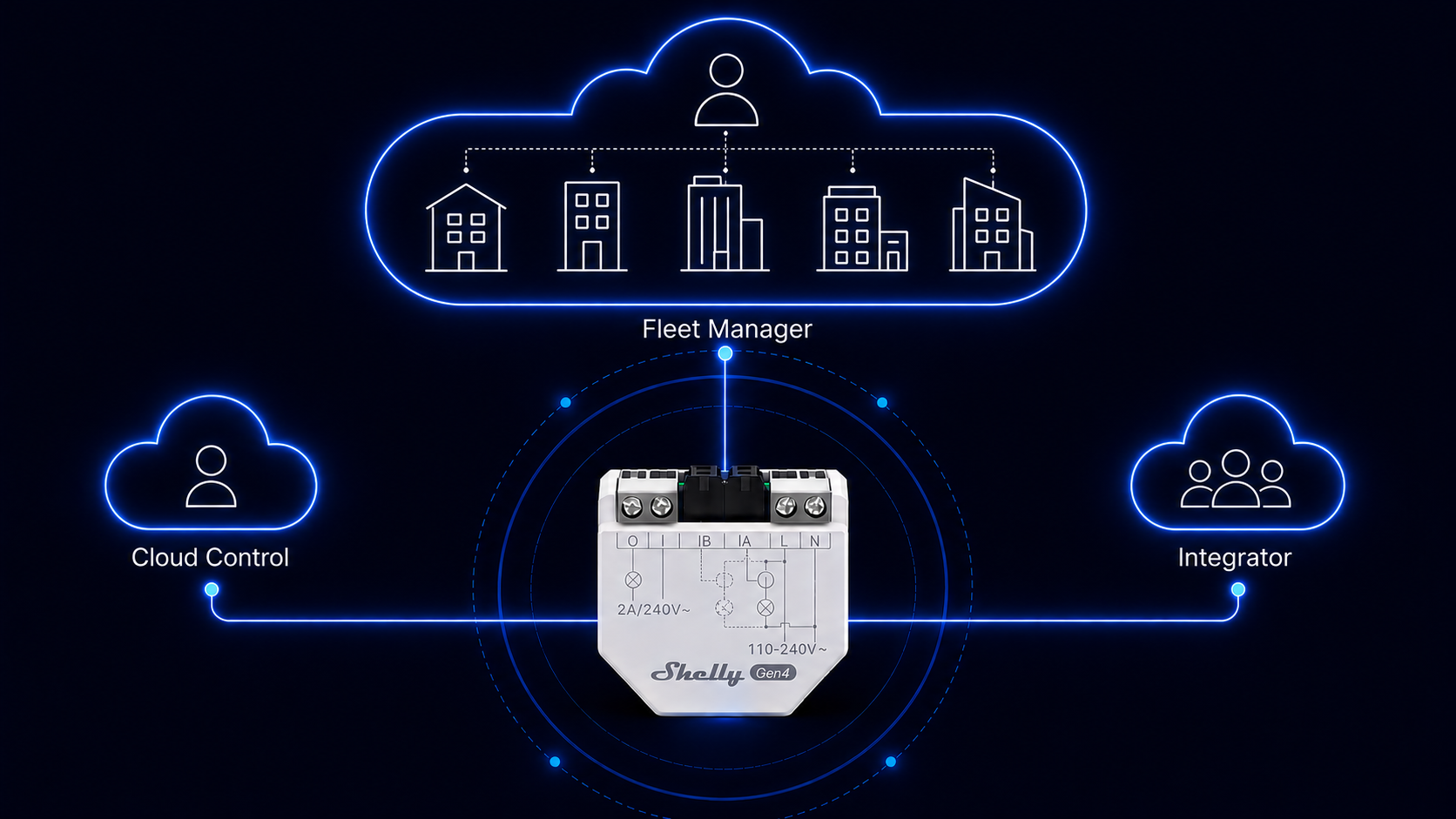
Shelly provides a diverse range of APIs for its devices, allowing flexible integration. Each device can be programmed and controlled either as a standalone unit (fully independent of Shelly Cloud) or remotely through a secure cloud API.
This article explains, at a high level, the difference between three Shelly services: Cloud Control API, Integrator API, and Shelly Fleet Manager (SFM). All three are cloud-based, but they are built for different scopes and different types of users; from a single personal account, to B2B integrations spanning many accounts, to fully independent fleet management.
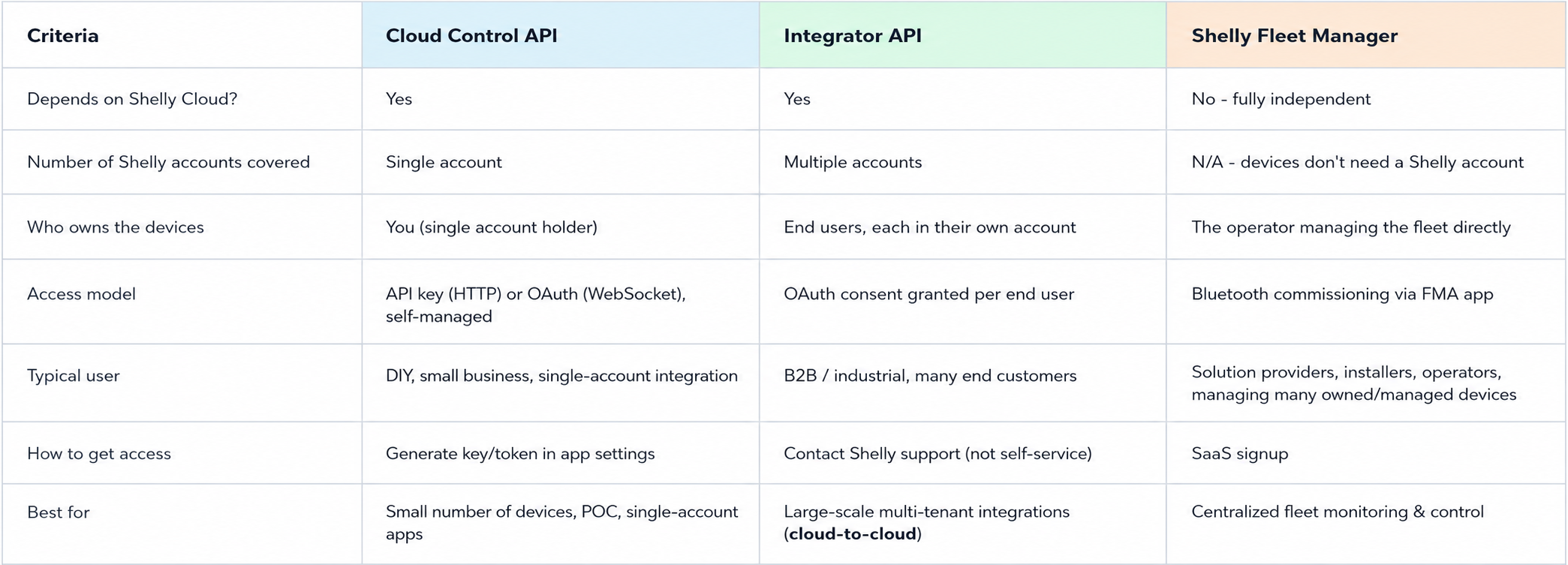
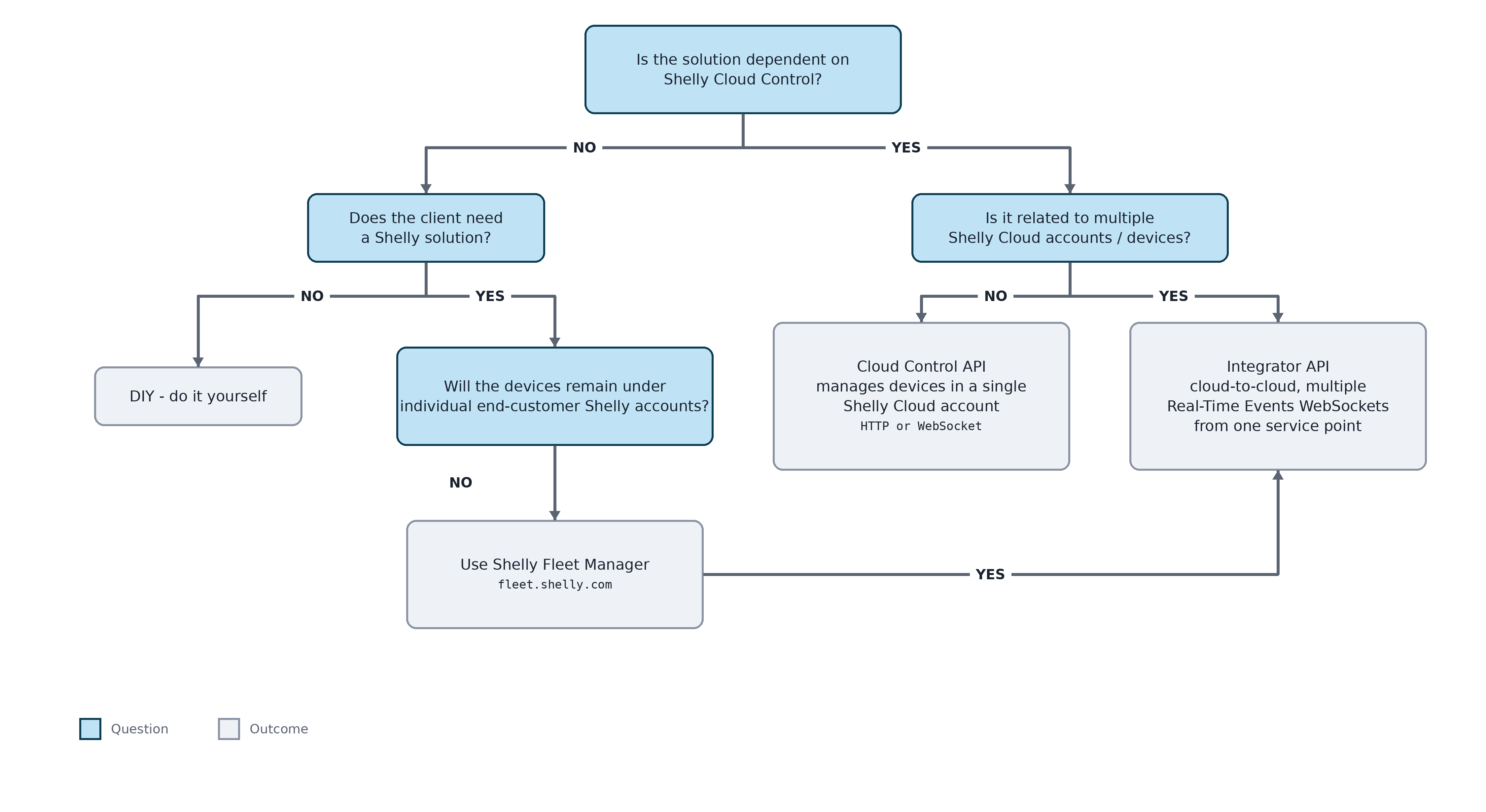
Use the comparison table and decision flow below to quickly identify which service fits your use case and read the detailed sections further down for the full picture.
Quick glossary:
-
WebSocket - A communication protocol that provides a permanently open, bi-directional channel over a single TCP connection. Shelly Cloud can push updates over WebSocket, whereas HTTP-based APIs work on a request/response basis (polling), with the connection closing after each exchange.
-
OAuth - An authorization protocol that allows a user to grant limited access to their account to a third-party service, without sharing their password directly.
-
Consent - Explicit permission given by a device owner allowing a specific integrator or service to access a defined set of their devices; can be reviewed or revoked at any time.
Comparison Table
-
Cloud Control API - control your own devices within a single Shelly account.
-
Integrator API - control devices across many separate end-user accounts, with their consent(cloud-to-cloud).
-
Shelly Fleet Manager - manage a fleet of devices you operate directly, independent of Shelly Cloud.
The diagram below provides a quick visual overview of the concepts explained in more detail later in this article.
Cloud Control API
A secure API for controlling Shelly devices through Shelly Cloud, within a single account. You can control all devices in that one account, but not devices from other accounts. You manage the account credentials yourself.
Use this when you're building something for your own Shelly account, not when you need to control devices belonging to many different customers. For that, see Integrator API below.
Cloud Control API supports two communication methods, differing mainly in authentication and connection style:
-
Control and State over HTTP - Stateless, request/response communication authenticated with an authorization key generated in the app settings. Best suited for a small number of devices, DIY projects, or proof-of-concept integrations. Note: the key is invalidated and must be regenerated if the account password changes.
More information: https://shelly-api-docs.shelly.cloud/cloud-control-api/communication-v2/ -
Control and Real-Time Events over WebSocket - A persistent, bi-directional connection authenticated via OAuth, allowing devices to push state changes to you in real time instead of you polling for them. Best suited for small business solutions with a low volume of devices. The access token is long-lived and is invalidated on password change. Non-commercial use requires the shelly-diy client ID, which may be subject to rate limits.
More information: https://shelly-api-docs.shelly.cloud/cloud-control-api/real-time-events/
Typical use cases:
-
A hobbyist building a personal home automation dashboard for their own Shelly devices.
-
A small business automating a handful of devices in a single location (e.g. a café controlling its own lighting and equipment) under one account.
-
A developer building a proof-of-concept or MVP integration before committing to a larger-scale solution.
Example Walk-through:
A developer wants to build a small personal dashboard that shows the status of 5 Shelly devices in their own home and lets them toggle relays remotely from a custom web app.
-
They log into their own Shelly Cloud account and generate an authorization key from the app settings.
-
Using the HTTP method, their app sends periodic requests (e.g. every 30 seconds) to Shelly Cloud to check device status, and sends a command whenever the user clicks a toggle button - a simple request/response pattern, no persistent connection needed.
-
Later, they want instant updates instead of waiting up to 30 seconds, so they switch to the WebSocket method, authenticate via OAuth, and keep a single open connection. Now, whenever a relay is switched (even from the official Shelly app on someone's phone), their dashboard updates instantly, without polling.
-
If the account password is changed, the developer needs to regenerate the HTTP key / re-authenticate the OAuth session, since both are tied to account credentials.
Integrator API
Cloud-to-Cloud API for integration, control and device status updates collection from Shelly devices across multiple Shelly users' accounts. Intended for B2B and big industrial use cases with a large volume of devices.
Access works through a consent-based model: each device owner logs into their own Shelly Cloud account and explicitly grants the integrator permission to access a selected set of their devices. This consent can be modified or revoked by the user at any time. Once granted, the integrator's back-end exchanges this authorization for an access token (JWT) tied to that specific user account and no repeated login is required afterwards; the integrator uses the token to communicate directly with the user's designated server.
The Integrator API supports multiple simultaneous Real Time Events WebSocket connections, allowing centralized streaming of status data from many different user accounts into a single service point, alongside basic device control.
Access to the Integrator API is not self-service - it requires contacting Shelly support, and licenses for personal/non-commercial use are not provided.
Typical use cases:
-
A smart-home or energy-management platform that lets independent end customers connect their own Shelly devices to receive automation, monitoring, or optimization services.
-
An insurance or utility company offering value-added services (e.g. leak detection alerts, energy usage insights) to policyholders/customers who each control their own devices.
-
A voice assistant or third-party smart-home ecosystem integrating Shelly device control for its many independent end users.
Example Walk-through:
A company builds a platform that lets independent homeowners connect their own Shelly devices to receive personalized automation recommendations. The company itself does not own any of the devices.
-
A homeowner signs up on the company's platform and clicks "Connect my Shelly devices."
-
They are redirected to log into their own Shelly Cloud account (their credentials are never seen or stored by the company) and are shown a consent screen listing which of their devices they're being asked to share.
-
The homeowner approves the request, selecting only 3 of their 8 devices to share.
-
The company's back-end receives an access token (JWT) scoped specifically to this homeowner's approved devices - no login/logout is required going forward; the token is simply reused for all future requests to that homeowner's account.
-
This repeats independently for every homeowner who signs up - the company's back-end maintains a separate token per user, streaming real-time status from all of them into one central system via multiple WebSocket connections.
-
If a homeowner later decides to stop sharing, they revoke consent directly from their own Shelly account - the company's access is immediately cut off for that user, without any action needed on the company's side.
To get access to the Integrator API, you'll need an integrator account with your own dedicated communication endpoints.
Request Integrator API access by filling this form.
Alternatively, you can reach us directly at support@shelly.cloud.
Licenses are not provided for personal/non-commercial use, and Shelly reserves the right to decline requests that don't meet our review criteria.
User consent: Consent is granted per device and can be read-only or read and control.
Detailed information can be found here - https://shelly-api-docs.shelly.cloud/integrator-api/
Shelly Fleet Manager(SFM)

A device management platform that operates completely independently from Shelly Cloud. Unlike the Cloud Control API and Integrator API, devices managed through Fleet Manager do not need a Shelly Cloud account at all. Instead, they connect directly to Fleet Manager via an outbound WebSocket connection.
Connection to back-end: Devices use an outbound WebSocket connection to establish a connection with Fleet Manager.
Note: SFM works only with Gen2+ devices. If a device is already connected to Shelly Cloud Control, connecting it to SFM will not disconnect it from Shelly Cloud - these are independent connections.
Fleet Manager provides real-time data acquisition, remote control, automation, and reporting for Gen2+ devices, functioning as a back-office solution for operators who commission and manage devices directly (for example, an installer or operator responsible for many devices across multiple sites).
Key capabilities:
-
Centralized dashboard - real-time status, power/energy readings, and connectivity health for the entire fleet in one view, with no need to build your own reporting layer from raw API data.
-
Alerts and notifications - automatic alerts when a device goes offline, reports a fault, or exceeds a defined threshold, so issues are caught before end users notice them.
-
Bulk operations - apply configuration profiles, push firmware updates, or run automations across many devices at once, instead of managing them one by one.
-
Historical reporting - exportable logs and usage/consumption reports across the whole fleet, useful for maintenance planning and billing.
Typical use cases:
-
An installation company managing Shelly devices deployed across hundreds of residential or commercial properties, needing one place to monitor device health and push updates.
-
A facility management provider overseeing lighting, HVAC-related relays, and energy metering across multiple buildings or retail locations.
-
A hospitality operator managing room-level device automation (sockets, thermostatic controls) across many rooms or properties from a single back office.
Example Walk-through:
An installer arrives at a new site with 20 unconfigured Shelly devices to deploy across multiple rooms.
-
They open the Shelly FMA app and start a Bluetooth scan. Тhe app automatically detects all new, nearby Shelly devices that haven't yet been added to any Fleet Manager instance.
-
Instead of configuring each device manually, the installer selects a pre-created configuration profile (set up in advance in Fleet Manager) - for example, a "Ground Floor Office" profile with predefined Wi-Fi credentials, relay settings, and naming convention.
-
Devices are assigned to this profile and, in the same step, placed into a group - e.g. grouped by physical location ("Ground Floor", "Warehouse", "Room 204"), so they appear organized in the Fleet Manager dashboard from the moment they're added.
-
Wi-Fi credentials and device settings are pushed automatically to all scanned devices at once, rather than connecting to each device's local setup network individually.
-
Within minutes, all 20 devices appear online, correctly named, grouped, and configured in the central Fleet Manager dashboard - without the installer touching the Shelly app 20 separate times.
Security and compliance
Because Fleet Manager can be deployed as self-hosted, open-source software, it is a strong option for organizations with strict data residency or compliance requirements - all device data and control stays within infrastructure the organization owns, rather than passing through Shelly's cloud. For teams that don't need this level of control, the SaaS option, hosted by Shelly, provides the same capabilities without any infrastructure to maintain.

Google Play Store: https://play.google.com/store/apps/details?id=com.shelly.fleetassistant&hl=en
Apple Store: https://apps.apple.com/bg/app/shelly-fma/id6526479868
A device management platform that operates completely independently from Shelly Cloud. Unlike the Cloud Control API and Integrator API, devices managed through Fleet Manager do not need a Shelly Cloud account at all.
Connection to back-end: Devices use an outbound WebSocket connection to establish a connection with Fleet Manager.
Note: SFM works only with Gen2+ devices. If a device is already connected to Shelly Cloud Control, connecting it to SFM will not disconnect it from Shelly Cloud - these are independent connections.
Fleet Manager provides real-time data acquisition, remote control, automation, and reporting, functioning as a back-office solution for operators who commission and manage devices directly...
Detailed information can be found here - https://fleet.shelly.com/
We Value Your Feedback!
Thank you for taking the time to read our article! Was it helpful or interesting?
Your insights can help us improve. We’d be grateful for any feedback. If you have a moment,
please share it with us at the following email: