
Partner proposal for a deeper EcoFlow and Shelly integration, based on installer feedback, real STREAM Ultra testing, public EcoFlow/Shelly information, and a practical path for EcoFlow-led energy orchestration with Shelly as the distributed metering and control layer.
What is EcoFlow
EcoFlow is an energy storage and smart energy ecosystem focused on making solar generation, battery storage, backup power and home energy control easier to deploy. For this article, the most important EcoFlow systems are EcoFlow STREAM, EcoFlow PowerStream, and DELTA with Smart Home Panel. Other EcoFlow systems can be mentioned where useful, but they are not the main focus of this partner proposal.
The common pattern across the relevant EcoFlow products is clear: EcoFlow is responsible for the energy platform. It is where the user sees solar production, battery state, storage behavior, backup behavior, consumption and energy decisions. The first touchpoint for the user should remain the EcoFlow app.
Shelly fits into the other side of the system: energy distribution, load control and monitoring at the device or circuit level. Shelly devices are already widely used by installers and end users because they expose standard APIs and cover many device classes: smart plugs, Pro DIN-rail devices, energy meters, relays, contactors and sensors. This makes Shelly a natural distributed device layer for EcoFlow energy systems.
Main EcoFlow systems in scope
EcoFlow STREAM
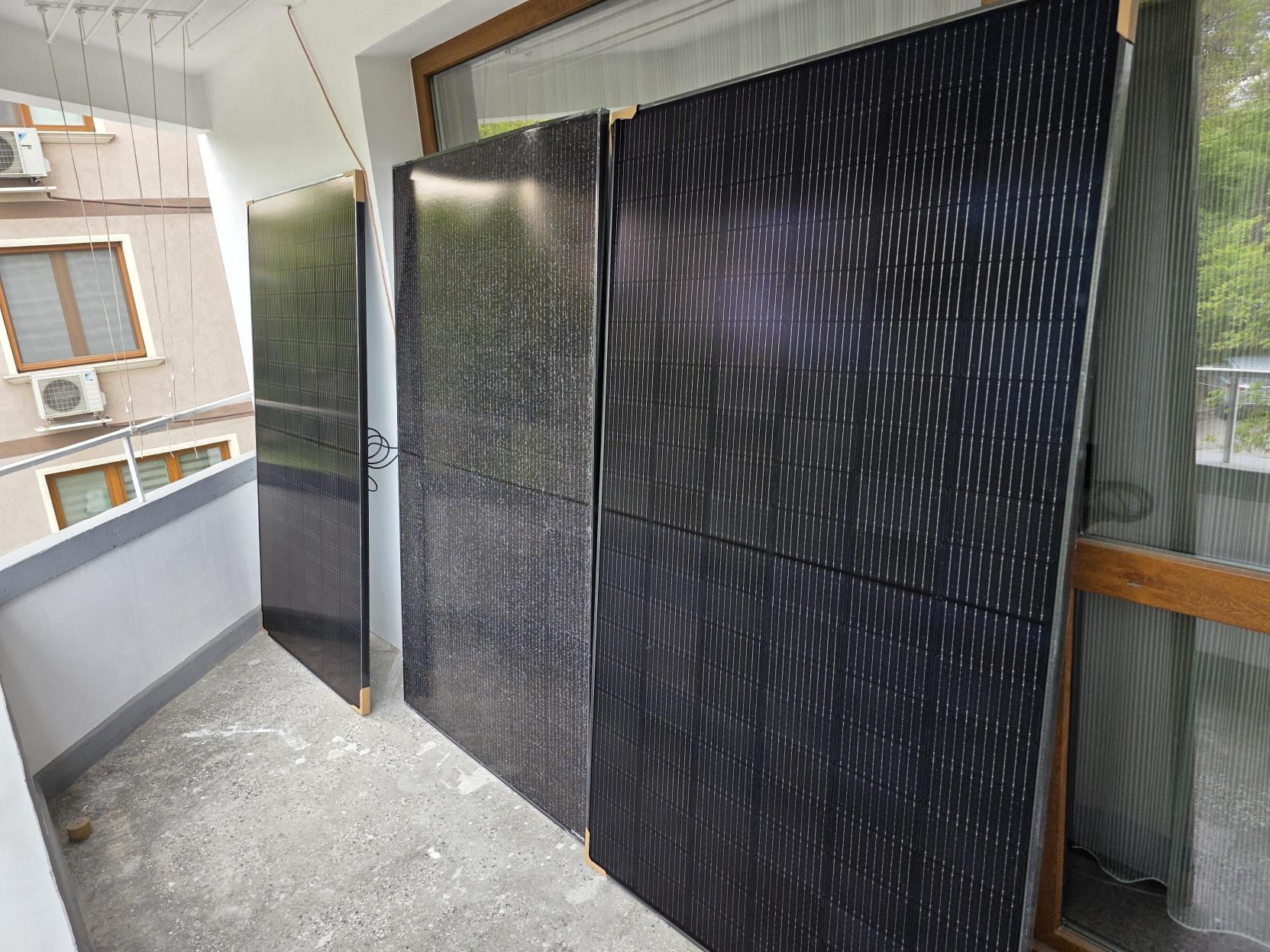
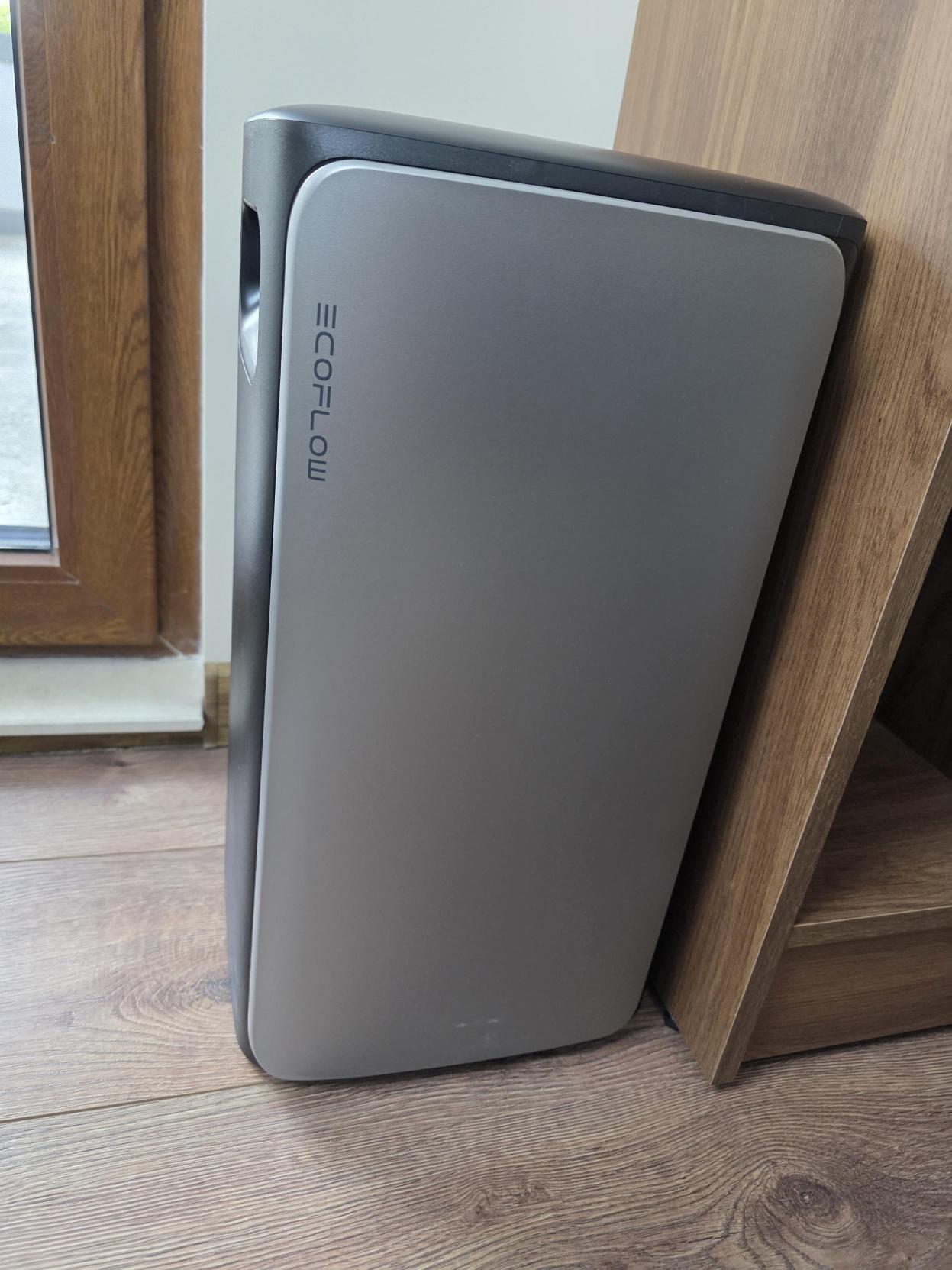
EcoFlow STREAM is the primary focus for the current field experience. The tested setup is an EcoFlow STREAM Ultra battery with solar panels in Germany.
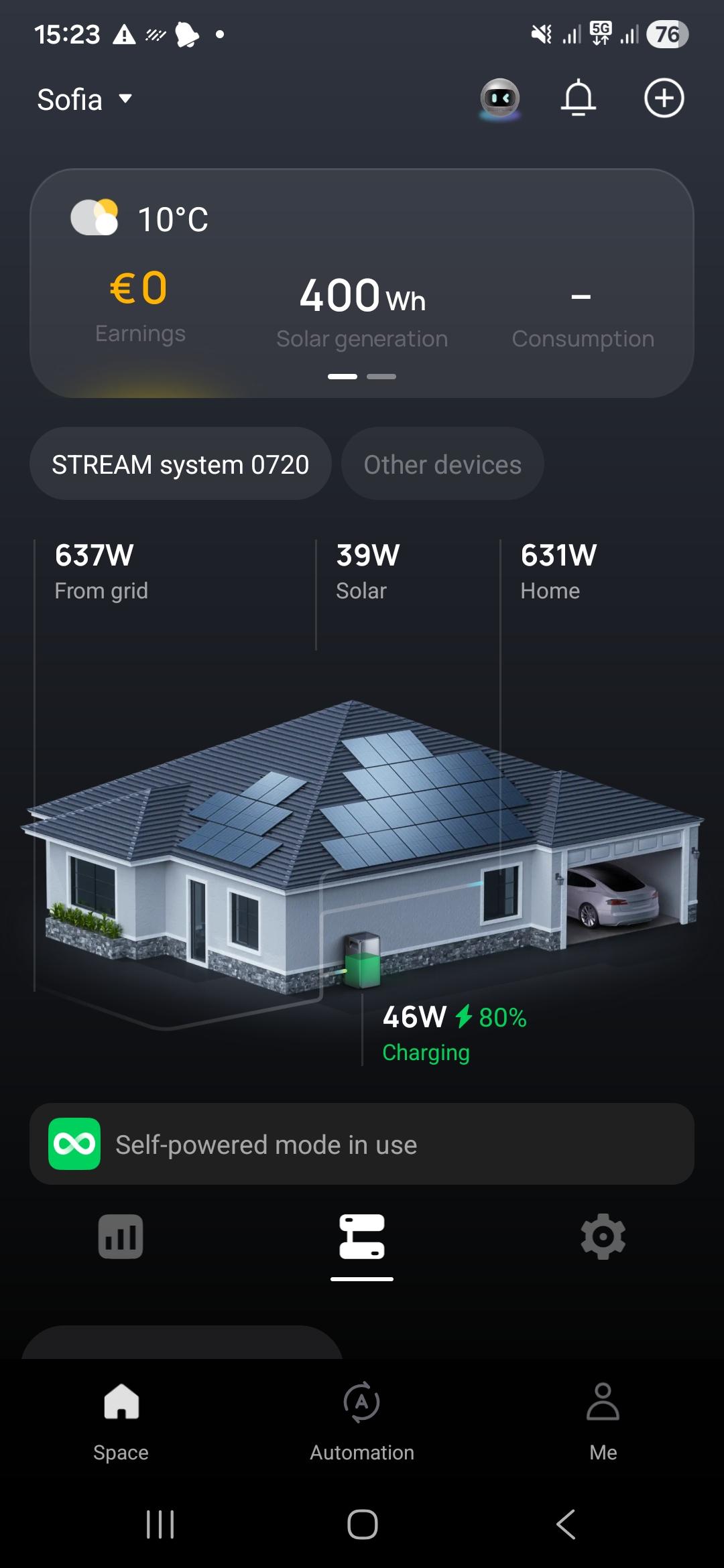
EcoFlow publicly describes STREAM Ultra as an all-in-one solar battery with a built-in grid-tied microinverter, solar input, battery storage, app monitoring and compatibility with a smart meter. This is the product family where Shelly support matters immediately, because the system depends on accurate household consumption and smart load behavior to improve self-consumption.
Why STREAM matters for Shelly:
-
It is directly connected to the self-consumption problem.
-
It benefits from accurate home consumption data.
-
It benefits from controllable loads.
-
It is relevant for plug-and-play and retrofit markets.
-
It is the product family where installers are already reporting that newer Shelly devices do not appear reliably.
EcoFlow PowerStream
EcoFlow PowerStream is also important because it connects balcony solar, portable power stations, smart plugs and EcoFlow app monitoring. It is highly relevant for plug-and-play end users and retrofit customers, especially in European markets where balcony solar is common.
Official EcoFlow product information positions PowerStream as a balcony solar system with a portable power station, smart plugs and EcoFlow app monitoring. The official page also describes real-time monitoring, remote control of appliances and automatic energy allocation, where smart plugs monitor appliance consumption and the microinverter allocates available electricity to the appliance or stores surplus energy in a portable power station.
Reference:
-
https://www.ecoflow.com/eu/powerstream
Why PowerStream matters for Shelly:
-
It is commonly used by users who want a simple solar entry point.
-
Smart plug behavior is easy for end users to understand.
-
Load-level control is central to the product story.
-
It is a natural bridge between EcoFlow solar/storage and Shelly plug-and-play devices.
DELTA + Smart Home Panel
DELTA with Smart Home Panel is important for whole-home backup and circuit-level energy management. EcoFlow describes Smart Home Panel as a core part of a home backup system that integrates with the DELTA Pro ecosystem and allows users to monitor energy, schedule charging, set circuit priority and manage backup behavior from the EcoFlow app.
Official EcoFlow Smart Home Panel information describes the panel as the heart of the home backup system. It integrates with the DELTA Pro ecosystem, supports up to 10 connected circuits, offers app-based energy monitoring, and lets users schedule charging and set circuit priority. This makes it directly relevant to Shelly because Shelly devices can extend the same circuit/load-level thinking into distributed monitoring and control.
Reference:
-
https://www.ecoflow.com/us/smart-home-panel
Why DELTA + Smart Home Panel matters for Shelly:
-
It is relevant for larger residential systems.
-
It introduces circuit-level thinking.
-
It needs clear load priority behavior.
-
It can benefit from Shelly metering, smart relays and contactor control.
-
It is relevant for backup and island-mode scenarios.
EcoFlow OASIS and other EcoFlow systems
EcoFlow OASIS and other EcoFlow energy-management products should be mentioned as part of the broader direction, not as the main article focus unless the integration scope is confirmed.
EcoFlow publicly presents OASIS as a home energy management system with real-time monitoring, dashboards, energy insights and cross-platform device integration. The public OASIS page references third-party devices compatible with Tiber, Matter and Shelly protocols. This supports the strategic direction: EcoFlow wants to be the energy orchestration layer, and Shelly can be the distributed execution and measurement layer.
Official EcoFlow OASIS information describes 24/7 real-time monitoring, customizable widgets, dashboards for generation and usage, and cross-platform device integration. The public OASIS page explicitly references third-party devices compatible with Tiber, Matter and Shelly protocols, which supports the proposal that Shelly should be treated as a broader device layer inside the EcoFlow energy-management experience.
Reference:
-
https://www.ecoflow.com/uk/oasis-home-energy-management-system
Why this matters for Shelly integration
The installer feedback shows a practical gap. Installers want to plan EcoFlow + Shelly solutions, but the current Shelly device visibility/support is not broad enough for confident planning.
In real installation attempts:
-
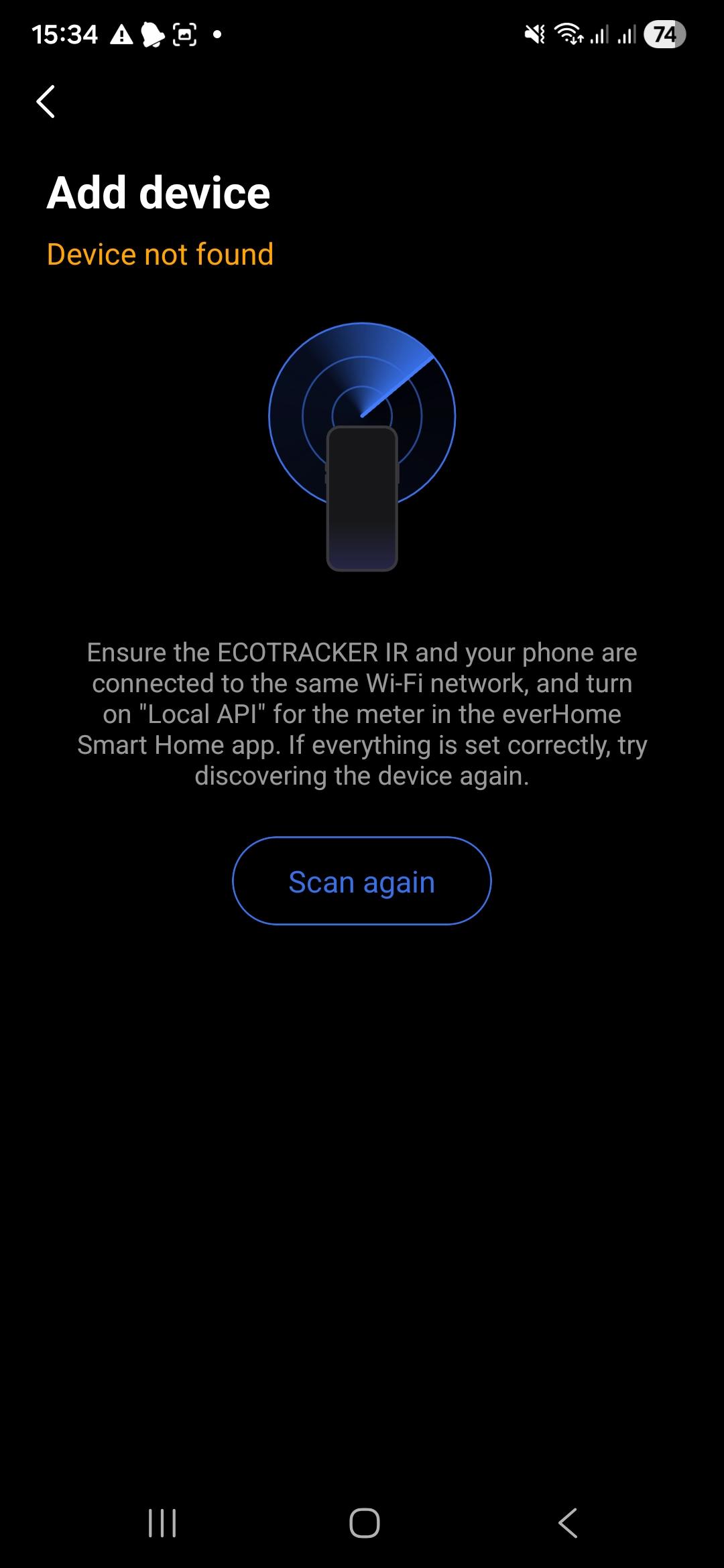
New Shelly Gen3 and Gen4 devices did not appear in the EcoFlow device scan.
-
No Gen3/Gen4 devices were shown during the tested discovery flow.
-
Some Shelly models appeared, mostly older devices.
This blocks three important customer groups:
1. New professional installations Installers want to use Shelly Pro devices, DIN-rail meters, relays and contactors in planned EcoFlow systems.
2. Retrofit installations Customers who already own Shelly devices want to add EcoFlow without replacing their existing smart-home or energy-distribution layer.
3. Plug-and-play end users Customers want to start with simple Shelly plug devices and grow into a larger EcoFlow energy system over time.
The opportunity is not only to support one or two co-branded accessories. The larger opportunity is capability-based Shelly support: EcoFlow discovers the Shelly device, understands the available capabilities, and maps those capabilities into the EcoFlow energy-management experience.
Shelly is already part of the EcoFlow ecosystem
EcoFlow and Shelly are already connected publicly. The important point is that this relationship exists, but the current product-level support appears narrower than what installers need in real projects.
Publicly visible evidence includes:
-
EcoFlow x Shelly Smart Plug / Plug S Gen3 product references.
-
EcoFlow x Shelly Pro 3EM smart meter references.
-
EcoFlow STREAM material describing smart-meter compatibility.
-
EcoFlow OASIS material referencing third-party devices compatible with Shelly protocols.
-
EcoFlow PowerInsight material listing Shelly smart plugs and Shelly 3EM / Shelly Pro 3EM as third-party devices.
-
Shelly support material listing EcoFlow as a third-party platform integrating Shelly devices.
This is a strong foundation. The problem is not whether EcoFlow and Shelly belong together. The problem is the integration level.
Confirmed public direction
The confirmed direction is that EcoFlow sees value in third-party device integration and Shelly compatibility. This aligns with EcoFlow’s broader energy-management messaging: one platform, app-led energy monitoring, and a simpler experience for the user.
The public OASIS positioning is especially important because it describes cross-platform device integration as part of EcoFlow’s energy-management experience. That is exactly where Shelly can contribute: device-level monitoring and control, connected back to EcoFlow’s energy decisions.
Current field issue
The field issue is simple:
> Installers and customers cannot reliably see and add newer Shelly devices in the EcoFlow flow.
This creates a planning loop:
-
Installers want to specify EcoFlow + Shelly.
-
They need confidence that Shelly devices will be visible and supported.
-
The current integration does not reliably show modern Shelly devices.
-
Because the devices are not visible, installers cannot plan complete solutions.
-
Because complete solutions are not planned, EcoFlow loses a practical path into professional, retrofit and plug-and-play scenarios.
Current confirmed support vs desired support
The article must separate two things:
Current public support
Current public support should be described carefully and tied to visible EcoFlow/Shelly product pages and supported-device pages.
Confirmed or publicly visible items:
-
EcoFlow x Shelly Smart Plug / Plug S Gen3
-
EcoFlow x Shelly Pro 3EM
-
Shelly smart plugs and Shelly meters listed in EcoFlow energy-management/device material
Desired support
The desired direction is broader:
-
Support all Shelly devices by capability, similar to the direction Victron has taken.
-
Use Shelly standard APIs to avoid one-off device integration.
-
Discover capabilities such as switch, meter, input, relay, sensor and multi-channel output.
-
Let EcoFlow decide which capabilities are meaningful in the energy context.
This does not mean every Shelly device must appear as the same type of load. It means EcoFlow should build the integration around the Shelly capability model.
App coexistence
EcoFlow and Shelly Smart Control should both continue to exist.
The expected model:
-
EcoFlow app sees the complete energy system.
-
EcoFlow app orchestrates energy decisions.
-
Shelly Smart Control sees and manages Shelly devices.
-
Shelly Smart Control remains useful for device-level configuration and diagnostics.
This is not an either/or app model.
EcoFlow is the energy-system view. Shelly Smart Control is the Shelly device view.
Control philosophy
EcoFlow should start and own the energy orchestration flow because the user begins from EcoFlow when planning energy behavior. Shelly should act as the distributed control and measurement layer.
The principle:
-
EcoFlow manages energy production and storage.
-
Shelly manages redistribution, control and monitoring at the device/load level.
-
EcoFlow decides the energy goal.
-
Shelly executes and measures at the edge.
The integration should not silently fight the user. If a user controls a Shelly device from Shelly Smart Control or from a physical input, EcoFlow should not immediately override the user without explanation. If EcoFlow must enforce a state for safety, tariff, backup, inverter limit or energy-management reasons, that should be explicit and mode-based.
How EcoFlow compares to Victron in Shelly integration
This comparison is intentionally narrow. It compares only the Shelly integration behavior. It does not compare battery quality, inverter quality, company strategy or general product quality.
The comparison is intentionally kept as a table so it remains precise and easy to update.
|
Integration behavior |
Victron |
EcoFlow current / observed |
EcoFlow target direction |
|---|---|---|---|
|
Native Shelly support |
Venus OS v3.70 includes native support for Shelly Gen2+ device classes. |
Public support exists, but observed discovery did not show Gen3/Gen4 devices in the tested EcoFlow flow. |
Capability-based support for modern Shelly families. |
|
New Shelly Gen3/Gen4 visibility |
Supported direction publicly announced by Victron for Gen2 and newer classes. |
Gen3/Gen4 devices were not visible in the tested scan. |
Gen3/Gen4 support should be expected and maintained. |
|
Discovery |
Victron discovers Shelly devices on the same network and allows enabling them. |
Current discovery method is unknown; observed result is incomplete. |
Combined BLE, Wi-Fi AP, LAN IP scan and mDNS flow. |
|
App visibility |
Shelly devices appear in the Victron switch pane when enabled. |
Some older devices appear; modern devices did not appear in the tested case. |
EcoFlow app should show supported Shelly devices as energy-aware loads, meters or controls. |
|
Manual control coexistence |
Victron-style systems can coexist with device-level control. |
Needs validation in EcoFlow. |
Mandatory cooperative control from EcoFlow and Shelly Smart Control. |
|
Professional installation |
Victron is open enough for professional integrators through Venus OS, Node-RED and D-Bus. |
Installers report planning difficulty because support scope is unclear. |
EcoFlow should give installers a predictable supported-device and capability model. |
|
Retrofit of existing Shelly homes |
Strong fit because Victron can use local/open paths. |
Blocked when existing/newer Shelly devices cannot be seen. |
EcoFlow should be able to join existing Shelly homes without replacing devices. |
|
Plug-and-play users |
Supported through switch pane and local device control. |
Works only where supported devices are visible. |
Smart plugs should be easy, visible and reliable. |
|
Advanced automation |
Victron can use Node-RED and local data paths. |
Custom Shelly script + EcoFlow API already proves logic is possible externally. |
EcoFlow should productize the logic inside its own app/automation layer. |
Main comparison conclusion
Victron shows that a broader Shelly integration is possible. EcoFlow does not need to copy Victron’s architecture, but it should learn from the integration principle:
-
discovery should be reliable;
-
modern Shelly generations should be supported;
-
device capabilities should be mapped instead of hardcoded by old model lists;
-
manual control should coexist with energy automation;
-
professional installers need a predictable planning model.
For EcoFlow, this is especially important because the first touchpoint is the app. If the app cannot see modern Shelly devices, the installer cannot move from concept to deployed solution.
Known concerns about the current integration
This section describes the current blockers and risks based on real installer feedback and the tested German installation.
Concern 1 - New Shelly devices do not appear
Observed behavior:
-
Shelly Plug S Gen3 did not appear.
-
Shelly Plug S Gen4 did not appear.
-
Shelly 1 Gen4 devices did not appear.
-
Mostly older Shelly devices appeared.
Impact:
-
Installers cannot reliably plan a modern EcoFlow + Shelly installation.
-
Customers with new Shelly devices cannot use them inside the EcoFlow flow.
-
The integration appears outdated even though Shelly APIs are standard and modern device families are available.
Recommended fix:
-
Move from model-list support to capability-based discovery.
-
Maintain compatibility for Gen3/Gen4 device families.
-
Expose a clear supported-device and supported-capability matrix.
Concern 2 - Discovery method is unclear
Current EcoFlow discovery method is unknown from the outside.
Possible methods that could be used:
-
Bluetooth discovery/provisioning
-
Wi-Fi AP provisioning
-
LAN IP scan
-
mDNS discovery
-
Shelly account/cloud import
-
Manual IP add
-
Combined method
Impact:
-
Installers do not know how to troubleshoot discovery failures.
-
Network issues cannot be separated from compatibility-list issues.
-
Customers cannot understand why some devices appear and others do not.
Recommended fix:
-
Make discovery behavior visible.
-
Show scan status and method.
-
Allow retry.
-
Allow manual IP add for advanced users/installers.
-
Use mDNS and IP scan for existing installations.
-
Use BLE or Wi-Fi AP for new unprovisioned devices.
Concern 3 - Compatibility is too narrow for planning
The public EcoFlow/Shelly story is promising, but if the practical support is limited to a small number of older or co-branded products, installers cannot design complete systems.
Impact:
-
Professional installations cannot be specified confidently.
-
Retrofit installations cannot reuse existing Shelly fleets.
-
Plug-and-play users cannot expand naturally.
Recommended fix:
-
Publish a compatibility matrix by capability and generation.
-
Support Shelly Pro devices for new installations.
-
Support existing Shelly devices for retrofit.
-
Support plug devices for end users.
Concern 4 - Manual control coexistence must be clear
Control should be possible from both systems:
-
EcoFlow app
-
Shelly Smart Control
-
physical input/button where supported
-
local Shelly API where used by advanced installers
Impact if not solved:
-
Users may feel that EcoFlow “breaks” their Shelly devices.
-
Existing Shelly homes become harder to retrofit.
-
Physical controls become confusing.
Recommended fix:
-
Cooperative control model.
-
Clear energy-rule priority.
-
Visible reason when EcoFlow enforces a state.
-
Mode-based override only when needed.
Concern 5 - Integration logic exists externally, but not natively
In the tested installation, a single Shelly JavaScript file using the EcoFlow API can manage power balancing. This proves that the logic is technically possible.
The issue is product ownership:
-
The logic should not live in a hidden custom script.
-
It should live inside EcoFlow, where the customer expects energy decisions to happen.
Recommended fix:
-
Move proven balancing logic into EcoFlow’s native automation layer.
-
Use Shelly devices as execution and measurement endpoints.
Business opportunity
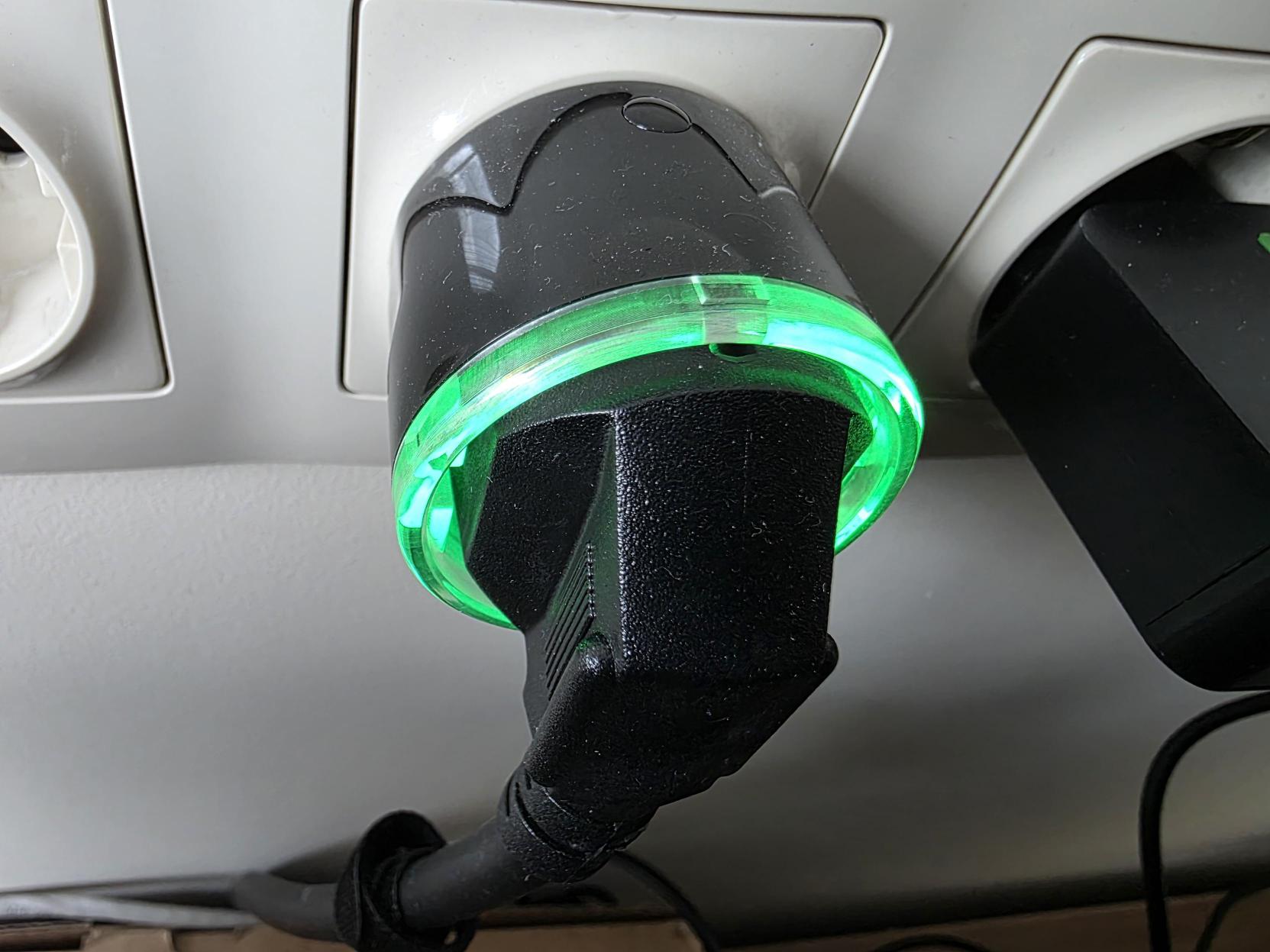
The EcoFlow + Shelly combination can give installers and partners a clearer smart energy story.
EcoFlow knows:
-
solar generation;
-
battery state;
-
storage behavior;
-
grid import/export;
-
tariff or Time-of-Use context;
-
backup mode;
-
system limits;
-
energy goals.
Shelly devices know:
-
appliance-level consumption;
-
circuit-level consumption;
-
per-phase measurements;
-
relay state;
-
physical input state;
-
local load behavior;
-
smart plug power;
-
distributed device status.
Together, the system can improve self-consumption, prioritize loads, avoid unnecessary import/export, control large appliances and make energy behavior visible to the customer.
Persona 1 - New professional installations
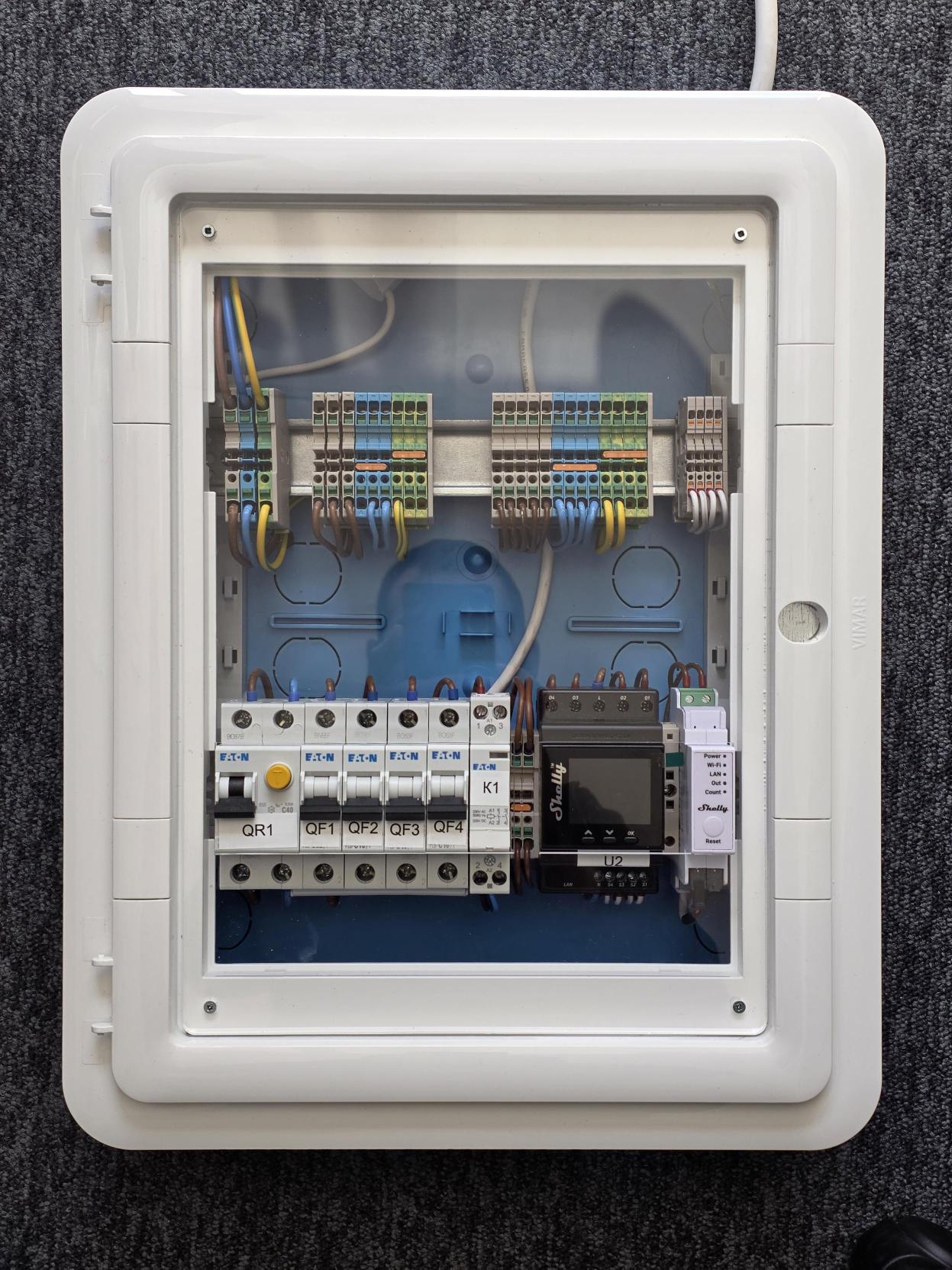
New professional installations are the strongest case for Shelly Pro devices.
Relevant Shelly devices:
-
Shelly Pro 3EM
-
Shelly EM-50
-
Shelly Pro relay devices
-
Shelly Pro PM devices
-
relays/contactors controlled through Shelly
-
future Shelly Pro devices
Typical loads:
-
water heater;
-
heat pump;
-
EV charger;
-
pool pump;
-
backup/non-critical circuits;
-
large appliances.
Why EcoFlow benefits:
-
Installers can design a complete energy-management solution.
-
Shelly gives circuit-level measurement and control.
-
EcoFlow remains the energy brain.
-
The installation becomes easier to explain to the customer.
Persona 2 - Retrofit of existing Shelly homes
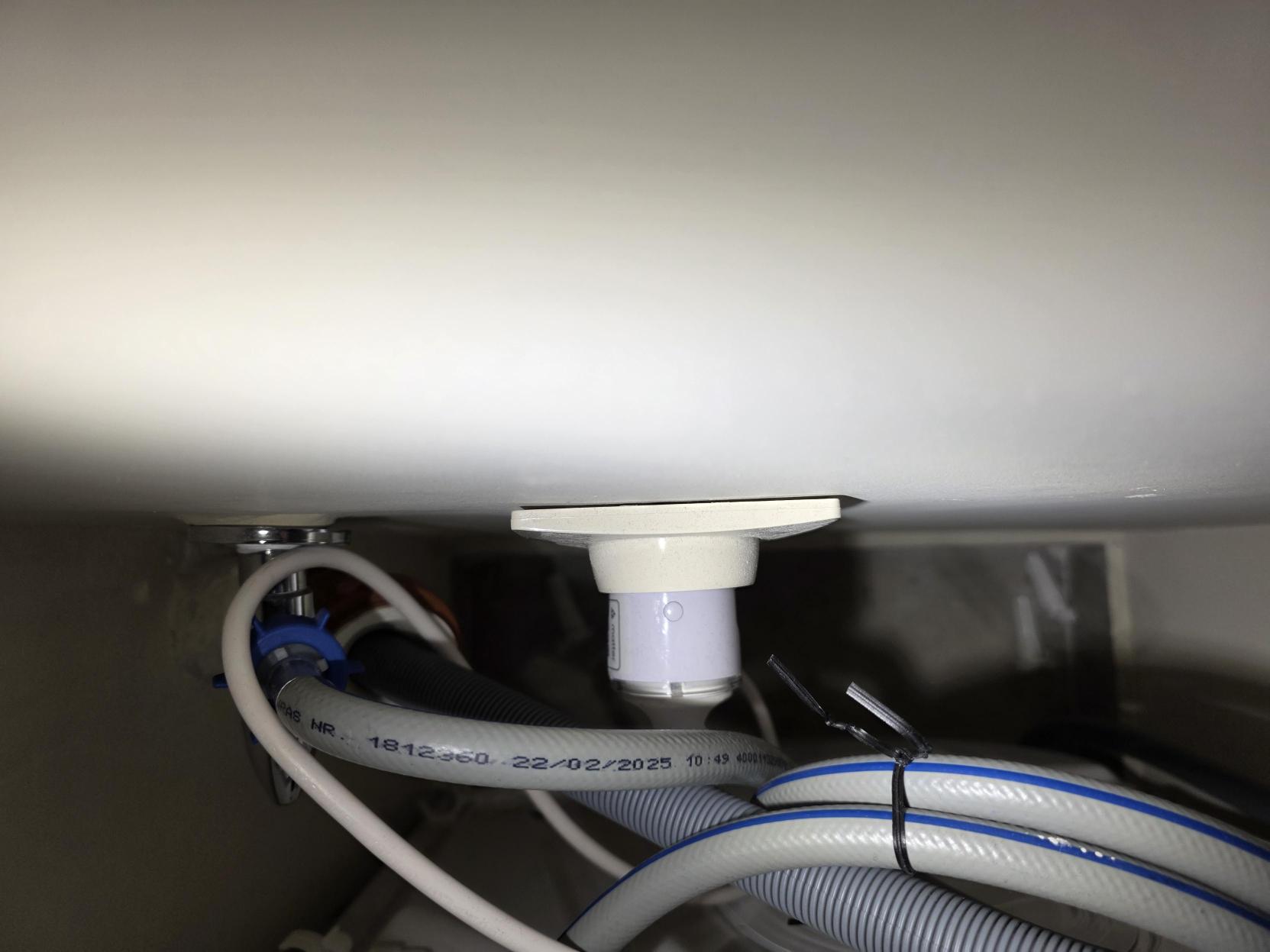
Many customers already have Shelly devices installed before they buy EcoFlow. They may already use Shelly for lighting, heating, pumps, plugs, relays, sensors and energy metering.
For these customers, EcoFlow should not require replacing the existing device layer.
The ideal flow:
1. Customer adds EcoFlow system. 2. EcoFlow discovers or imports existing Shelly devices. 3. EcoFlow maps useful devices into energy categories. 4. Existing Shelly app routines continue working. 5. EcoFlow adds energy intelligence on top.
Why EcoFlow benefits:
-
Lower barrier to adoption.
-
Higher customer confidence.
-
More attractive retrofit story.
-
Less hardware waste.
-
Faster installer handover.
Persona 3 - Plug-and-play end users
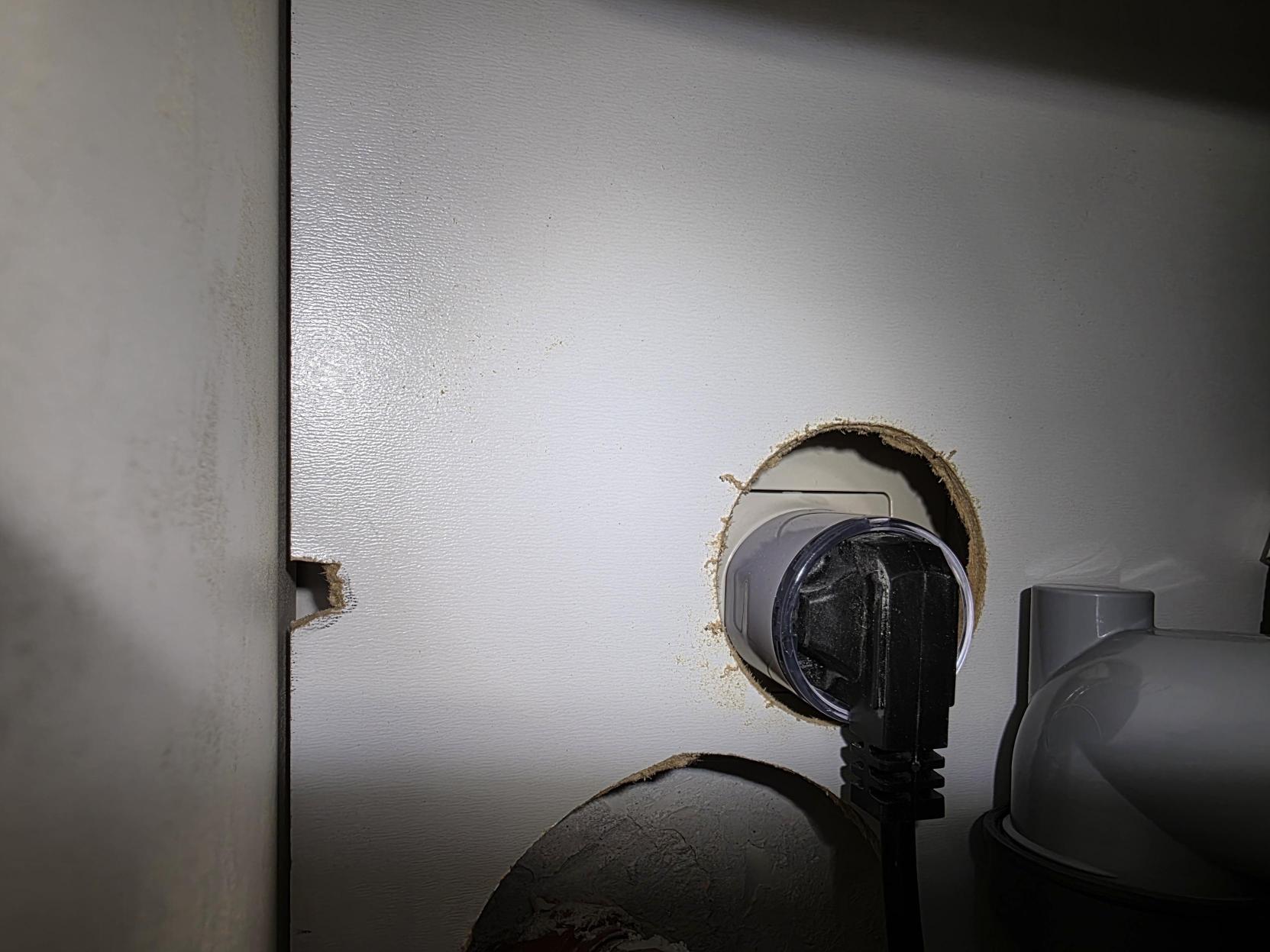
Plug-and-play users need simple devices and simple language.
Relevant Shelly devices:
-
Shelly Plug S Gen3
-
Shelly Plug S Gen4
-
other supported plug devices
Typical loads:
-
heater;
-
fan;
-
dehumidifier;
-
washing machine;
-
small water heater;
-
office equipment;
-
appliance loads.
Why EcoFlow benefits:
-
A user can start small.
-
The customer sees energy impact immediately.
-
The app story is simple: “Use more of your own solar.”
-
The system can grow from plug control into a full EcoFlow energy installation.
Use cases to support
All of these use cases are relevant across the target regions and personas:
Water heater on solar surplus
When solar surplus is available, EcoFlow can activate a Shelly-controlled water heater. When surplus drops or battery priority changes, EcoFlow can pause or stop the load.
EV charger / large load control
EcoFlow can coordinate large loads against available solar, battery SOC, grid import limits and backup requirements.
Heat pump
Heat pumps can be scheduled or enabled based on energy availability, tariff windows and comfort constraints.
Pool pump
Pool pumps are good flexible loads. EcoFlow can shift runtime to solar-rich or low-tariff periods.
Smart plug appliance control
Smart plugs are the simplest visible proof of value for end users.
Three-phase monitoring
Shelly Pro 3EM and related meters can provide phase-level visibility. This is important in professional installations and for diagnosing wiring or load imbalance.
Backup / island mode load priority
When backup power is limited, EcoFlow can use Shelly-controlled relays to shed non-critical loads and preserve battery runtime.
Tariff / Time-of-Use scheduling
Loads can be shifted to low-cost windows or solar-rich periods.
Business conclusion
The opportunity is to make EcoFlow easier to choose.
Broad Shelly support gives EcoFlow:
-
a stronger installer story;
-
a stronger retrofit story;
-
a stronger plug-and-play story;
-
a stronger app ecosystem story;
-
a credible path toward distributed energy management.
The blocker is not the lack of Shelly APIs. The blocker is the current integration level.
Integration team
Overview of the EcoFlow Shelly integration
This section covers what works, what does not, and what needs to be fixed for a smooth installer experience.
Test system used for this evaluation
Country:
-
Germany
Network:
-
Standard local IP network
-
TP-Link router
EcoFlow system:
-
EcoFlow STREAM Ultra battery
-
solar panels
Shelly devices available/tested:
-
Shelly Plug S Gen3
-
Shelly Plug S Gen4
-
Shelly Pro 3EM
-
Shelly EM-50
-
several Shelly 1 Gen4 devices
Firmware versions mentioned:
-
1.5.7
-
2.0.0
Observed EcoFlow app issue:
-
New Shelly Gen3 and Gen4 devices were not shown.
-
Some older Shelly devices appeared.
Working custom workaround:
-
A Shelly JavaScript file using EcoFlow API can manage power balance.
Desired product direction:
-
The balancing/control logic should live inside EcoFlow.
-
Shelly should provide the measurement and control layer.
How device discovery should work
The current EcoFlow discovery method is unknown from the outside. The article should not claim a specific current method unless it is confirmed by EcoFlow.
What matters is the desired discovery architecture.
EcoFlow app
  |
  +-- New Shelly device
  |     +-- Bluetooth discovery
  |     +-- Wi-Fi AP provisioning
  |     +-- capability read
  |     +-- EcoFlow role assignment
  |
  +-- Existing Shelly installation
  |     +-- mDNS discovery
  |     +-- LAN IP scan
  |     +-- manual IP add
  |     +-- optional Shelly account/cloud import
  |     +-- capability read
  |     +-- EcoFlow role assignment
  |
  +-- EcoFlow energy layer
        +-- meter role
        +-- controllable load role
        +-- monitoring-only role
        +-- backup-priority role
Discovery path 1 - Bluetooth
Bluetooth is useful for new devices near the installer.
Best for:
-
factory-new devices;
-
first-time setup;
-
plug-and-play users;
-
simple onboarding.
Limitations:
-
not ideal for large existing installations;
-
installer may need to stand near each device;
-
not efficient for dozens of Shelly devices;
-
may create friction if it is the only default path.
Discovery path 2 - Wi-Fi AP provisioning
Wi-Fi AP provisioning is useful when a Shelly device is not yet connected to the customer network.
Best for:
-
new device provisioning;
-
plug-and-play users;
-
installations where the device is still factory fresh.
Limitations:
-
redundant for devices already connected to the LAN;
-
can be slow for professional installations;
-
can fail if Wi-Fi list refresh or credentials handling is weak.
Discovery path 3 - LAN IP scan
LAN IP scan is useful for devices already installed on the local network.
Best for:
-
retrofit installations;
-
existing Shelly homes;
-
professional installations with known network ranges;
-
cases where mDNS is unreliable.
Limitations:
-
may be slow on large networks;
-
may require firewall permissions;
-
may need rate limiting;
-
may need manual subnet selection.
Discovery path 4 - mDNS
mDNS is useful because Shelly devices can announce themselves on the network.
Best for:
-
same-LAN discovery;
-
existing devices;
-
automatic “new device found” user experience;
-
background discovery.
Limitations:
-
VLANs and multicast filtering can block it;
-
Wi-Fi isolation can break it;
-
routers can throttle multicast;
-
repeated scans may miss devices.
Discovery path 5 - combined discovery flow
The recommended path is a combined flow.
The app should support:
1. mDNS discovery for already-connected devices. 2. IP scan fallback. 3. Bluetooth or Wi-Fi AP for new devices. 4. Manual IP entry for advanced installers. 5. Optional Shelly account/cloud import for retrofit fleets if supported commercially.
This matters because EcoFlow serves multiple personas:
-
new installations;
-
retrofit homes;
-
plug-and-play end users.
One discovery method cannot serve all three well.
Known onboarding issues observed in real installation
Issue 1 - New Shelly Gen3/Gen4 devices do not appear
Observation:
-
Shelly Plug S Gen3 did not appear.
-
Shelly Plug S Gen4 did not appear.
-
Shelly 1 Gen4 devices did not appear.
-
Mostly older devices appeared.
Impact:
-
Modern Shelly device families cannot be planned confidently.
-
Installers cannot specify EcoFlow + Shelly solutions.
-
Customers who already purchased newer Shelly devices cannot use them in EcoFlow.
Recommended fix:
-
Update device compatibility for Gen3/Gen4.
-
Move to capability-based support.
-
Do not depend only on old model lists.
Issue 2 - The user cannot distinguish network failure from compatibility failure
Observation:
-
When a device does not appear, it is unclear whether the cause is network discovery, firmware, unsupported generation, unsupported model or app logic.
Impact:
-
Installers cannot troubleshoot quickly.
-
Customers lose trust in the integration.
Recommended fix:
-
Show scan method.
-
Show scan progress.
-
Show troubleshooting hints.
-
Allow manual IP test.
-
Log device discovery attempts.
Issue 3 - Existing installations are not treated as first-class
Observation:
-
The most important retrofit case is an existing Shelly installation.
-
If EcoFlow expects only a narrow supported accessory flow, retrofit becomes difficult.
Impact:
-
EcoFlow loses customers who already have Shelly.
-
Installers cannot sell EcoFlow as an upgrade to a smart home.
Recommended fix:
-
Add an “existing Shelly devices” path.
-
Import/display already-installed devices.
-
Preserve user-assigned names.
-
Allow device role assignment.
Issue 4 - Device naming must be user-friendly
Observation:
-
Installers and customers need devices shown by meaningful names, not only model codes.
Impact:
-
Ten identical plugs become impossible to identify.
-
Multi-channel devices become confusing.
Recommended fix:
-
Read the user-assigned Shelly device name.
-
Read channel names where available.
-
Allow renaming inside EcoFlow without breaking Shelly app names.
Issue 5 - Manual control behavior must be explicit
Observation:
-
Users should be able to control Shelly devices from both EcoFlow and Shelly Smart Control.
Impact:
-
If EcoFlow silently overrides Shelly/manual control, the user experience becomes worse.
Recommended fix:
-
Cooperative control model.
-
Energy rules shown clearly.
-
Manual override shown in the app.
-
Safety or backup overrides should be mode-based and explained.
System architecture
Hardware components
EcoFlow components in scope:
-
EcoFlow STREAM Ultra battery
-
solar panels
-
EcoFlow PowerStream
-
DELTA + Smart Home Panel
-
EcoFlow app
-
EcoFlow OASIS / PowerInsight where relevant
Shelly components in scope:
-
Shelly Plug S Gen3
-
Shelly Plug S Gen4
-
Shelly Pro 3EM
-
Shelly EM-50
-
Shelly 1 Gen4
-
Shelly Pro devices
-
Shelly relays and contactors
-
Shelly sensors where useful for future energy logic
Connectivity
Known from the tested setup:
-
standard local IP network;
-
TP-Link router;
-
EcoFlow STREAM Ultra with solar panels;
-
Shelly devices on the local network.
Unknown / to confirm:
-
exact EcoFlow-to-Shelly discovery method;
-
whether EcoFlow uses local, cloud or hybrid device communication;
-
whether EcoFlow can import devices through Shelly account authorization;
-
whether EcoFlow can use Shelly local APIs directly;
-
whether manual IP add is available;
-
whether mDNS is used.
App model
Expected app model:
-
EcoFlow app is the energy-system app.
-
Shelly Smart Control remains the Shelly device app.
-
Both apps coexist.
-
EcoFlow sees the complete energy picture.
-
Shelly Smart Control sees Shelly devices.
Control model
Expected control model:
-
EcoFlow sets energy goals.
-
Shelly devices execute local control.
-
Shelly devices report device-level state and measurement.
-
Manual control is allowed.
-
EcoFlow only overrides manual control when there is a clear energy rule or safety reason.
What works today through custom Shelly scripting
Shelly JavaScript controller
  |
  +-- Local Shelly RPC reads
  |     +-- EM1.GetStatus -> act_power
  |     +-- Switch.GetStatus -> apower
  |     +-- aggregate total measured load
  |
  +-- EcoFlow signed cloud API
  |     +-- read STREAM Ultra state
  |     +-- write STREAM Ultra control parameters
  |
  +-- Decision logic
        +-- night window -> charge
        +-- daytime load above threshold -> discharge
        +-- daytime load below/equal threshold -> idle
The current custom workaround proves that the integration logic is technically possible today. The actual implementation lives in:
load_balancing_static.shelly.js
There is also a production-oriented Virtual Components variant:
load_balancing_static_vc.shelly.js
The real-case scenario uses load_balancing_static.shelly.js. It runs directly on a Shelly device and closes the loop between local Shelly measurements and EcoFlow STREAM Ultra control through the EcoFlow cloud API.
The script combines:
-
EcoFlow battery SOC;
-
EcoFlow PV production;
-
grid import/export or balance state;
-
load power where available;
-
Shelly EM / Plug S local measurements;
-
EcoFlow API signed commands;
-
night charging logic;
-
discharge logic when total measured load is above threshold;
-
idle logic when load is below threshold.
This is important because it changes the discussion. The discussion is not “Can this be done?” The answer is yes. The real question is where the logic should live.
The answer should be:
> The logic should live inside EcoFlow.
Shelly scripting is powerful, but a custom script is not the right long-term product layer for normal customers and installers.
Why the workaround matters
The workaround demonstrates:
-
EcoFlow data can be used for balancing decisions.
-
Shelly devices can provide local, fast measurement data.
-
Distributed load control is practical.
-
The core product behavior can be prototyped outside EcoFlow.
-
A Shelly device can act as the bridge without an external server.
-
EcoFlow STREAM Ultra can be commanded through the EcoFlow API from a Shelly script.
Actual script behavior
The static script has three operating modes:
|
Mode |
Condition |
EcoFlow action |
|---|---|---|
|
|
Sum of configured Shelly device readings is above |
STREAM Ultra is commanded into self-powered/discharge behavior. |
|
|
Current local hour is inside the configured night charging window |
STREAM Ultra is commanded to charge toward |
|
|
Day hours and total measured load is at or below |
STREAM Ultra is held so it neither actively discharges nor charges for the load case. |
The default configuration pattern is:
var CONFIG = {
    accessKey  : "YOUR_ACCESS_KEY",
    secretKey  : "YOUR_SECRET_KEY",
    serial     : "YOUR_DEVICE_SERIAL",
    region     : "eu",
    nightStart : 23,
    nightEnd   : 6,
    nightSoc   : 95,
    threshold  : 600,
    pollMs     : 5000
};
The configured Shelly measurement devices are static IP/host entries:
var DEVICES_CFG = [
    { type: "em",   host: "192.168.1.10", channel: 0, name: "Main EM ch0" },
    { type: "em",   host: "192.168.1.10", channel: 1, name: "Main EM ch1" },
    { type: "plug", host: "192.168.1.20", channel: 0, name: "Plug South"  }
];
For Shelly measurements, the script uses local RPC:
-
EM1.GetStatusfor Shelly EM Gen4 style meter channels, readingact_power; -
Switch.GetStatusfor Shelly Plug S Gen3 style plug channels, readingapower.
For EcoFlow control, the script uses:
-
GET /iot-open/sign/device/quota/all?sn=<serial>to read STREAM Ultra state; -
PUT /iot-open/sign/device/quotato send STREAM Ultra configuration/dispatch changes.
EcoFlow API requests are signed inside the Shelly script using HMAC-SHA256 with:
-
accessKey; -
secretKey; -
nonce; -
timestamp; -
sorted request parameters;
-
signheader.
This is significant: the proof of concept does not require a laptop, Home Assistant, ioBroker, Cloudflare Worker or other server. It is a Shelly-hosted bridge between local Shelly metering and EcoFlow cloud control.
Why the workaround is not enough
The workaround is not enough because:
-
it is hidden from normal users;
-
it requires technical knowledge;
-
it is not an official installer workflow;
-
it is hard to support globally;
-
it does not solve app discovery;
-
it does not give EcoFlow a complete product experience;
-
it does not solve compatibility-list confidence.
-
static IP configuration does not solve large-scale discovery or commissioning;
-
credentials must be embedded in the script;
-
API behavior, rate limits and error handling need product-level support.
Product conclusion
EcoFlow should absorb the proven logic into the app and energy-management layer.
Shelly should remain the distributed device layer.
Real-world setup notes
Country and market
The confirmed test context is Germany. The target regions are broader:
-
EU
-
UK
-
Australia
-
Africa
-
global relevance where EcoFlow and Shelly are sold
Network
The tested network is a standard local IP network with a TP-Link router.
Important network questions for future testing:
-
Does discovery work on a flat LAN?
-
Does discovery work across VLANs?
-
Does discovery depend on mDNS?
-
Does discovery work when multicast is blocked?
-
Does discovery work if Shelly devices have static IPs?
-
Can installers manually add a device by IP?
Firmware
Firmware versions mentioned:
-
1.5.7
-
2.0.0
Future article update should clarify:
-
which firmware belongs to which Shelly device;
-
EcoFlow firmware/app versions;
-
whether Gen3/Gen4 failures are firmware-related or app compatibility-related.
Installer feedback pattern
This is not only one installation problem. Similar feedback is reported from installers across different regions.
The repeated message:
-
customers cannot see new Shelly devices;
-
installers cannot plan complete EcoFlow + Shelly solutions;
-
support is not predictable enough;
-
the integration needs to continue and deepen.
The approved installer-feedback summary is:
-
Installers from multiple regions report that new Shelly devices are not reliably visible in the EcoFlow discovery flow.
-
In the tested setup, Shelly Gen3 and Gen4 devices did not appear in the EcoFlow scan.
-
Some older Shelly devices appeared, which suggests a discovery/support-list gap rather than a general Shelly API limitation.
-
This limits installer planning confidence because they cannot specify EcoFlow + Shelly systems if device visibility is unclear.
-
The issue affects both real installations and planned projects.
Affected regions:
-
EU
-
UK
-
Australia
-
Africa
-
Global feedback is also relevant where similar installer patterns appear.
Main installer concern:
Installers want to use EcoFlow as the energy production and storage layer, with Shelly as the distributed measurement and control layer.
The current blocker is not the technical possibility of the integration, but the level of native EcoFlow support for Shelly discovery, visibility and control.
Resources
EcoFlow resources:
-
EcoFlow STREAM Ultra:
-
EcoFlow PowerStream:
-
EcoFlow Smart Home Panel:
-
EcoFlow OASIS:
-
EcoFlow PowerInsight device list:
-
EcoFlow Developer:
Shelly resources:
-
Shelly API documentation:
-
Shelly Integrator API:
-
Shelly third-party integrations article:
Attached supporting files:
-
load_balancing_static.shelly.js -
load_balancing_static_vc.shelly.js -
README.md -
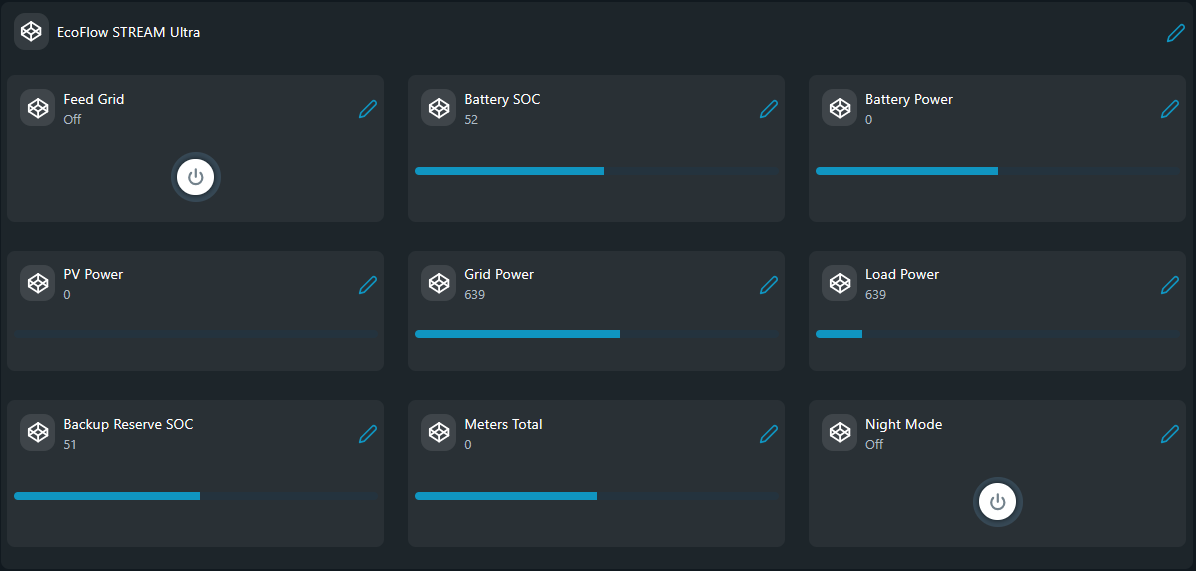
screenshot.png
-
ecoflow-api-notes.md -
installer-feedback-summary.md
Not available:
-
Screenshot of older Shelly devices visible in EcoFlow. The current test setup does not include old Shelly devices.
-
Separate screenshot of the full Shelly device list. The available test evidence is the Gen3/Gen4 EcoFlow scan result and the real installation/device photos.
Developers
Overview
This section documents the technical direction for making EcoFlow + Shelly integration robust enough for installers and end users.
The goal is to identify which approaches are:
-
possible today;
-
blocked by current product behavior;
-
suitable for a partner proposal;
-
suitable for real installations;
-
useful only as a custom workaround;
-
candidates for EcoFlow-native implementation.
The most important technical point:
> Shelly devices are not the hard part. Shelly devices expose standard APIs. The hard part is EcoFlow productizing the discovery, mapping and energy-control layer.
Test configuration
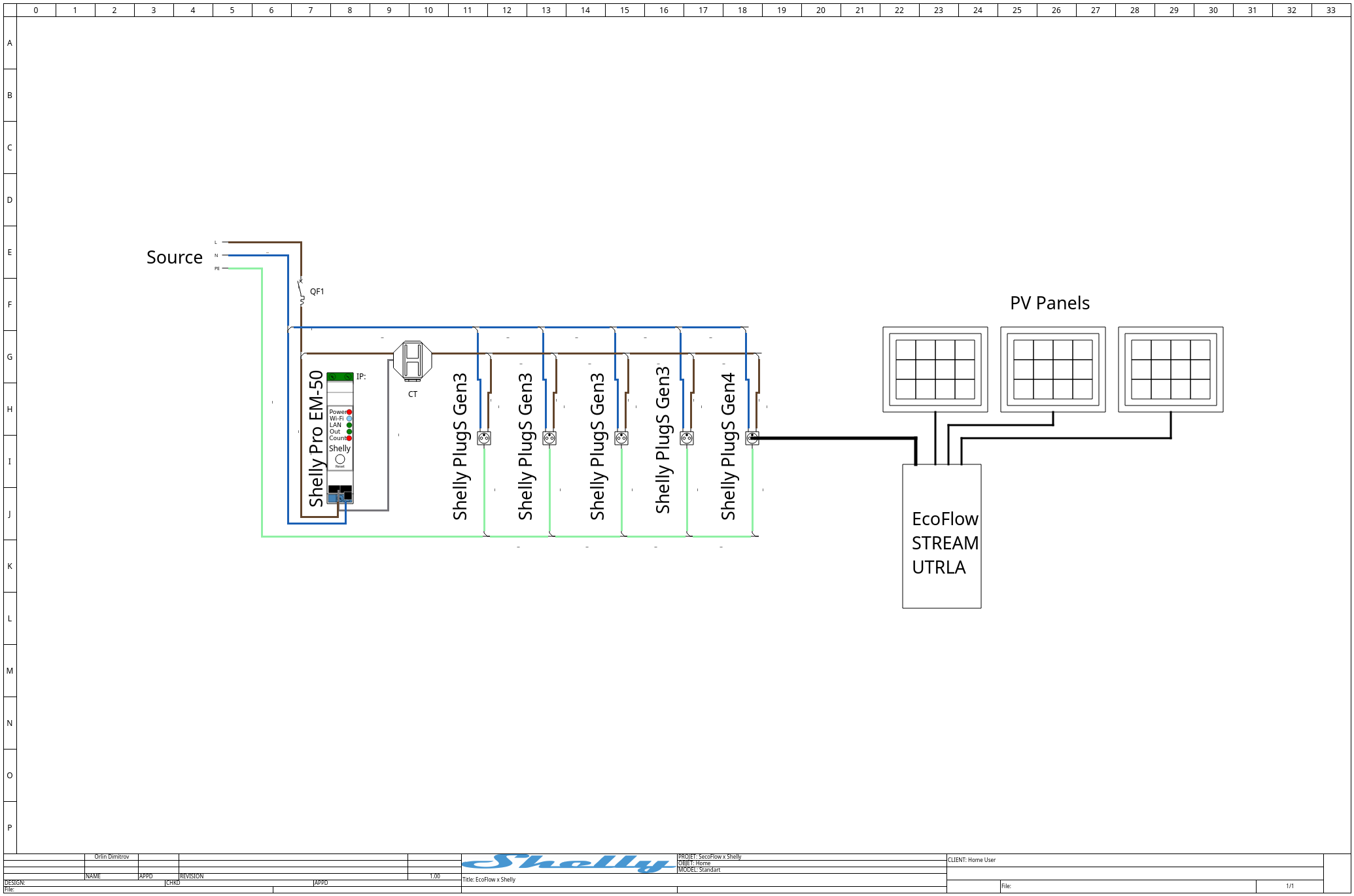
The schematic shows the real connection pattern for the EcoFlow + Shelly test setup: grid/source, Shelly metering, Shelly Plug S Gen3/Gen4 devices, PV panels, and EcoFlow STREAM Ultra connected as the energy production/storage layer.
EcoFlow system
-
Product:
-
Solar:
-
Country:
-
App:
-
Firmware:
-
API access:
Script source:
-
Real-case static script:
-
Virtual Components production variant:
-
README:
Shelly devices
Tested / available devices:
-
Shelly Plug S Gen3
-
Shelly Plug S Gen4
-
Shelly Pro 3EM
-
Shelly EM-50
-
several Shelly 1 Gen4 devices
Firmware versions mentioned:
-
1.5.7
-
2.0.0
The test set used a mixture of these firmware versions across the Shelly devices. Exact firmware-to-model mapping was not recorded and should not be claimed.
Network
-
Standard local IP network
-
TP-Link router
-
Shelly devices on LAN/Wi-Fi
-
EcoFlow device/app on same user environment
Virtual / data layout for Shelly display
The production variant load_balancing_static_vc.shelly.js creates Virtual Components in the Shelly app. It creates a group named EcoFlow STREAM Ultra and uses number/boolean components to visualize EcoFlow and balancing data.
|
VC |
Signal |
Type |
Meaning |
Status |
|---|---|---|---|---|
|
0 |
EcoFlow STREAM Ultra |
group |
Virtual Components group |
implemented in VC variant |
|
1 |
Battery SOC |
number |
|
implemented in VC variant |
|
2 |
Battery Power |
number |
|
implemented in VC variant |
|
3 |
PV Power |
number |
|
implemented in VC variant |
|
4 |
Grid Power |
number |
|
implemented in VC variant |
|
5 |
Load Power |
number |
|
implemented in VC variant |
|
6 |
Backup Reserve SOC |
number |
|
implemented in VC variant |
|
7 |
Meters Total |
number |
Sum of polled Shelly devices, W |
implemented in VC variant |
|
8 |
Feed Grid |
boolean |
|
implemented in VC variant |
|
9 |
Night Mode |
boolean |
Derived from configured night window |
implemented in VC variant |
EcoFlow API and developer access
EcoFlow has a developer platform, and public third-party/open-source integration work indicates that cloud API access is used by external systems. The tested workaround also uses EcoFlow API access from a Shelly JavaScript controller.
The real script now provides concrete API details for the STREAM Ultra control path.
Portal access
Portal:
https://developer.ecoflow.com/us/
Known from public ecosystem:
-
Developer access is available.
-
Some third-party integrations use cloud API credentials.
-
Official developer documentation is web-app based and may require login/JavaScript.
To document:
-
Account type: EcoFlow developer account.
-
Developer approval status: pending.
-
Access key and secret key come from the EcoFlow Developer Portal and are required by the script.
-
STREAM Ultra serial number is required by the script.
-
Real test region:
eu. -
Script supports region selection as
euorus.
Authentication
The real script signs EcoFlow cloud API requests inside Shelly script using HMAC-SHA256.
The request headers include:
accessKey: <EcoFlow access key>
nonce: <random numeric nonce>
timestamp: <milliseconds timestamp>
sign: <HMAC-SHA256 signature>
The signature is built from:
-
request parameters flattened into key/value pairs;
-
sorted parameter strings;
-
accessKey; -
nonce; -
timestamp; -
EcoFlow
secretKeyas the HMAC key.
The script implements SHA-256 and HMAC-SHA256 directly in mJS because the Shelly script runtime does not provide a high-level HMAC helper.
API hosts
The script uses region-specific EcoFlow hosts:
var ECO_HOSTS = {
    eu: "https://api-e.ecoflow.com",
    us: "https://api-a.ecoflow.com"
};
API endpoints used by the script
Read all STREAM Ultra quota/state values:
GET /iot-open/sign/device/quota/all?sn=<STREAM_ULTRA_SERIAL>
Write STREAM Ultra configuration/control values:
PUT /iot-open/sign/device/quota
The write body includes:
{
  "sn": "<STREAM_ULTRA_SERIAL>",
  "cmdId": 17,
  "cmdFunc": 254,
  "dirDest": 1,
  "dirSrc": 1,
  "dest": 2,
  "needAck": true,
  "params": {}
}
Rate limits
Official EcoFlow API server-side rate limits are not documented here. The current article can document the implementation intervals used by the scripts.
|
Area |
Interval / behavior |
Source |
Notes |
|---|---|---|---|
|
Local Shelly meter polling |
|
|
Polls Shelly devices locally, not EcoFlow cloud. |
|
Static script EcoFlow state read |
On idle transition |
|
Calls |
|
Static script EcoFlow write |
Only on mode change |
|
Sends |
|
VC script EcoFlow state refresh |
|
|
Keeps EcoFlow API reads out of the 5-second hot loop. |
|
VC script EcoFlow write |
Only on mode change |
|
Same command path as static script. |
Important distinction:
-
The script intervals are known.
-
The official EcoFlow API server-side limits still need confirmation from EcoFlow documentation or developer approval.
Device identifiers
Document how the working script identifies devices:
-
EcoFlow serial number:
-
Device ID:
-
Product type:
-
Shelly IP / ID:
Key data and control points
The working custom script proves that the following data/actions are useful.
EcoFlow data
|
Signal |
Used for |
Status |
|---|---|---|
|
Battery SOC |
decide charge/discharge and available reserve |
read as |
|
Minimum discharge SOC |
calculate idle hold behavior |
read as |
|
PV production |
display solar production |
read as |
|
Grid import/export or balance state |
understand grid flow |
read as |
|
Load power |
understand demand and load behavior |
read as |
|
Battery power |
identify charge/discharge behavior |
read as |
|
Backup reserve SOC |
display and set reserve behavior |
read as |
|
Feed grid mode |
enable/disable feed-grid behavior |
read as |
|
Energy strategy mode |
force self-powered behavior and disable intelligent schedule |
set through |
Shelly data
|
Signal |
Used for |
Status |
|---|---|---|
|
Shelly EM active power |
measure local load/circuit power |
|
|
Shelly Plug active power |
measure plug load power |
|
|
Meter phase data |
professional/three-phase balancing |
target direction |
|
Input state |
respect physical/manual control |
target direction |
|
Device name/channel name |
installer identification |
static |
Control actions
|
Action |
Owner |
Notes |
|---|---|---|
|
Read Shelly power |
EcoFlow via Shelly layer |
Current script polls Shelly devices locally over HTTP RPC. |
|
Read EcoFlow battery/PV state |
EcoFlow |
Native to EcoFlow. |
|
Request discharge |
EcoFlow |
Current script sets |
|
Request charge |
EcoFlow |
Current script sets feed-grid mode and backup reserve SOC during the night window. |
|
Request idle |
EcoFlow |
Current script holds SOC above minimum discharge SOC and disables feed-grid mode. |
|
Balance power |
EcoFlow |
Currently done in custom script; should move into EcoFlow. |
|
Respect manual override |
EcoFlow + Shelly |
Mandatory for user experience. |
Operating modes and automation signals
EcoFlow should expose Shelly control differently depending on mode.
Self-consumption mode
Goal:
-
maximize use of locally generated solar;
-
reduce grid import/export where desired;
-
use flexible loads when energy is available.
Shelly behavior:
-
turn on smart plug loads when surplus is available;
-
activate relays/contactors for water heater or pool pump;
-
pause loads when battery needs priority;
-
monitor appliance consumption.
Time-of-Use / tariff mode
Goal:
-
shift flexible loads to low-cost windows;
-
avoid running large loads during high-cost periods;
-
coordinate battery charging/discharging with tariff.
Shelly behavior:
-
schedule water heater;
-
schedule heat pump support;
-
control pool pump;
-
delay appliance loads where practical.
Backup / reserve mode
Goal:
-
preserve battery capacity;
-
keep critical circuits available;
-
shed non-critical loads.
Shelly behavior:
-
turn off non-critical loads;
-
disable EV charger or water heater;
-
keep critical loads visible;
-
allow emergency manual override only with clear warning.
Island / outage mode
Goal:
-
protect limited backup capacity;
-
prevent inverter overload;
-
prioritize essential loads.
Shelly behavior:
-
shed large non-critical loads;
-
sequence loads instead of turning everything on at once;
-
prevent simultaneous large-load peaks;
-
show user why a load is blocked.
Manual mode
Goal:
-
allow user control.
Shelly behavior:
-
Shelly app and physical control remain usable;
-
EcoFlow monitors the result;
-
EcoFlow only intervenes if an energy rule or safety mode requires it.
Shelly API foundation
Shelly’s standard APIs are the reason this integration should be broad, not narrow.
Shelly devices expose common concepts:
-
device status;
-
component status;
-
switch state;
-
meter data;
-
input state;
-
configuration;
-
local HTTP/RPC;
-
WebSocket/RPC;
-
MQTT where configured;
-
scripting on supported devices;
-
cloud/integrator APIs where appropriate.
Capability-based mapping
EcoFlow should not need to treat every Shelly model as a separate integration project.
Instead:
1. Discover Shelly device. 2. Read device and component capabilities. 3. Identify components: - switch - meter - input - sensor - relay channel - dimmer 4. Map components into EcoFlow energy roles: - smart load - whole-home meter - circuit meter - controllable relay - backup-priority load - monitoring-only device 5. Let the user/installer assign role and priority.
Multi-channel devices
Multi-channel devices should not be flattened into one generic device.
Example behavior:
-
Shelly Pro 4PM should expose each channel.
-
Each channel should have a name.
-
Each channel should be assignable to a load.
-
Each channel should have its own power state and measurement where available.
Device names
EcoFlow should use user-friendly names:
-
device name;
-
channel name;
-
room/location where available;
-
user-assigned Shelly name.
This is critical for retrofit installations.
Local discovery options
Start: Add Shelly device in EcoFlow
  |
  +-- Is the device new / not yet on Wi-Fi?
  |     +-- yes -> Bluetooth or Wi-Fi AP provisioning
  |     +-- no  -> continue
  |
  +-- Is the device already on the same LAN?
  |     +-- yes -> mDNS + LAN IP scan
  |     +-- no  -> manual IP, subnet scan, or account import
  |
  +-- EcoFlow reads Shelly capabilities
  |
  +-- Installer/user assigns energy role
        +-- meter
        +-- controllable load
        +-- relay/contactor
        +-- monitoring only
        +-- backup priority
New device flow
Best discovery methods:
-
Bluetooth;
-
Wi-Fi AP provisioning;
-
QR/manual fallback where available.
Flow:
1. User opens EcoFlow app. 2. User selects “Add Shelly device”. 3. EcoFlow detects nearby Shelly device. 4. EcoFlow provisions Wi-Fi if needed. 5. EcoFlow reads device capabilities. 6. User assigns energy role.
Existing installation flow
Best discovery methods:
-
mDNS;
-
LAN IP scan;
-
manual IP add;
-
optional account/cloud import.
Flow:
1. Installer selects “Use existing Shelly devices”. 2. EcoFlow scans the network. 3. EcoFlow shows discovered devices by user name. 4. EcoFlow highlights compatible capabilities. 5. Installer assigns roles. 6. EcoFlow validates control and measurement.
Advanced installer flow
Best discovery methods:
-
manual IP;
-
subnet scan;
-
JSON import;
-
Shelly account authorization if supported.
Flow:
1. Installer provides IP/subnet/account. 2. EcoFlow scans and reads capabilities. 3. Installer maps devices to loads. 4. EcoFlow saves commissioning report.
Integration approaches investigated
Approach 1: Current EcoFlow app discovery
Architecture:
EcoFlow app
  -> add/discover Shelly device
  -> supported devices appear
  -> unsupported/newer devices missing
Status:
-
Partially working.
Observed result:
-
Some older Shelly devices appeared.
-
Shelly Gen3/Gen4 devices did not appear.
Conclusion:
-
The current discovery/support path is not enough for professional planning.
Approach 2: Shelly JavaScript + EcoFlow API workaround
Architecture:
Shelly JavaScript controller
  -> local Shelly RPC reads from configured EM / Plug S devices
  -> aggregate measured load
  -> EcoFlow signed cloud API reads STREAM Ultra quota/state
  -> EcoFlow signed cloud API writes STREAM Ultra control parameters
  -> select charge / discharge / idle mode
Status:
-
Real-case static variant exists and is used:
-
Production-oriented Virtual Components variant exists:
What it does:
-
Polls Shelly EM channels using
EM1.GetStatus. -
Polls Shelly Plug S channels using
Switch.GetStatus. -
Sums the configured device readings.
-
Uses night window and load threshold logic.
-
Commands EcoFlow STREAM Ultra through
/iot-open/sign/device/quota. -
Reads EcoFlow state through
/iot-open/sign/device/quota/all.
Limitation:
-
Too technical for normal customers.
-
Not an official EcoFlow workflow.
-
Not enough for global installer support.
-
Static configuration requires editing IP addresses, credentials and serial number in the script.
-
EcoFlow credentials live in the Shelly script.
-
It does not solve EcoFlow app discovery or compatibility-list issues.
Conclusion:
-
Proves the logic is possible.
-
Should become native EcoFlow functionality.
Approach 3: EcoFlow native capability-based Shelly integration
Architecture:
EcoFlow app / OASIS / energy-management layer
  -> discover Shelly device
  -> read capabilities
  -> assign energy role
  -> control and monitor through EcoFlow
  -> allow Shelly Smart Control coexistence
Status:
-
Recommended product direction.
Limitation:
-
Requires EcoFlow product and engineering implementation.
Conclusion:
-
Best long-term path.
Approach 4: Shelly Integrator API / account-based import
Architecture:
User authorizes Shelly account
  -> EcoFlow imports shared devices
  -> EcoFlow receives device list/status/control capability
  -> installer assigns energy roles
Status:
-
Conceptual recommendation.
Why useful:
-
Strong for retrofit installations.
-
Preserves existing devices.
-
Can import user names.
-
Avoids device-by-device onboarding.
Limitation:
-
Requires commercial/API agreement and user consent model.
Conclusion:
-
Useful path for partner-grade integration.
Approach 5: Local LAN API integration
Architecture:
EcoFlow local controller/app/gateway
  -> mDNS/IP discovery
  -> Shelly local RPC/HTTP
  -> status and control
Status:
-
Recommended where EcoFlow has a local capable controller or gateway path.
Why useful:
-
Low latency.
-
Works without cloud dependency for local control.
-
Good for backup and island-mode logic.
Limitation:
-
Requires EcoFlow local device or app architecture capable of local communication.
Conclusion:
-
Important for serious energy-management behavior.
Approach 6: Cloud relay / external service
Architecture:
External service
  -> EcoFlow API
  -> Shelly Cloud or local endpoint
  -> update loads/values
Status:
-
Possible, but not preferred as product architecture.
Limitation:
-
Adds third-party dependency.
-
Not ideal for fast load control.
-
Harder to explain to installers.
Conclusion:
-
Useful for prototypes, not the target product experience.
Shelly JavaScript workaround
Inputs
  |
  +-- EcoFlow API
  |     +-- cmsBattSoc
  |     +-- cmsMinDsgSoc
  |     +-- powGetPvSum
  |     +-- powGetSysGrid
  |     +-- powGetSysLoad
  |
  +-- Shelly local RPC
  |     +-- EM act_power
  |     +-- Plug/Switch apower
  |
  +-- Script configuration
        +-- nightStart / nightEnd
        +-- nightSoc
        +-- threshold
        +-- pollMs

Decision engine
  |
  +-- charge
  +-- discharge
  +-- idle

Outputs to EcoFlow
  |
  +-- cfgFeedGridMode
  +-- cfgBackupReverseSoc
  +-- cfgEnergyStrategyOperateMode
The real-case script is available at:
load_balancing_static.shelly.js
The production-oriented Virtual Components variant is available at:
load_balancing_static_vc.shelly.js
The README for the implementation is:
README.md
Script purpose
The script demonstrates load-balancing behavior for EcoFlow STREAM Ultra using:
-
EcoFlow cloud API control;
-
local Shelly EM / Plug S power measurements;
-
static configuration;
-
charge / discharge / idle mode selection;
-
night charging window;
-
load threshold logic.
Inputs
Actual inputs in CONFIG:
-
accessKey -
secretKey -
serial -
region -
cmdId -
cmdFunc -
dirDest -
dirSrc -
dest -
nightStart -
nightEnd -
nightSoc -
threshold -
pollMs
Actual device inputs in DEVICES_CFG:
-
type:emorplug -
host: Shelly IP address or hostname -
channel: EM channel index or Switch id -
name: friendly label for logs
Outputs
Actual EcoFlow control outputs:
-
cfgFeedGridMode -
cfgBackupReverseSoc -
cfgEnergyStrategyOperateMode.operateSelfPoweredOpen -
cfgEnergyStrategyOperateMode.operateIntelligentScheduleModeOpen
Actual Shelly-side outputs:
-
log output;
-
selected mode:
charge,dischargeoridle; -
in the VC variant, Virtual Components for EcoFlow state and balancing status.
Modes
|
Mode |
Trigger |
Behavior |
|---|---|---|
|
|
Daytime and total Shelly-measured load is above |
Enables feed-grid/self-powered behavior and lowers reserve target so STREAM Ultra can discharge. |
|
|
Local time is inside |
Sets backup reserve SOC to |
|
|
Daytime and measured load is below/equal to |
Holds current SOC above minimum discharge SOC and disables feed-grid behavior. |
Local Shelly polling
The script reads configured Shelly devices over local HTTP:
http://<shelly-host>/rpc/EM1.GetStatus?id=<channel>
http://<shelly-host>/rpc/Switch.GetStatus?id=<channel>
It uses:
-
act_powerfor EM channels; -
apowerfor Plug/Switch channels.
EcoFlow API calls
Read STREAM Ultra state:
GET https://api-e.ecoflow.com/iot-open/sign/device/quota/all?sn=<serial>
Write STREAM Ultra control values:
PUT https://api-e.ecoflow.com/iot-open/sign/device/quota
For the US region, the script uses:
https://api-a.ecoflow.com
Representative script excerpt
The full script should be referenced from the source file instead of duplicating all 503 lines in this article. The core mode logic is:
if (night) {
    requestCharge(...);
} else if (totalW > CFG.threshold) {
    requestDischarge(...);
} else {
    requestIdle(...);
}
Product interpretation
The script should be treated as proof of concept, not as the final solution.
The final solution should be:
-
visible in EcoFlow app;
-
supportable by EcoFlow;
-
explainable to installers;
-
robust across supported Shelly device families;
-
safe for end users.
Next planned approach
Phase 1: Stabilize current integration
  -> supported device list
  -> clear scan behavior
  -> better errors and retry

Phase 2: Add modern Shelly families
  -> Gen3 / Gen4 visibility
  -> capability-based model
  -> firmware validation

Phase 3: Support installer workflows
  -> existing Shelly installation import
  -> role assignment
  -> channel naming
  -> commissioning confidence

Phase 4: Productize energy logic
  -> solar surplus rules
  -> tariff scheduling
  -> backup load priority
  -> native EcoFlow balancing
Recommended next technical/product approach:
1. Confirm current EcoFlow supported Shelly device list. 2. Test Gen3 and Gen4 device discovery with EcoFlow. 3. Identify why new devices do not appear: - model list; - discovery method; - firmware; - protocol change; - regional app configuration. 4. Add capability-based discovery. 5. Add installer path for existing Shelly installations. 6. Add cooperative manual-control behavior. 7. Move proven balancing logic into EcoFlow.
Phase 1 - Stabilize current integration
Goal:
-
Make currently supported devices reliable.
Tasks:
-
document supported models;
-
show scan progress;
-
improve error messages;
-
preserve user names;
-
provide delete/retry.
Phase 2 - Add modern Shelly families
Goal:
-
Make Gen3/Gen4 devices visible and usable.
Tasks:
-
test current Shelly generations;
-
map capabilities;
-
avoid old-model-only filtering;
-
validate firmware versions.
Phase 3 - Support installer workflows
Goal:
-
Make the integration usable for professionals.
Tasks:
-
existing Shelly installation import;
-
role assignment;
-
load naming;
-
commissioning report;
-
multi-channel support;
-
compatibility matrix.
Phase 4 - Productize energy logic
Goal:
-
Move external balancing logic into EcoFlow.
Tasks:
-
solar surplus rules;
-
tariff scheduling;
-
battery reserve rules;
-
backup load priority;
-
phase monitoring;
-
manual override behavior.
Current state
Working:
-
EcoFlow and Shelly have public integration/product references.
-
EcoFlow OASIS and PowerInsight public pages show a broader third-party-device direction.
-
Shelly standard APIs make broad integration technically realistic.
-
Custom Shelly JavaScript + EcoFlow API workaround can manage STREAM Ultra load balancing.
-
The real-case static script exists as the attached file
load_balancing_static.shelly.js. -
The Virtual Components production variant exists as the attached file
load_balancing_static_vc.shelly.js. -
The static script polls local Shelly EM / Plug S devices and commands EcoFlow STREAM Ultra through signed EcoFlow cloud API calls.
Partially working:
-
Some older Shelly devices appear in the EcoFlow flow.
Not working / observed blocker:
-
Shelly Gen3 and Gen4 devices did not appear in the tested EcoFlow scan.
Unknown:
-
exact EcoFlow Shelly discovery method;
-
exact supported-device list by region/app version;
-
current EcoFlow manual override behavior;
-
whether EcoFlow can import existing Shelly account devices;
-
whether EcoFlow uses local or cloud paths for Shelly devices;
-
full EcoFlow API details for STREAM.
Ready to add later:
-
real screenshots from EcoFlow app;
-
screenshots of failed Gen3/Gen4 discovery;
-
screenshots of older Shelly devices appearing;
-
API request/response examples;
-
installer feedback examples by region.
Recommended next step:
Run a focused discovery test with:
-
EcoFlow STREAM Ultra;
-
EcoFlow app version recorded;
-
Shelly Plug S Gen3;
-
Shelly Plug S Gen4;
-
Shelly Pro 3EM;
-
Shelly EM-50;
-
Shelly 1 Gen4;
-
one older Shelly device that appears successfully;
-
packet/network notes if possible.
The goal is to separate:
-
network discovery issue;
-
model compatibility issue;
-
firmware issue;
-
regional app issue;
-
product limitation.
Research Sources
EcoFlow:
-
EcoFlow STREAM Ultra product page:
-
EcoFlow PowerStream product page:
-
EcoFlow Smart Home Panel product page:
-
EcoFlow OASIS product page:
-
EcoFlow PowerInsight third-party device list:
-
EcoFlow Developer Platform:
Shelly:
-
Shelly API documentation:
-
Shelly Integrator API:
-
Shelly third-party integrations support article:
Victron comparison reference:
-
Victron Venus OS v3.70 announcement:
-
Victron dbus-shelly:
Attached implementation source:
-
EcoFlow STREAM Ultra static load-balancing script:
-
EcoFlow STREAM Ultra Virtual Components load-balancing script:
-
EcoFlow STREAM Ultra script README:
-
EcoFlow STREAM Ultra Virtual Components screenshot: