

Victron Venus OS v3.70 provides native local integration for modern Shelly Wi-Fi/Ethernet devices, making Shelly a practical switching, metering and load-control layer inside Victron energy systems.
What is Victron Energy
Victron Energy is a long-established energy technology company known for professional battery-based power systems. Its product ecosystem covers inverter/chargers, chargers, solar charge controllers, GX communication devices, monitoring, remote management, and energy-storage control.
For this article, the most important part of the Victron ecosystem is Venus OS.
Venus OS is the operating system used on Victron GX devices such as Cerbo GX, Ekrano GX, Venus GX and integrated GX systems. The GX device acts as the local system brain. It connects Victron devices, exposes the local user interface, sends data to VRM, and provides automation paths such as Node-RED on Venus OS Large.
Why this matters for Shelly:
-
Victron already has a local controller in the installation.
-
Venus OS can discover and control local devices.
-
The GX device can act as a stable local integration point.
-
Shelly devices can extend load control and metering without replacing the Victron energy system.
Shelly is already part of Venus OS
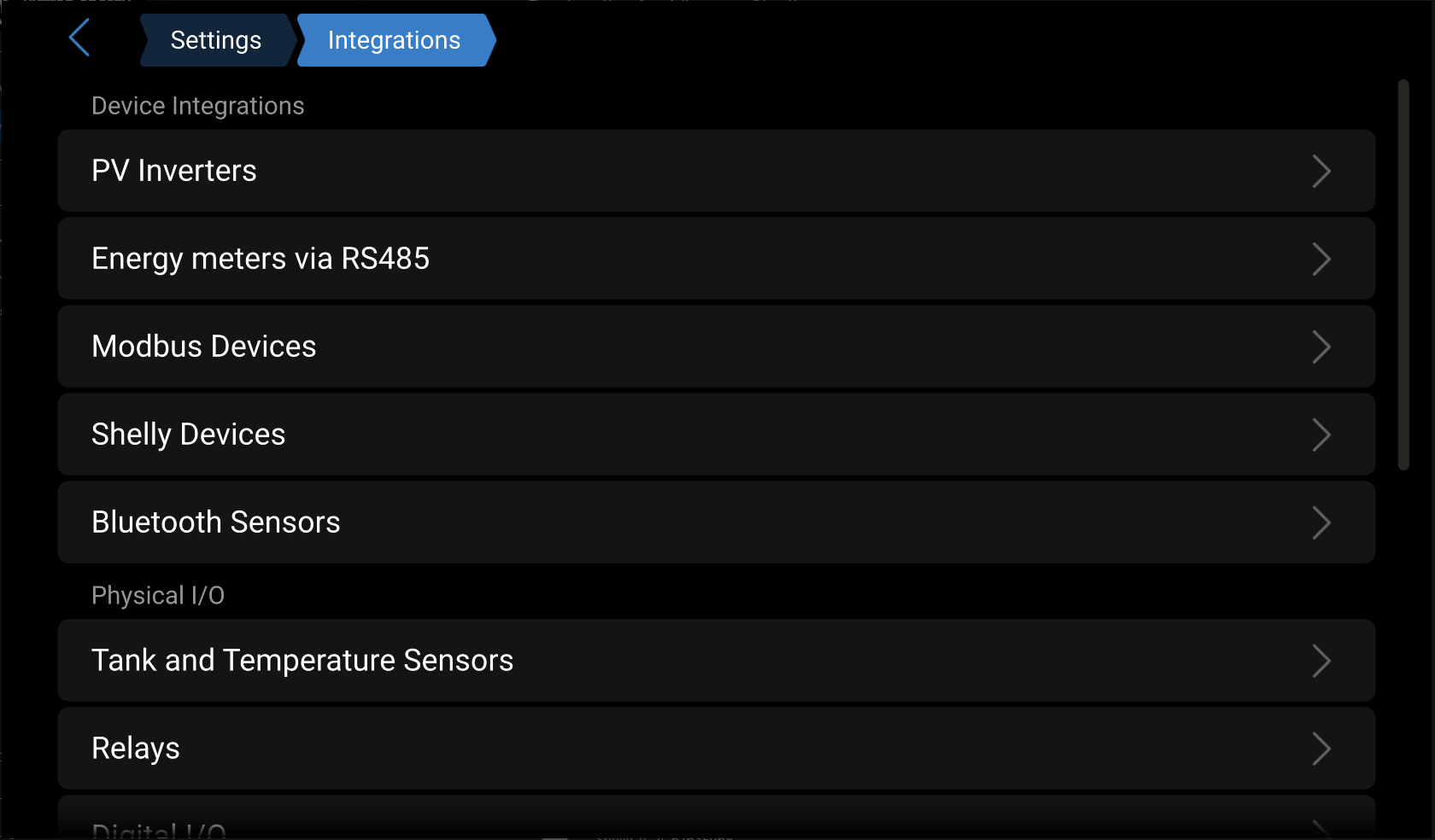
Victron officially added native Shelly support in Venus OS v3.70, released on February 25, 2026.
Official Victron release information says Venus OS v3.70 adds Shelly smart device integration and expands the switch pane into a central point for digital control. The release also states that Shelly Gen2 and newer smart switches, energy meters and RGB light controllers are natively supported.
Public Victron documentation describes the integration as local:
-
Shelly devices are discovered on the same network as the GX by mDNS.
-
The GX connects to Shelly devices through their WebSocket endpoint.
-
Detected Shelly devices are disabled by default.
-
The user must enable devices manually.
-
Once enabled, supported Shelly devices appear as switches, energy meters, or both.
-
Switching outputs can be controlled from the Venus OS switch pane.
-
A Shelly device can also be added manually by IP address if automatic discovery does not find it.
This is important because it makes Shelly a native part of the Victron local-control experience, not only an external smart-home accessory.
Why the Victron Integration Matters
Victron has a strong professional installer base in off-grid, marine, RV, industrial, backup and energy-storage projects. In these installations, optional loads are often important:
-
water heaters;
-
pool pumps;
-
HVAC and heat pumps;
-
EV chargers;
-
lighting circuits;
-
workshop loads;
-
non-critical backup loads.
Shelly devices are already widely used for this type of edge control and metering. The Venus OS integration gives installers a native path to bring those devices into the Victron energy system.
The use cases are relevant across all personas and user groups:
-
professional installers;
-
retrofit users;
-
home energy users;
-
RV and boat users;
-
off-grid users;
-
backup-system users;
-
product teams studying how to integrate Shelly into their own ecosystems.
The integration story is clear:
-
Victron manages generation, storage, inverter/charger behavior, ESS, backup and remote monitoring.
-
Shelly provides distributed switching, dimming, RGB control and energy metering.
-
Venus OS is the local orchestration layer.
-
VRM and Remote Console can expose the system remotely where supported.
Supported Integration Behavior
The official Venus OS documentation describes these core behaviors.
|
Behavior |
Status in Venus OS v3.70 |
|---|---|
|
Shelly Gen2 and later LAN device support |
Broad native support for compatible Wi-Fi/Ethernet device classes |
|
Local discovery |
mDNS on the same network as the GX |
|
Manual add |
Supported by IP address |
|
Transport |
GX connects to Shelly WebSocket endpoint |
|
Default state |
Devices are discovered disabled |
|
Enable/disable |
Individual channels can be enabled or disabled |
|
Switch pane |
Supported outputs appear in the switch pane |
|
Device/channel naming |
Names synchronize with Victron custom names where supported |
|
Dedicated energy meter roles |
Genset, AC load or PV inverter |
|
Grid role for dedicated Shelly EM |
Not supported |
|
Smart plug with metering |
EM role is AC load only in v3.70 documentation |
|
Bluetooth-only Shelly devices |
Not part of the native Venus OS Shelly integration path |
Native Device Scope
The practical scope of the Venus OS v3.70 update should be read as broad native support for Shelly Gen2 and newer Wi-Fi/Ethernet devices in the supported integration classes. In this article, Bluetooth-only Shelly devices are excluded from the native integration scope.
|
Shelly category |
Native Venus OS v3.70 direction |
|---|---|
|
Switches and relays |
Native switch pane control where the device class is supported |
|
Switches with metering |
Native switch/control plus AC-load metering behavior where supported |
|
Energy meters |
Native meter integration with supported Victron roles |
|
Dimmers |
Native dimming control where the device class is supported |
|
RGB / RGBW controllers |
Native lighting control where the device class is supported |
|
Smart plugs |
Native switch/control plus metering behavior where supported |
|
Bluetooth-only devices |
Excluded from the native Venus OS Shelly integration path |
Victron documentation and the dbus-shelly repository list examples such as Shelly Plus Plug S, Pro 4PM, Pro 1PM, Pro 3EM, 1PM Gen4, Mini 1PM Gen4, Mini 1 Gen4, Dimmer Gen3 and Plus RGBW PM. These examples are useful validation points, but the important message is broader: the integration is designed around modern Shelly local network APIs, not around one isolated Shelly model.
Known Limitations
The Victron integration is strong, but it should be described accurately.
Password-Protected Devices
Password-protected Shelly devices are not supported in Venus OS v3.70 documentation. A secured Shelly device may not appear in the device list.
Installer implication:
-
The installer must know whether the Shelly device has authentication enabled.
-
If a device does not appear, password protection is one of the first checks.
Same-Network Requirement
The native discovery path depends on the Shelly device and GX device being on the same network. Automatic discovery uses mDNS.
Installer implication:
-
VLANs, Wi-Fi isolation, multicast filtering and guest networks can block discovery.
-
Manual IP add can help when automatic discovery fails.
Sensors and Add-ons
Victron documentation says sensors and other Shelly hardware are not supported by the native v3.70 Shelly integration.
Installer implication:
-
Present the native integration as broad support for Shelly Gen2+ Wi-Fi/Ethernet switching, metering, dimming and lighting classes, not as Bluetooth-device support.
-
Advanced cases may require Node-RED, MQTT, custom D-Bus services, or other integration work.
Multi-Channel Naming
Victron documentation notes limitations around naming individual energy-meter channels on multi-channel devices.
Installer implication:
-
Naming is good enough for many switch/load cases.
-
Multi-channel metering still needs careful commissioning notes.
Single-Channel EM Devices
Community notes around v3.70 explain that single-channel EM devices, such as Shelly 1 EM Mini Gen4, are not supported in that release. They also note that support for Shelly EM-50 and mono-phase Pro 3EM mode was planned for a later Venus OS version.
Installer implication:
-
For v3.70, Pro 3EM should be treated as supported in three-phase mode only.
-
Single-phase metering support should be validated against the actual Venus OS version before promising it.
Special Functions
Using Shelly switching devices for special Victron functions such as generator start/stop or alarm relay is not natively supported in the v3.70 Shelly integration.
Installer implication:
-
Use GX relays for native relay functions.
-
Use Node-RED or custom logic for advanced Shelly-based workflows.
Business Opportunity
Victron is already an open and installer-friendly platform. Native Shelly support strengthens that position.
The business opportunity is not only “Shelly appears in Victron”. The larger opportunity is that Shelly can become a practical distributed load-control and metering layer for energy ecosystems.
Victron demonstrates the pattern clearly: the energy platform remains responsible for the energy system, while Shelly extends the platform into real-world switching, metering and local control.
This helps:
-
professional off-grid installations;
-
retrofit systems;
-
marine and RV systems;
-
backup installations;
-
homes with existing Shelly devices;
-
installers who need affordable load control without adding complex PLC hardware.
Shelly is valuable because it gives Victron installers more device-level reach:
-
AC load switching;
-
plug-level metering;
-
circuit-level metering;
-
dimming;
-
RGB control;
-
optional load shedding;
-
local automation hooks.
Real Installation Reference
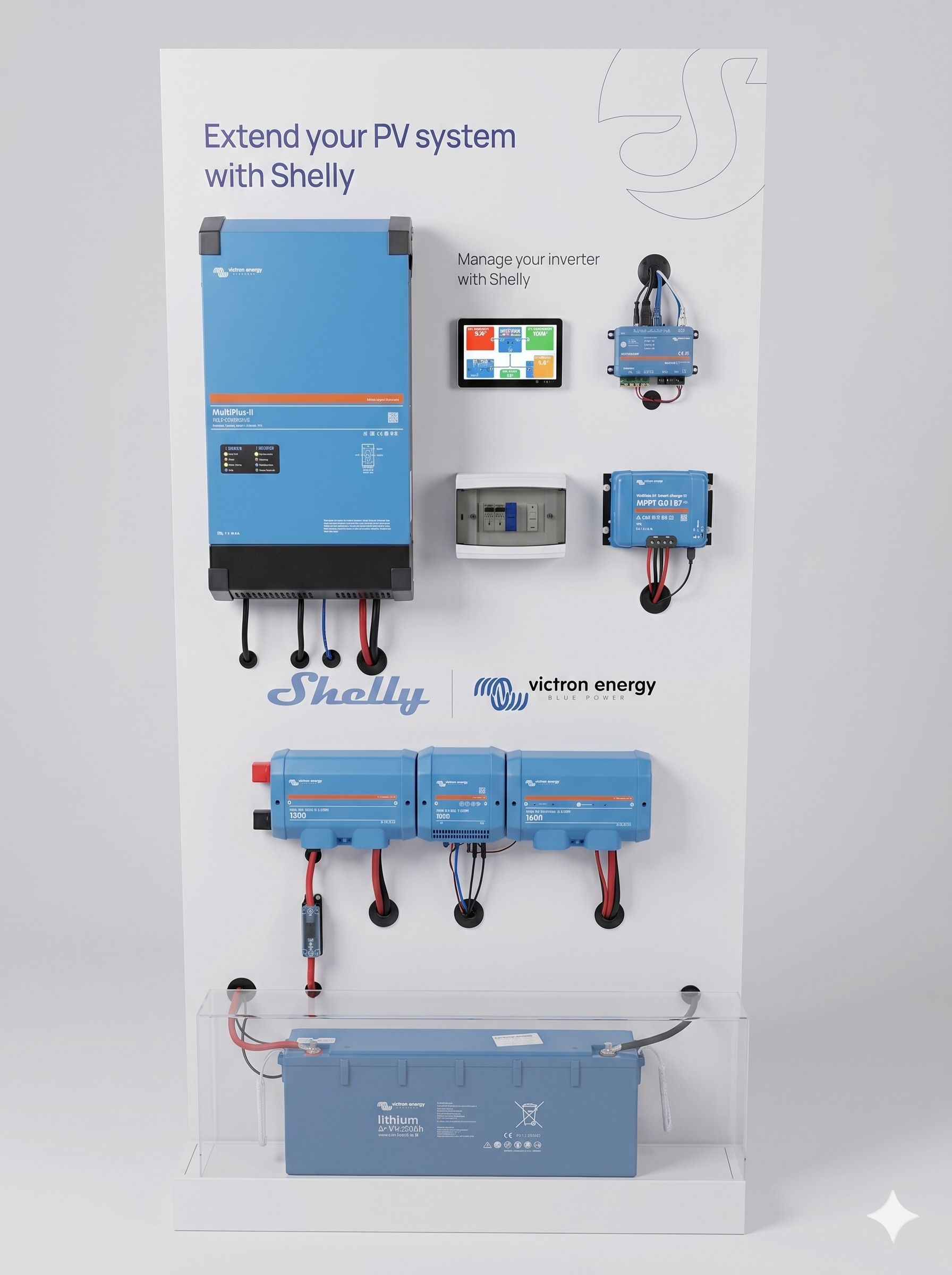
This article is supported by a real Victron installation in Europe. The same integration pattern is globally relevant because Victron systems are used worldwide in houses, RVs, boats, off-grid systems and backup systems.
The installation is both a real installation and a practical test/demo environment. The listed use cases are tested on this setup.
Victron System
|
Component |
Model |
|---|---|
|
GX device |
Cerbo GX MK2 |
|
Inverter/charger |
MultiPlus-II 24/5000/120-50 |
|
Battery management |
Lynx Smart BMS 500A |
|
Battery |
Smart LiFePO4 25.6-200Ah |
|
Solar charger |
SmartSolar Charger MPPT 150/35 |
|
Venus OS |
v3.70 Large |
|
Automation layer |
Node-RED enabled through Venus OS Large |
Shelly Devices in the Setup
|
Device |
Role in the integration |
|---|---|
|
Shelly Pro EM-50 |
Native Venus OS energy measurement / metering |
|
Shelly Pro 1 |
Relay / controllable output |
|
Shelly Gen4 Strip |
Native Venus OS lighting / controllable load example |
All Shelly devices in this setup run firmware 1.7.5 or newer.
Field-Tested Native Support
This matrix documents the real devices tested in the installation. It is not meant to limit the Venus OS v3.70 integration only to these three models. The broader integration direction is native support for modern Shelly Wi-Fi/Ethernet devices, while Bluetooth-only devices are excluded.
|
Shelly device |
Firmware version |
Visible in Venus OS |
Visible in switch pane |
Controllable from Node-RED |
Visible in VRM / Remote Console |
Integration path |
|---|---|---|---|---|---|---|
|
Shelly Pro EM-50 |
1.7.5 or newer |
Yes |
Yes / meter view |
Yes |
Yes |
Native Venus OS Shelly integration |
|
Shelly Pro 1 |
1.7.5 or newer |
Yes |
Yes |
Yes |
Yes |
Native Venus OS Shelly integration |
|
Shelly Gen4 Strip |
1.7.5 or newer |
Yes |
Yes |
Yes |
Yes |
Native Venus OS Shelly integration |
Confirmed Working Behavior
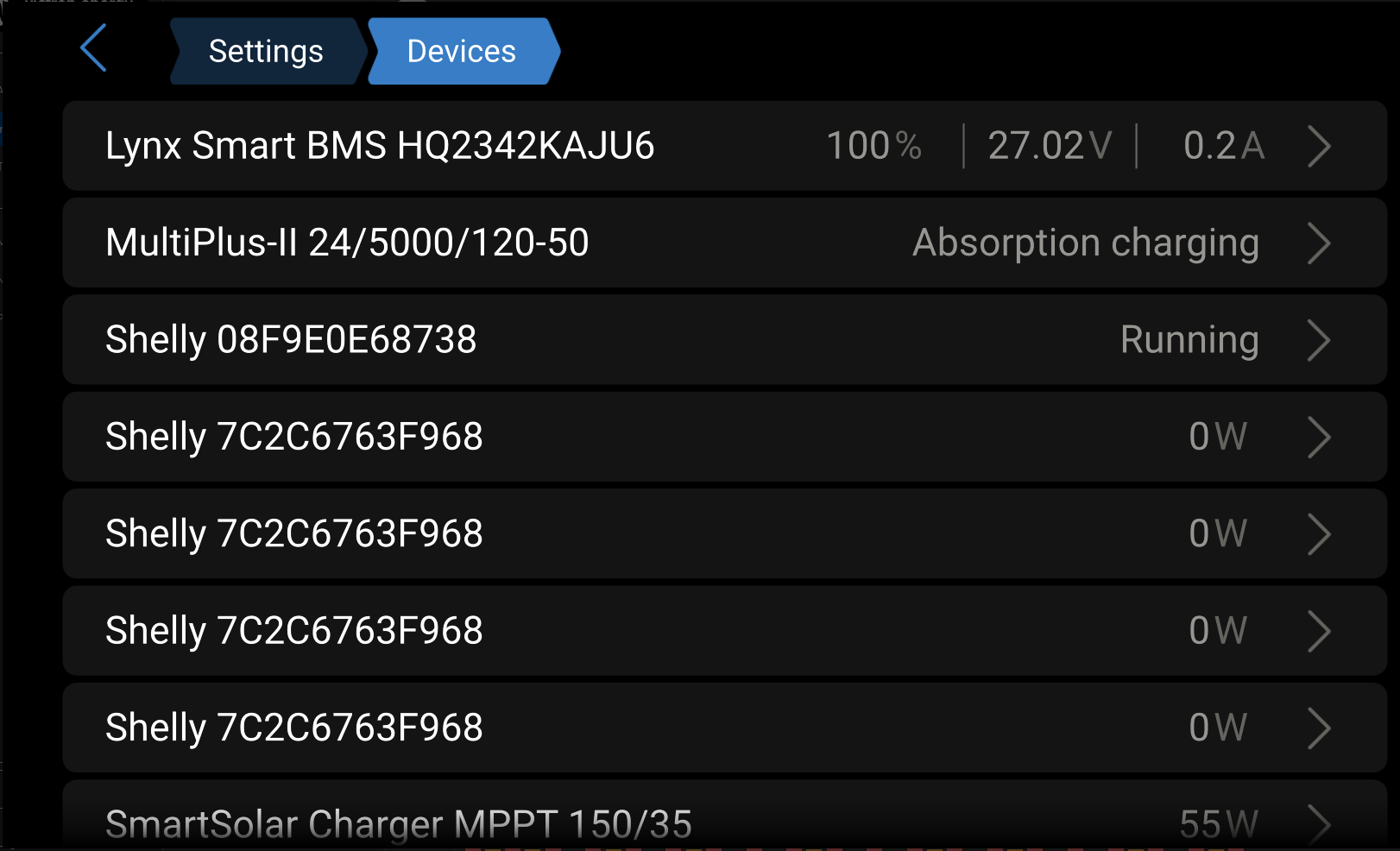
In this setup, the following behaviors are confirmed:
-
Shelly devices are discovered in Venus OS.
-
Shelly devices appear in the Venus OS switch pane.
-
Shelly meter data is visible.
-
Shelly Pro EM-50 appears natively in Venus OS v3.70 in this setup.
-
Shelly Gen4 Strip appears natively in Venus OS v3.70 in this setup.
-
Node-RED can control Shelly devices.
-
VRM / Remote Console can show Shelly-related control and status through the Victron interface.
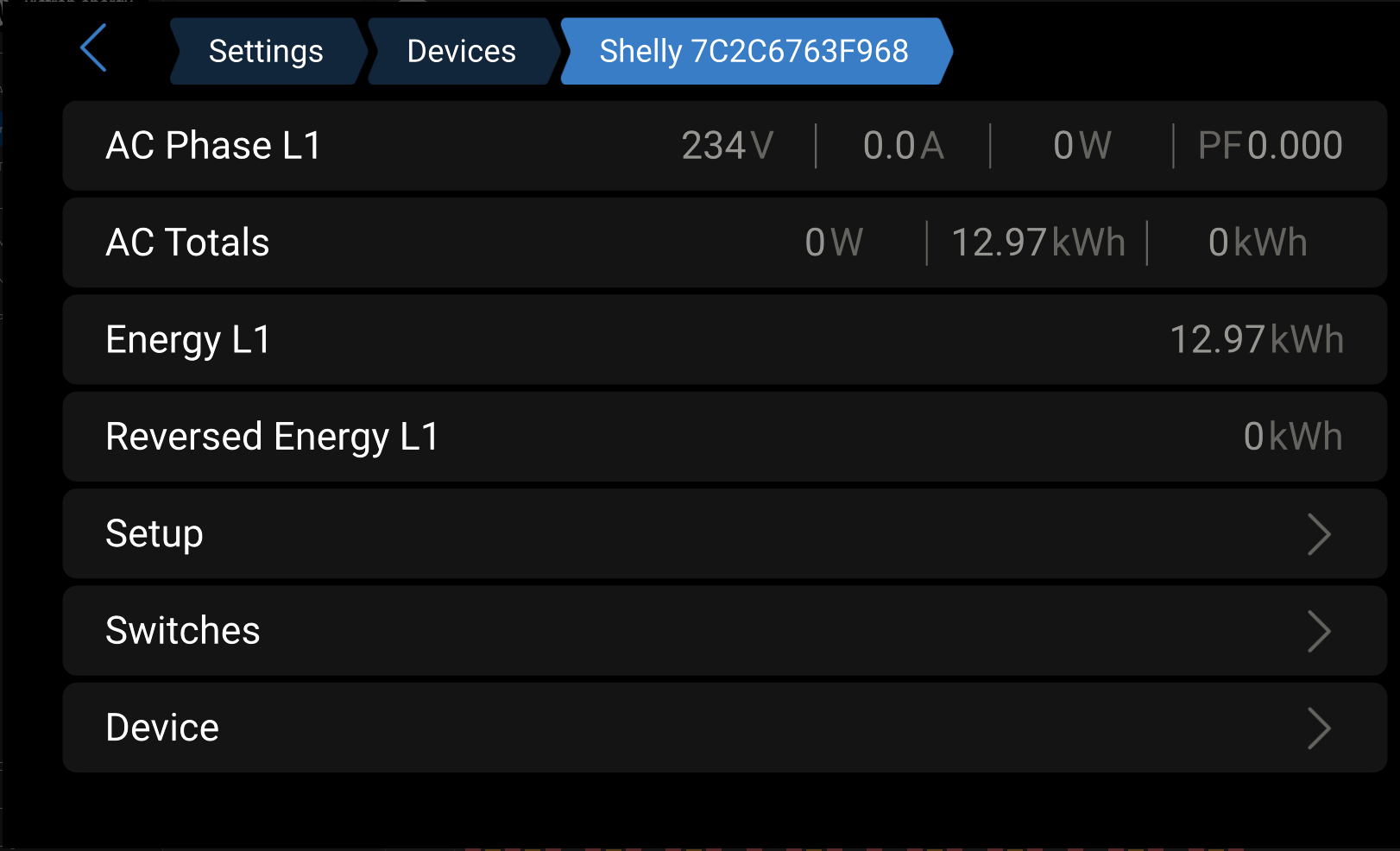
This makes the installation useful not only as a Victron example, but as a reference pattern for other energy brands that want to integrate Shelly into their own ecosystem.
Integration Team Notes
Recommended Positioning
The article should position Victron as the energy brain and Shelly as the distributed edge layer.
Victron GX / Venus OS
  |
  +-- Victron inverter/charger
  +-- Victron MPPT / PV data
  +-- Battery / BMS / ESS data
  +-- VRM / Remote Console
  |
  +-- Shelly local integration
        +-- switches
        +-- dimmers
        +-- RGBW controllers
        +-- energy meters
        +-- smart plugs
        +-- AC load visibility
Discovery Flow
Shelly device on same LAN
  |
  +-- mDNS discovery by GX
  |
  +-- device appears under Settings -> Integrations -> Shelly
  |
  +-- device is disabled by default
  |
  +-- installer enables device/channel
  |
  +-- Venus OS registers the matching service
  |
  +-- switch / meter / output appears in the appropriate UI
Fallback:
Automatic discovery fails
  |
  +-- installer manually adds Shelly IP address
  |
  +-- GX connects locally
  |
  +-- compatible channels are enabled manually
Practical Installer Checks
Before reporting a device as unsupported, check:
-
Venus OS version is v3.70 or newer.
-
Shelly device is Gen2 or newer.
-
Shelly device class is supported.
-
Shelly and GX are on the same network.
-
mDNS/multicast is not blocked.
-
Shelly device is not password protected.
-
Device firmware is current enough for stable RPC/WebSocket behavior.
-
Pro 3EM is in a supported three-phase configuration where applicable.
Developers
Native Architecture
The native Venus OS integration is built around local Shelly connectivity and D-Bus service registration.
Shelly device
  |
  +-- mDNS announcement
  |
  +-- GX discovery
  |
  +-- WebSocket connection
  |
  +-- capability/channel handling
  |
  +-- D-Bus service registration
        +-- com.victronenergy.switch
        +-- com.victronenergy.acload
        +-- com.victronenergy.pvinverter
        +-- com.victronenergy.genset
        +-- role depends on device capability and configuration
The public dbus-shelly repository describes this general model:
-
GX and Shelly must be in the same network.
-
GX discovers Shelly over mDNS.
-
Found devices are listed under
com.victronenergy.shelly/Devices/. -
Each channel can be enabled individually.
-
After enabling, a dedicated D-Bus service is registered.
-
The service type depends on Shelly capabilities.
Service Mapping
|
Shelly capability |
Victron service direction |
|---|---|
|
Switch without metering |
|
|
Smart plug / switch with metering |
AC load service direction |
|
Dedicated energy meter |
Role-based meter service such as genset, PV inverter or AC load |
|
Dimmer |
Switch pane dimming output |
|
RGBW controller |
Switch pane RGB/RGBW control, with limitations |
Node-RED Path
Venus OS Large includes Node-RED. Venus OS v3.70 also improves Node-RED virtual switch support in the switch pane.
This creates an advanced path for installers:
Victron system values
  +-- battery SOC
  +-- PV power
  +-- grid import/export
  +-- inverter state
  +-- ESS mode

Node-RED logic
  +-- solar surplus rules
  +-- backup reserve rules
  +-- load shedding
  +-- generator-aware behavior
  +-- tariff/time schedule

Shelly output
  +-- switch load
  +-- dim load
  +-- monitor load
  +-- expose virtual switch in switch pane
This should be presented as an advanced integration path, not as required for normal native Shelly support.
Node-RED Sample Flow - PV Surplus Load Enable
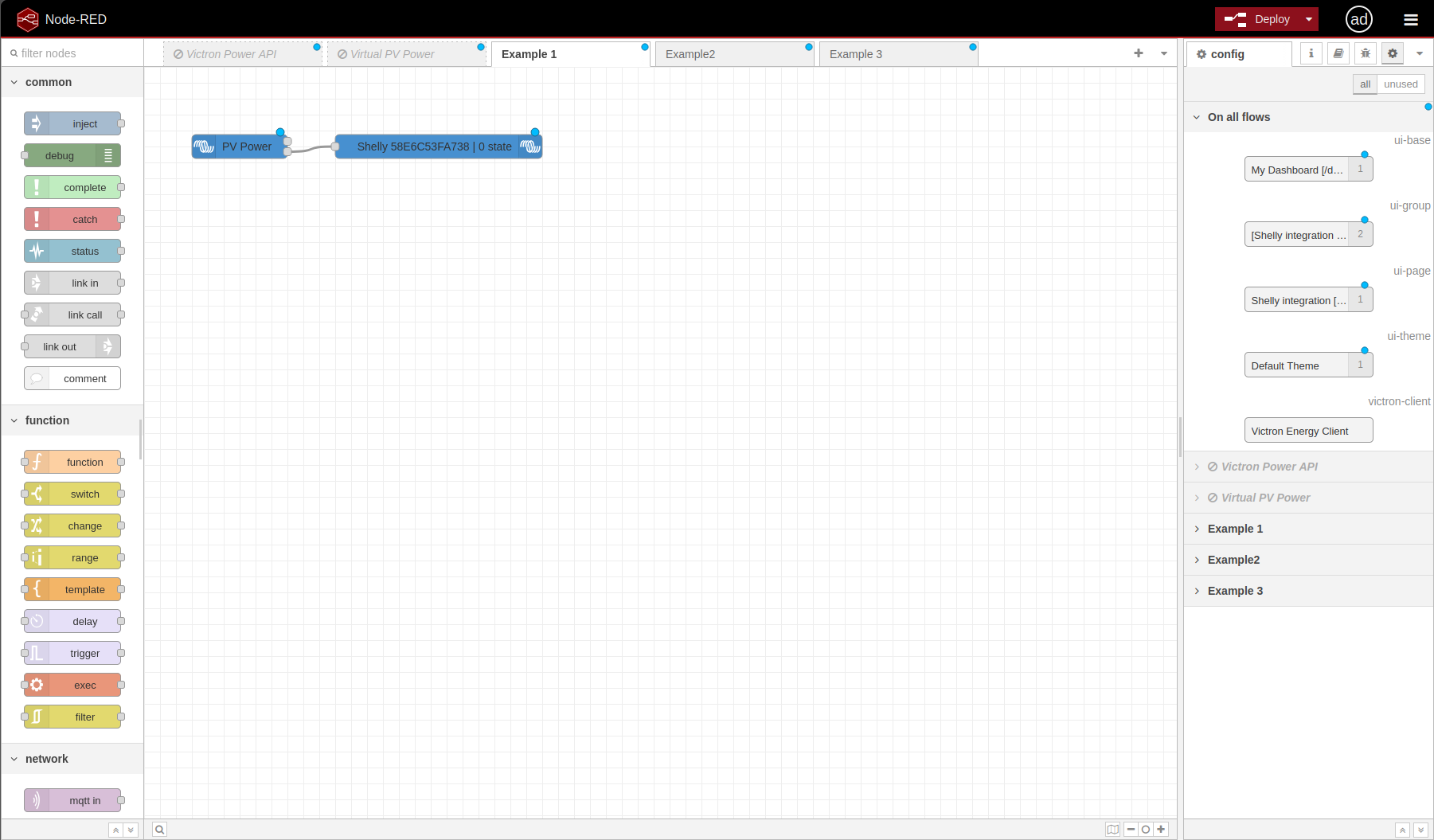
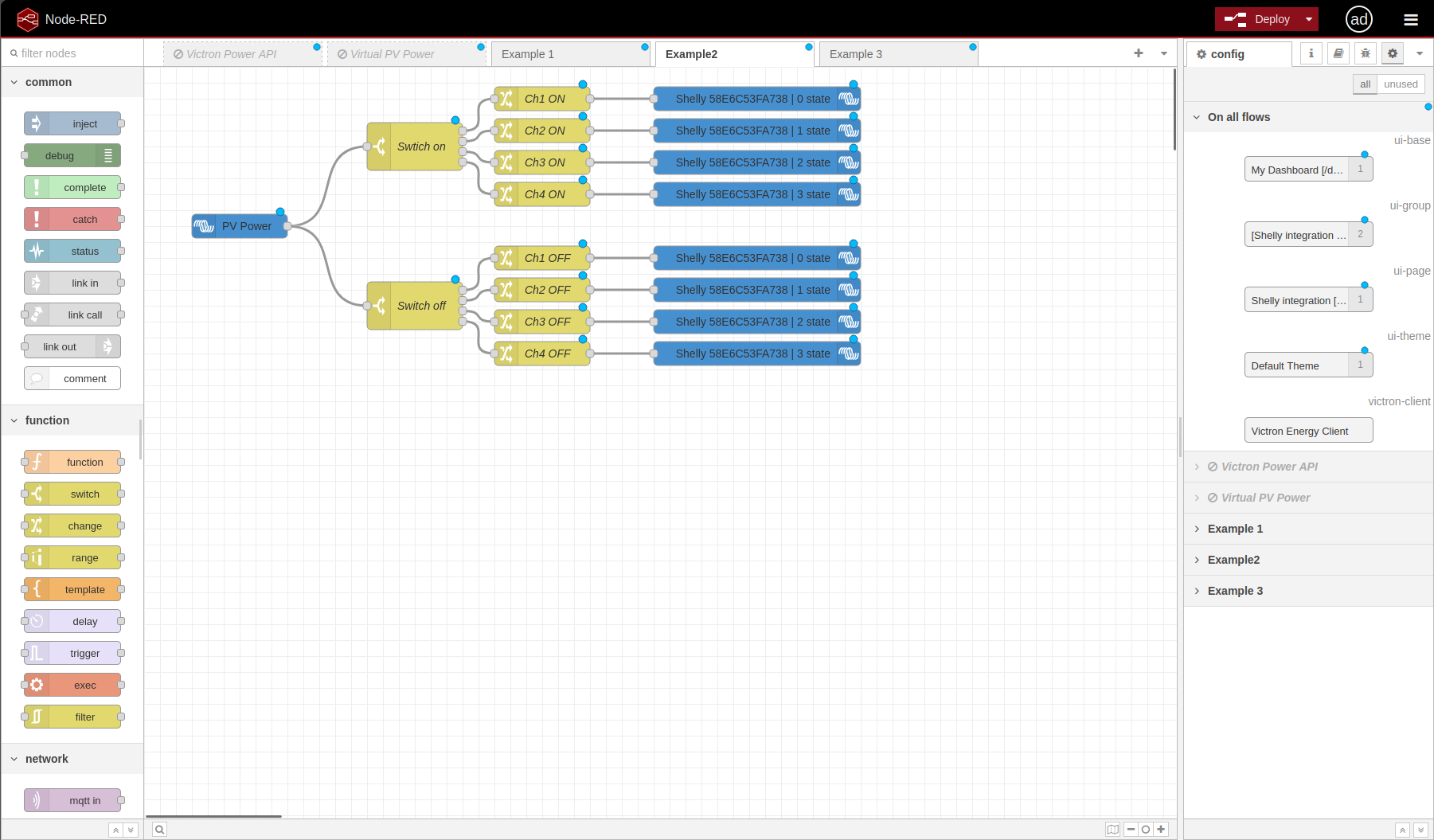
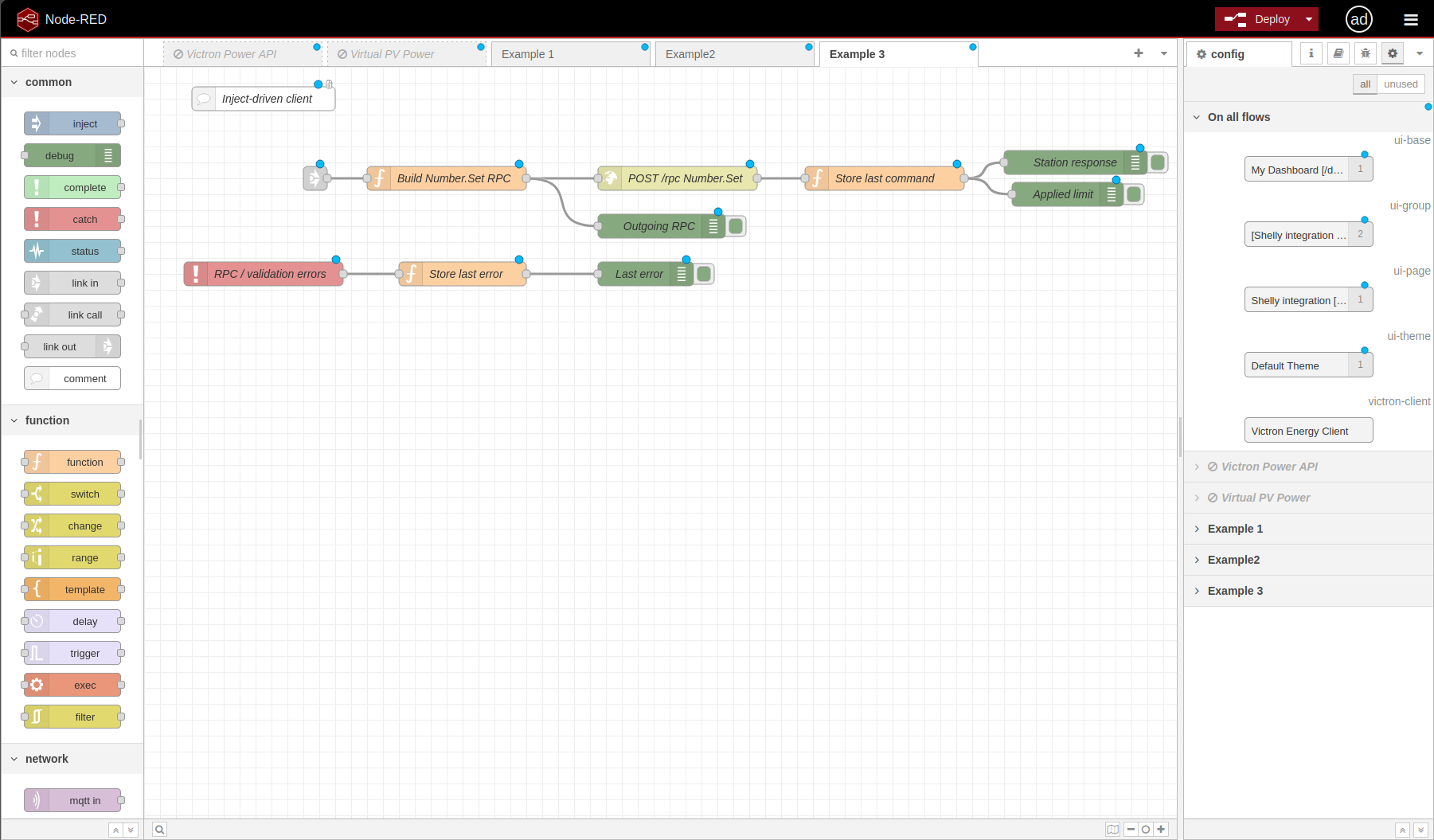
The following screenshots show a practical Node-RED example for PV-surplus load enablement. The goal is to use Victron system values as the energy decision input and Shelly devices as the local execution layer.
Example 1 shows the simplest form: PV power is used as an input signal and a Shelly output is controlled from the flow.
Example 2 expands the logic into multi-channel control. A switch decision is split into channel on/off outputs and routed to the Shelly device channels.
Example 3 shows the command path. The flow builds a Number.Set RPC command, sends it to the station endpoint, stores the last command, and exposes response/error/debug information.
The same pattern can be adapted for:
-
switch optional loads based on battery SOC;
-
enable loads when PV surplus is available;
-
shed non-critical loads in backup mode;
-
control lighting or appliance loads from the Victron switch pane;
-
expose advanced automation as virtual switches where useful.
Current State
Working from official documentation and confirmed real installation behavior:
-
Venus OS v3.70 includes native Shelly support.
-
Supported Shelly Gen2 and newer devices can be discovered locally.
-
mDNS discovery is used on the same network.
-
Manual IP add is available.
-
Compatible Shelly devices are disabled by default until enabled.
-
Supported devices can appear as switches, energy meters, or both.
-
Switch outputs can be controlled from the switch pane.
-
Node-RED can extend the system for advanced logic.
-
Real setup uses Cerbo GX MK2, MultiPlus-II, Lynx Smart BMS, Smart LiFePO4 battery and SmartSolar MPPT.
-
Real setup runs Venus OS v3.70 Large because Node-RED is required.
-
Real setup includes Shelly Pro EM-50, Shelly Pro 1 and Shelly Gen4 Strip.
-
Real setup uses Shelly firmware 1.7.5 or newer.
-
Shelly Pro EM-50 and Shelly Gen4 Strip are confirmed as native in Venus OS v3.70 in this setup.
-
Shelly discovery, switch pane visibility, meter visibility, Node-RED control and VRM / Remote Console visibility are confirmed.
Not included yet:
-
Personal contacts.
-
Custom D-Bus driver examples.
Research Sources
Victron:
-
Venus OS v3.70 release article:
-
Cerbo GX manual, supported non-Victron products, Shelly Energy Meters & Switches:
-
Victron
dbus-shellyrepository: -
Victron Venus OS D-Bus API reference:
Shelly:
-
Shelly API documentation:
-
Shelly third-party integrations support article: