Skip table of contents

Sigenergy - Sigen

6a6eaefb-12ba-4445-9a9f-2c2826aea87e.png

What is Sigenergy

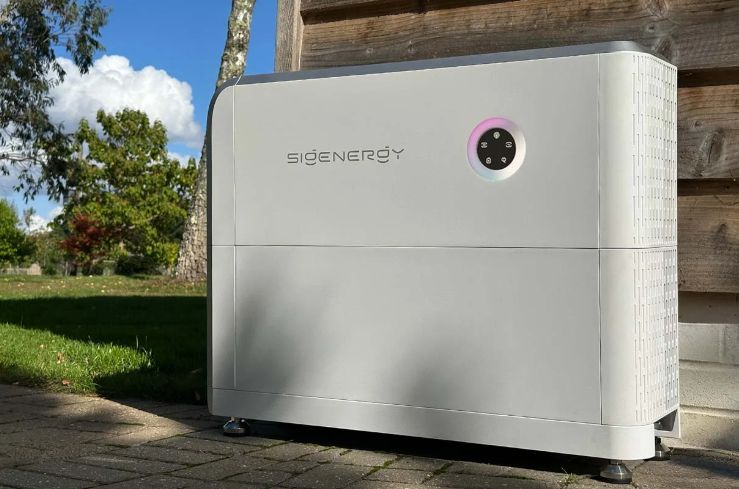
Sigenergy (brand name: Sigen) is a Chinese manufacturer of residential and commercial solar inverters, battery storage systems, and EV chargers. Their flagship product - the SigenStor system - combines a hybrid inverter, modular battery packs, and an AC-coupled gateway in a single integrated platform managed through the mySigen mobile app.

Sigenergy is growing rapidly in the European market with installations in residential and small commercial segments. Their hardware quality is strong, and the mySigen app provides a clean, modern interface for homeowners and installers.

Shelly is already part of mySigen

image-20260316-163842.png

Sigenergy already ships native Shelly support inside the mySigen app. Users can add Shelly smart switches and plugs as controllable loads and schedule them alongside their inverter and battery. This makes Sigenergy one of a growing set of solar/storage brands with formal Shelly integration.

What users can do today from inside mySigen:

  • Add Shelly smart switches and plugs as controllable loads

  • Schedule loads using Time-of-Use (TOU) windows

  • View per-device power consumption statistics

  • Manage up to 24 smart loads per system

How Shelly compares to competitors in this space

Feature

Huawei EMMA

EcoFlow STREAM

Zendure ZEN+

mySigen

TOU scheduling (Shelly)

Yes

Yes

Yes

Yes

PV surplus auto-activation

Yes

Yes

Yes

Partial

Per-appliance power monitoring

Yes

Yes

Yes

Yes

Condition-based dispatch

Yes

Yes

Yes

No

Cloud-based device discovery

No

No

Yes

No

Device shown by user name

Yes

Yes

Yes

No

Full Shelly device portfolio

Partial

Partial

Yes

Partial

Single-app configuration

Yes

Yes

Yes

Yes

Known concerns about the current integration

Beyond onboarding friction (described in the Integration Team section), the current

mySigen Shelly integration has some behavioural characteristics that may frustrate

DIY users and technically savvy installers.

Device control is not co-operative.

When a Shelly device is onboarded to mySigen and set to OFF by the system (e.g. outside

a TOU window), turning it on from any other path - the Shelly app, a wall switch, an

automation, or a manual HTTP call - causes mySigen to immediately turn it off again.

The system enforces its own state without negotiation. This is by design for energy

management, but it removes user agency in ways that are not obvious and can feel like a malfunction.

For devices with physical inputs (most Shelly relay modules have an input terminal that

can be wired to a wall switch or button), using the physical input to toggle the device

state will be overridden by mySigen. The physical switch appears to work but the state

immediately reverts. This behaviour is unexpected to end users who have existing Shelly

switches on those inputs.

Navigation and control depth Controlling individual Shelly devices within mySigen requires multiple taps. The devices are not exposed at the top level - users must navigate into the smart loads section and then into each device individually. For users accustomed to one-tap control in the Shelly app, this adds friction.

Business opportunity

The Shelly + Sigenergy combination gives installers everything needed for genuine intelligent energy management - without requiring any additional hardware:

  • The inverter knows generation, battery state, and grid conditions in real time

  • Shelly devices know exactly what each appliance is consuming, circuit by circuit

  • Together: the system can prioritise loads, protect the inverter limit, charge at the right tariff, and act on PV surplus automatically

A practical example: a 10 kW inverter with an oven (4 kW), two water heaters (3 kW each), and an EV charger (up to 11 kW). Without coordination, combined loads can reach 21 kW. With Sigen and Shelly working together:

  • Oven running -> water heaters pause automatically

  • EV charger starts -> large loads defer until cooking or heating finishes

  • Battery full, strong PV generation -> loads activate in priority order

  • Night low-tariff window -> water heaters run on schedule

  • Inverter limit always respected, without the user thinking about it

This works entirely within the Shelly scripting and automation framework and requires no API access or additional integrations - making it a standalone installer offering independent of mySigen's current load control limitations.

What Sigen could do that no competitor has done yet:

Automatic device discovery (Home Assistant model)

When a new Shelly device joins the network, it announces itself via mDNS. No energy platform currently listens for these announcements in the background and prompts the user when a new device is found. Home Assistant does exactly this: "A new Shelly device was found - do you want to add it to your home?" No scan, no Bluetooth pairing, no provisioning flow. Being first to do this in the solar/energy space would set a new standard for the first impression of the integration.

Reactive load dispatch using live inverter state TOU scheduling and PV surplus activation exist on every platform. Reacting in real time to a combination of conditions - inverter approaching its limit, a large load just starting, battery SOC at a threshold - and automatically adjusting which loads run is not yet a productised feature anywhere. Sigen has the inverter data; Shelly provides the per-circuit data. The combination is unique.

Three-phase load awareness:

Sigen works in three-phase environments. Shelly devices can measure per-phase voltage, current, and power. Load shedding or balancing based on per-phase conditions is something no energy platform has offered as a built-in feature.

Installer-grade commissioning workflow:

Most Shelly integrations are designed for consumers setting up a single home. Sigen has a strong installer channel. A workflow that lets an installer connect to a customer's Shelly account, import all devices with their existing names, assign them to loads, and commission the whole system in one session would be genuinely differentiated.

Sigen's Shelly integration is a strong foundation. The opportunity is to make it the best integration in the market - not just better than the current state, but better than anything a competitor offers. Shelly has built automations and tooling that demonstrate this level of coordination today, and is prepared to share the technical details to support Sigen in implementing it right.

Contacts

Wang Kai (Kai Wang)       - Technical contact, Sigenergy

Tony He (He Runze)        - Commercial contact, Sigenergy

Yang Ziheng (Ziheng Yang) - Technical contact, Sigenergy

Ivan Ivanov               - Regional contact, Sigenergy

Dimitar Stoyanov          - Solution Engineer (owns this integration), Shelly Europe

Mircho Mirev              - Integration Manager, Shelly Europe

Integration team

Overview of the mySIGEN Shelly integration

The mySigen app supports adding Shelly devices as controllable loads. This section covers what works, what does not, and what needs to be fixed for a smooth installer experience.

Test system used for this evaluation:

  • 10 kW Sigenergy SigenStor at a real residential site;

  • 100+ Shelly devices already installed on the site;

  • Shelly device used for Virtual Component display testing;

How device discovery works

mySigen offers two paths when adding a Shelly device:

Bluetooth path - labelled "recommended" for new devices. Uses BLE to find nearby Shelly devices and provision them onto the WLAN. Pre-selected by default.

WLAN Network path - for devices already connected to the network. Scans the local network via mDNS (UDP port 5353) to discover existing Shelly devices.

For existing installations (the common case for installers), the WLAN path is the correct choice.

Known onboarding issues observed in real installation

Issue 1 - Bluetooth default steers installers to the wrong path The BT option is pre-selected and labelled "recommended". For sites where Shelly devices are already installed, this leads installers through unnecessary BT provisioning steps for every device.

Issue 2 - WLAN scan finds only a fraction of devices mDNS relies on devices actively announcing themselves via multicast. With VLANs, routers that throttle multicast, or large device counts, only a small subset appears per scan. Repeated scans keep finding the same devices.

Issue 3 - No scan progress indication The scan shows results, then new devices appear with no indicator that scanning is still running. Users cannot tell when to stop waiting.

Issue 4 - Devices shown by model code, not user-assigned name mDNS returns the manufacturer model identifier (e.g. ShellyPlus1PM), not the name assigned in the Shelly app. With 10 identical plugs controlling different appliances, identification requires physically toggling each device to hear the relay click.

Fix available: the user-assigned name is accessible via a single local HTTP call - Sys.GetConfig returns device.name. One HTTP call after mDNS discovery is sufficient.

No change to the discovery mechanism is required.

This fix would also benefit other platforms that use mDNS for Shelly discovery, such as Home Assistant. It could be proposed as a general improvement: run mDNS listening in the background continuously, and when a new Shelly device is detected, surface a notification to the user asking if they want to add it - removing the need for manual scanning entirely.

Issue 5 - Unnecessary network provisioning step after WLAN discovery When a device is found via WLAN scan, the app has already proven it is on the network (mDNS only works for reachable devices). The flow still presents a factory-fresh network provisioning step. This is redundant.

Bluetooth-specific failures observed (out of 5 attempts: 2 succeeded, 3 failed):

  • Router AP limit error (inaccurate)

  • Failure to retrieve Wi-Fi network list

  • Device appearing connected in the flow but not visible in smart home devices list, with no way to delete the entry and retry

  • Devices showing as offline in mySigen despite being online and fully controllable

  • No option to refresh the Wi-Fi network list within the pairing flow

System architecture (what is in the box)

Hardware components:

  • SigenStor Inverter: hybrid inverter, manages PV, battery, grid, and AC load

  • Battery Pack(s): modular lithium storage, stackable, ~10 kWh per module

  • AC Gateway: connects AC-coupled devices and provides LAN/cloud connectivity

  • EV Charger (optional): integrated DC/AC EV charging

  • Heat Pump (optional): managed load visible in the energy flow

Connectivity:

  • The inverter connects to the AC gateway via internal LAN cable (not to the home network)

  • The gateway connects to the home LAN and from there to the internet

  • IMPORTANT: do not connect the inverter directly to the home LAN. Only the gateway   should be connected to the home network. Connecting both causes daily offline dropouts.

  • The inverter also has a built-in Wi-Fi module for local communication

  • Cloud connectivity via api-eu.sigencloud.com (EU). Remote control requires cloud.

Web interface:

  • The inverter has a web UI accessible on the local network but only via the installer account. The homeowner profile does not have web UI access - they are limited to the mySigen mobile app. MySigen app: primary user interface for real-time energy flow, historical data, mode control, Shelly load management, and fault monitoring.

What works today for data display on Shelly

For showing live Sigenergy data (PV, battery, grid, load) on a Shelly device as Virtual Components, any Shelly device with scripting capability can be used:

OPTION A: GL.iNet Router Bridge (WORKING, fully local, 1 s polling, laptop-independent)

Python script running as a system service on the GL.iNet router at 192.168.8.1. Reads Modbus TCP from the Sigenergy gateway (192.168.8.105:502, unit 247) every 1 second and pushes five values to Shelly Pro2 Virtual Components 200-204 via HTTP Number.Set. No external dependencies - pure Python stdlib. Auto-restarts on crash and on router reboot via procd init. Requires: GL.iNet router on the same LAN as the gateway (already in place). Script: sigen-bridge-router.py, deployed to /root/sigen-bridge.py.

OPTION B: Python Modbus Bridge (WORKING, laptop required)

Reads Modbus TCP from the Sigenergy gateway (local network, no internet needed). Writes values to Shelly Virtual Components every 30 seconds via HTTP. Requires: laptop on the same network, running sigen-modbus-bridge.py.

OPTION C: Python Cloud API Poller (WORKING, laptop required)

Polls the Sigenergy OpenAPI every 60 seconds. Writes values to Shelly Virtual Components via HTTP. Requires: laptop with internet access, running sigen-poller.py.

OPTION D: Cloudflare Worker Relay (DESIGNED, READY TO DEPLOY, laptop-independent)

A Cloudflare Worker runs on a 5-minute cron, polls Sigenergy, caches data in KV. Shelly polls the worker URL every 5 minutes and updates VCs. Requires: one-time Cloudflare account setup (free, no credit card). Code is written and tested. Blocked only by absence of an account.

RS485 Investigation Summary (concluded April 2026)

Three RS485 connection points were tested on the installed hardware:

Gateway P6 (external HEMS port, 3-pin screw terminal): gateway acts as Modbus MASTER on this bus - emits SID=0 broadcast frames. Not usable as a slave read port.

Inverter RS485-2 (RJ45-2, pins 13/14): reserved exclusively for the Sigenergy energy meter / CT sensor. Returns SID=255 (idle) at all baud rates. Not reconfigurable.

Inverter RS485-1 (COM port screw terminal, pins 15/16): correct Modbus slave port (sid=1, baud=38400). Not yet reachable - requires a proprietary COM port cable that was not shipped with the unit. Cable requested from Sigenergy on 2026-04-01. Once the cable arrives: connect to inverter COM port pins 15/16 (A+/B-), sid=1, baud=38400, 8N1 - then the RS485 path becomes the preferred permanent solution (no router dependency).

Note: the inverter RJ45 ports are standard Ethernet, not RS485. Do not confuse them with the COM port screw terminal.

Real-world setup notes

LAN cable - critical gotcha

Only the gateway should be connected to the home LAN. The inverter connects to the gateway via its own LAN connection. Do not connect the inverter's LAN port to the home network if you have Gateway - doing to causes the system to go offline.

Phase sequence validation:

The Sigen system flagged a phase sequence wiring error during commissioning. Shelly per-phase measurements identified exactly which phase was wired incorrectly. Without per-phase data, locating the fault would have taken significantly longer.

Resources

Sigenergy developer portal:    developer.sigencloud.com

API EU endpoint:               https://api-eu.sigencloud.com

mySigen app:                   available on iOS and Android

Files attached to this page:

README.md

  [ sigen-monitor.js sigen-monitor-rs485.js ] Shelly script - polls cloud relay, updates VCs

  [ sigen-poller.py ] Python cloud API poller (laptop-dependent)

  [ sigen-modbus-bridge.py ] Python Modbus TCP bridge (laptop-dependent)

  [ worker.js ] Cloudflare Worker relay code (ready to deploy)

  [ wrangler.toml ] Cloudflare Worker config

  [ sigen_agent.py ]  Sigenergy API Agent (Claude-powered assistant)

  [ sigen_agent_README.md ] Agent setup and usage guide

Developers

Overview

This section documents the complete technical investigation into displaying live

Sigenergy solar/battery data on a Shelly device as Virtual Components, without

requiring a laptop or permanently running PC. Six approaches were investigated.

Full details, code, register maps, API endpoints, and error codes are below.

Any Shelly device with scripting capability can be used for this integration.

Test configuration

Device:    Shelly Pro 2 (firmware 1.7.4)

System:    10 kW Sigenergy SigenStor

           (system ID, IP addresses, and owner details omitted - use your own values)

Virtual Component layout:

CODE
VC 200 - PV Power (W)       type: number, always >= 0, icon: solar-power (gold)
VC 201 - Battery SOC (%)    type: number, range 0-100, icon: battery-medium (green)
VC 202 - Battery Power (W)  type: number, positive=charging, icon: battery-charging (teal)
VC 203 - Grid Power (W)     type: number, positive=export, icon: transmission-tower (orange)
VC 204 - Load Power (W)     type: number, always >= 0, icon: home-lightning-bolt (blue)

All five VCs are visible in the Shelly Cloud app.

image-20260317-120635.png

SIGENERGY Developer API

Portal Access

Portal: developer.sigencloud.com

Two paths:

  Register as developer - invitation code required (request from Sigenergy). Approval: 3-5 days.

Note: Shelly's developer registration has been approved and was used in this integration.

  Sign in with Sigenergy account - for device owners and installers, no registration needed.

API Base URL (EU region): https://api-eu.sigencloud.com

Authentication

The API uses key-based auth (base64 encoded AppKey:AppSecret pair).

Step 1 - Get AppKey and AppSecret from developer portal: Control Center -> Settings

Step 2 - Request a token:

CODE
POST /openapi/auth/login/key
Content-Type: application/json
Body: { "key": "<base64(AppKey:AppSecret)>" }
Response:
{
    "code": 0,
    "msg": "success",
    "data": "{\"tokenType\":\"Bearer\",\"accessToken\":\"<token>\",\"expiresIn\":43199}"
}

IMPORTANT: data field is a JSON string, not an object. Must be parsed twice.

Token lifetime: ~12 hours (expiresIn in seconds). Cache the token; re-request when within 5 minutes of expiry.

Step 3 - Include in all subsequent requests:

CODE
Authorization: Bearer <accessToken>
sigen-region: eu

Rate Limits

  • Energy flow and realtime data: once per 5 minutes per station.

  • General API calls: maximum 10 requests per minute (third-party accounts).

Getting the System ID

The systemId is the unique station identifier. To find it:

  1. Open mySigen -> Settings

  2. Tap the three-dot icon (upper right)

  3. systemId appears in the Basic Info section

Key API endpoints

Energy Flow (Real-time)

CODE
GET /openapi/systems/{systemId}/energyFlow
Authorization: Bearer <token>
sigen-region: eu

Response fields (all in kW except batterySoc):

CODE
pvPower       - PV generation (kW). Always >= 0.
gridPower     - Grid power (kW). Positive = selling to grid, Negative = buying.
batteryPower  - Battery power (kW). Positive = charging, Negative = discharging.
batterySoc    - Battery state of charge (%). Range 0-100.
loadPower     - Load consumption (kW). Always >= 0.
evPower       - DC or AC EV charging power (kW).
heatPumpPower - Heat pump power (kW).

System Realtime Data (Generation stats)

CODE
POST /openapi/system/realtime/data
Authorization: Bearer <token>
Content-Type: application/json
Body:
{
  "systemId": "<systemId>"
}

Returns: daily, monthly, annual, and lifetime PV generation (kWh), CO2 reduction, coal saved, and tree equivalent.

Battery Command (VPP/NBI control)

CODE
POST /openapi/system/battery/command
Authorization: Bearer <token>
Content-Type: application/json
Body:
{
  "accessToken": "<token>",
  "commands": [{
    "systemId": "<systemId>",
    "activeMode": "charge",
    "startTime": 1715154185,
    "duration": 30,
    "chargingPower": 5.0,
    "chargePriorityType": "PV"
  }]
}

Parameters:

CODE
activeMode            - charge, discharge, selfConsumption, or idle
startTime             - Unix timestamp in seconds
duration              - Duration in minutes
chargingPower         - Max charge/discharge power (kW), optional
pvPower               - Max PV charging power (kW), optional
maxSellPower          - Max export to grid (kW), optional
maxPurchasePower      - Max import from grid (kW), optional
chargePriorityType    - PV or GRID, optional
dischargePriorityType - PV or BATTERY, optional

Maximum 24 commands per batch per station.

Switch Operating Mode (NBI only)

CODE
POST /openapi/system/operationMode/switch
Authorization: Bearer <token>
Content-Type: application/json
Body:
{
  "systemId": "<systemId>",
  "energyStorageOperationMode": 0
}

Modes:

CODE
MSC (0) - Maximum Self-Consumption
FFG (5) - Fully Feed-in to Grid
VPP (6) - VPP mode (service provider only)
NBI (8) - North Bound Integration mode

NBI Onboarding/Offboarding

CODE
POST /openapi/board/onboard
POST /openapi/board/offboard
Content-Type: application/json
Body:
[
  "<systemId>"
]

Result codes: 0 = success, 1401 = already in correct state (harmless).

Operating modes

Maximum Self-Consumption (MSC):

PV powers the load first. Surplus charges the battery. If PV is insufficient, battery discharges to cover the load. Grid is last resort.

Charge:

System prioritises charging the battery from PV, then grid if PV insufficient. Surplus PV is fed to the grid.

Discharge:

Prioritises discharging through PV first, then battery. For peak shaving or export. Self-Consumption Grid:

Like MSC but surplus goes to the grid rather than the battery.

Idle:

Battery neither charges nor discharges. PV surplus goes to the grid.

VPP:

The service provider exclusively controls dispatch. The owner cannot change mode while active.

Exiting requires the service provider to offboard.

NBI (North Bound Integration)

Designed to allow both owner and service provider to switch modes. Default for

third-party integrations. Query access is enabled by default; control requires explicit

permission from Sigenergy.

Note on NBI behavior observed in testing: when the system was in NBI mode after

onboarding, the homeowner account could still change the operating mode from

the mySigen app. This contradicts the documented behavior and may indicate

a firmware version difference or configuration issue. Verify NBI mode restrictions

with Sigenergy before relying on them for VPP or dispatch use cases.

MQTT push (data subscription)

CODE

Broker:     mqtts://mqtt-eu.sigencloud.com:8883
Auth:       Mutual TLS (ca.pem, client.pem, client.key - provided by Sigenergy per app key)
Data topic: {appKey}/openapi/period/{systemId}
Activation: publish {accessToken, systemIdList} to openapi/subscription/period
Interval:   every 5 minutes (configurable in developer portal: App -> Data Subscription)
Push types: Telemetry (periodic), Change (on status change), Alarm (on fault).

Key telemetry signals:

CODE
gridActivePowerW             - Active power at grid connection point
pvPowerW                     - Total PV output
storageSOC%                  - Battery state of charge
storageChargeDischargePowerW - Battery charge/discharge power (positive=charging)
inverterPhaseAActivePowerW   - Per-phase active power (A, B, C available)
gridPhaseAActivePowerW       - Per-phase grid power (A, B, C available)
batteryMaxChargePowerW       - Max instantaneous charge power
batteryMaxDischargePowerW    - Max instantaneous discharge power
inverterActivePowerW         - Total inverter active power

System status signals:

CODE
systemStatus        - standby / running / fault / shutdown / disconnected
onOffGridStatus     - Grid-connected or islanded
chargeCutOffSOC%    - SOC at which charging stops
dischargeCutOffSOC% - SOC at which discharging stops
peakShavingStatus   - Peak shaving on/off
stormWatchStatus    - Storm Watch (pre-charge for resilience) on/off

Modbus register map (confirmed via TCP testing)

Connection:

CODE
<GATEWAY_IP>:502, Unit ID 247 (plant level)

pymodbus 3.x: PDU address = full register number (do NOT subtract 30001).

CODE
Signal        Register  Count  Type    Scale  Notes
gridPower     30005     2      int32   1 W    Positive = import from grid
batterySoc    30014     1      uint16  0.1    Divide by 10 for %
pvPower       30035     2      int32   1 W
batteryPower  30037     2      int32   1 W    Positive = charging
loadPower     30284     2      int32   1 W

Confirmed real measurement (daytime):

CODE
PV=2800W  SOC=15%  Battery=0W  Grid=-8540W (exporting)  Load=11340W

RS485 physical parameters (baud rate, parity, stop bits): confirm from gateway spec.
These registers were confirmed via Modbus TCP. RS485 uses the same register map.

Approach 1: Python Modbus Bridge (Working, Laptop-Dependent)

Architecture:

CODE
sigen-modbus-bridge.py
  -> Modbus TCP -> Sigenergy Gateway (<GATEWAY_IP>:502, Unit ID 247)
  -> Number.Set HTTP POST -> Shelly VCs 200-204

Polling interval: 30 seconds.
Status: WORKING. Can be run as a Windows Scheduled Task.
Limitation: requires laptop on the local network.

File: sigen-modbus-bridge.py (attached to the page)

Approach 2: Python Cloud API Poller (Working, Laptop-Dependent)

Architecture:

CODE
sigen-poller.py
  -> POST /openapi/auth/login/key
  -> GET  /openapi/systems/{id}/energyFlow
  -> Number.Set HTTP POST -> Shelly VCs 200-204

Polling interval: 60 seconds. Token cached for 12 hours.
Values returned in kW, multiplied by 1000 before writing to VCs.
Status: WORKING.
Limitation: laptop-dependent.

File: sigen-poller.py (attached to the page)

Approach 3: SIGENERGY MQTT push to Shelly subscriber (not working)

Architecture attempted:

CODE
Sigenergy MQTT broker -> push every 5 min -> Shelly MQTT.subscribe -> update VCs

What was tried:

CODE
* Sigenergy TLS client certificate bundle (ca.pem, client.pem, client.key) uploaded to Shelly MQTT settings.
* Shelly connected to broker successfully (MQTT status: connected = true).
* Script subscribed to {appKey}/openapi/period/{systemId} topic.
* Data Subscription enabled in developer portal (HTTP mode, then MQTT mode).
* Activation publish sent from both portal and Python client.
* Debug log streamed from Shelly: no [mqtt] messages appeared.
* Python wildcard subscriber (#) confirmed: zero messages on any topic from the broker.

Result: Connection established. No telemetry arrived in 30+ minutes across multiple attempts with different configurations.

Root cause:

CODE
The Sigenergy MQTT broker enforces ACL per subscriber. Only client certificates
issued specifically for Sigenergy app-level subscribers authorize telemetry on
{appKey}/openapi/period/... topics. The Shelly device certificate is not in that ACL.
The broker silently discards all publications to subscriptions from unauthorized clients.
This is deliberate broker-side security design. It cannot be bypassed by changing the
topic, subscription activation method, portal settings, or certificate configuration.

Conclusion: Architecturally incompatible with current broker ACL design. No fix possible from the Shelly side.

Approach 4: Direct HTTP from Shelly Script to SigEnergy API (Permanently Blocked)

Architecture attempted:

CODE
Shelly script Timer (every 5 min)
  -> HTTP.GET -> Sigenergy API
  -> parse JSON
  -> update VCs

What was tried:

CODE
* GET /openapi/systems/{systemId}/energyFlow from Shelly.call HTTP.GET
* GET /device/sigen/station/energyflow?id=<systemId> (mySigen app-tier endpoint)
* HTTP.POST for auth: POST /openapi/auth/login/key
* Custom User-Agent headers, different Authorization header formats

Result:

CODE
POST /auth/oauth/token               -> 401 or 200 (works normally, NOT blocked)
POST /openapi/auth/login/key         -> reachable, returns tokens (NOT blocked)
GET  /openapi/systems/.../energyFlow -> HTTP 424 (BLOCKED)
GET  /device/sigen/station/energyflow -> HTTP 424 (BLOCKED)
Shelly firmware debug log:
shos_http_client.cp: code 424

Root cause:

CODE
The Sigenergy server inspects incoming requests at the application layer and returns 424
(Failed Dependency) for all data-serving endpoints when the TLS client fingerprint matches
an embedded IoT device pattern, regardless of HTTP header content.
The block is path-specific: auth endpoints are not blocked; data endpoints are blocked.

Conclusion: Direct API calls from Shelly to Sigenergy data endpoints are permanently blocked at the server level. No workaround exists within the Shelly scripting environment.

Approach 5: Shelly Cloud Remote RPC (Endpoint Not Available)

Architecture attempted:

CODE
Cloud relay script (cron)
  -> Sigenergy API
  -> POST /device/rpc
  -> Shelly Cloud
  -> Number.Set

What was tried:

CODE
* Auth key confirmed valid: GET /device/all_status returned device with cloud.connected: true
  and all five VC values.
* POST /device/rpc called with:
  - auth_key in JSON body
  - auth_key as URL parameter
  - Authorization: Bearer header
* Device WebSocket cloud connection (ws component) enabled via Ws.SetConfig, device rebooted.
* /device/rpc continued returning 404 after reboot.

Result:

CODE
POST /device/rpc returns HTTP 404 "Requested method was not found" for all formats.
GET  /device/all_status on same server works correctly (auth is valid).

Conclusion: /device/rpc is not available on a free Shelly Cloud account. Remote programmatic control via Shelly Cloud REST API requires a paid tier or partner-level access.

Approach 6: Cloudflare Worker Relay (Ready to Deploy)

Architecture:

CODE
Cloudflare Worker cron (*/5 * * * *):
  1. POST /openapi/auth/login/key -> get Sigenergy token
  2. GET  /openapi/systems/{systemId}/energyFlow -> get live data
  3. KV.put('latest', JSON) -> cache result in Cloudflare KV store
Shelly script Timer (every 5 min):
  1. HTTP.GET https://{worker}.workers.dev/ -> get cached JSON
  2. Virtual.getHandle('number:2xx').setValue() -> update each VC

Why this works where others fail:

CODE
Cloudflare Workers are full cloud runtimes: they call Sigenergy without restriction
(standard HTTPS, no IoT TLS fingerprint). The *.workers.dev domain uses a Cloudflare
certificate trusted by Shelly's embedded TLS, so Shelly can poll the worker without
hitting the 424 block.
This is the only tested cloud architecture that is:
* Laptop-independent (runs in Cloudflare infrastructure 24/7)
* No push dependency (Shelly pulls on its own timer)
* Completely free (Cloudflare Workers free tier: 100k requests/day, no credit card)

Cloudflare Worker code (worker.js)

CODE
const SIGEN_BASE = 'https://api-eu.sigencloud.com';
const SYSTEM_ID  = '<YOUR_SYSTEM_ID>';
async function getSigenToken(authKey) {
  const resp = await fetch(SIGEN_BASE + '/openapi/auth/login/key', {
    method: 'POST',
    headers: { 'Content-Type': 'application/json' },
    body: JSON.stringify({ key: authKey })
  });
  if (!resp.ok) throw new Error('Sigen auth HTTP ' + resp.status);
  const json = await resp.json();
  if (json.code !== 0) throw new Error('Sigen auth ' + json.code + ': ' + json.msg);
  const td = typeof json.data === 'string' ? JSON.parse(json.data) : json.data;
  return td.accessToken;
}
async function getEnergyFlow(token) {
  const resp = await fetch(SIGEN_BASE + '/openapi/systems/' + SYSTEM_ID + '/energyFlow', {
    headers: { 'Authorization': 'Bearer ' + token, 'sigen-region': 'eu' }
  });
  if (!resp.ok) throw new Error('Sigen energyFlow HTTP ' + resp.status);
  const json = await resp.json();
  if (json.code !== 0) throw new Error('Sigen energyFlow ' + json.code + ': ' + json.msg);
  return typeof json.data === 'string' ? JSON.parse(json.data) : json.data;
}
export default {
  async scheduled(event, env, ctx) {
    const token = await getSigenToken(env.SIGEN_AUTH_KEY);
    const v     = await getEnergyFlow(token);
    const data = {
      pvW:   Math.round((v.pvPower      || 0) * 1000),
      socPc:              v.batterySoc   || 0,
      batW:  Math.round((v.batteryPower || 0) * 1000),
      griW:  Math.round((v.gridPower    || 0) * 1000),
      loadW: Math.round((v.loadPower    || 0) * 1000),
      ts: Date.now()
    };
    await env.SIGEN_DATA.put('latest', JSON.stringify(data));
  },
  async fetch(request, env, ctx) {
    const url = new URL(request.url);
    if (url.pathname === '/refresh') {
      try {
        await this.scheduled(null, env, ctx);
        const raw = await env.SIGEN_DATA.get('latest');
        return new Response(raw, { headers: { 'Content-Type': 'application/json' } });
      } catch (e) {
        return new Response(JSON.stringify({ error: e.message }), { status: 500 });
      }
    }
    const raw = await env.SIGEN_DATA.get('latest');
    if (!raw) return new Response(JSON.stringify({ error: 'no data yet' }), { status: 404 });
    return new Response(raw, { headers: { 'Content-Type': 'application/json' } });
  }
};

Required Cloudflare config (wrangler.toml – example)

CODE
name = "sigen-worker"
main = "worker.js"
compatibility_date = "2024-01-01"
[vars]
# SIGEN_AUTH_KEY is set as a secret, not here
[[kv_namespaces]]
binding = "SIGEN_DATA"
id = "your-kv-namespace-id"
  • KV binding named SIGEN_DATA

  • Secret SIGEN_AUTH_KEY = base64(AppKey:AppSecret) from Sigenergy developer portal

  • Cron: */5 * * * *

Shelly script (sigen-monitor.js)

CODE
// ============================================================
//  SIGEN CLOUD MONITOR
//  Polls Cloudflare Worker every 5 min for latest solar data.
//  Set WORKER_URL after deploying your Cloudflare Worker.
// ============================================================
let WORKER_URL = "https://<YOUR-WORKER>.workers.dev/";
let VC = {
  pvPower:      200,
  batterySoc:   201,
  batteryPower: 202,
  gridPower:    203,
  loadPower:    204
};
function fetchAndUpdate() {
  Shelly.call("HTTP.GET", { url: WORKER_URL, timeout: 15 }, function(res, err) {
    if (err || !res || res.code !== 200) {
      print("[poll] error:", err, res && res.code);
      return;
    }
    let v;
    try { v = JSON.parse(res.body); }
    catch(e) {
      print("[poll] JSON err");
      return;
    }
    if (!v || v.error) {
      print("[poll] no data:", v && v.error);
      return;
    }
    print("[poll] PV=" + v.pvW + "W SOC=" + v.socPc + "% Bat=" + v.batW +
          "W Grid=" + v.griW + "W Load=" + v.loadW + "W");
    Virtual.getHandle("number:" + VC.pvPower     ).setValue(v.pvW);
    Virtual.getHandle("number:" + VC.batterySoc  ).setValue(v.socPc);
    Virtual.getHandle("number:" + VC.batteryPower).setValue(v.batW);
    Virtual.getHandle("number:" + VC.gridPower   ).setValue(v.griW);
    Virtual.getHandle("number:" + VC.loadPower   ).setValue(v.loadW);
  });
}
Timer.set(5 * 60 * 1000, true, fetchAndUpdate, null);
fetchAndUpdate();
print("Sigen monitor started, polling:", WORKER_URL);

Deployment steps:

CODE
1. Create free account at https://dash.cloudflare.com (email only, no card required)
2. Create KV namespace named SIGEN_DATA in the Cloudflare dashboard
3. Deploy worker (wrangler CLI or Cloudflare REST API)
4. Set secret SIGEN_AUTH_KEY = base64(AppKey:AppSecret)
5. Update WORKER_URL in sigen-monitor.js
6. Deploy script to Shelly and start it

Equivalent alternatives that would also work:

CODE
* GitHub Actions (cron) + GitHub Gist raw URL as Shelly polling target
* Val.town (cron + HTTP endpoint, free, email signup only)
* Any always-on service that makes HTTPS calls and serves a small JSON 

SIGENERGY API Agent (Claude-powered assistant)

A conversational AI assistant with full Sigenergy OpenAPI knowledge, built on the Claude API. Ask questions in plain English, receive accurate answers, and optionally make live API calls to any Sigenergy system.

What it does:

CODE
* Answers any question about Sigenergy endpoints, authentication, data formats, error codes,
  rate limits, operating modes, MQTT subscriptions, and more
* Guides developer portal setup and navigation
* Makes live API calls: authenticate, fetch real-time energy flow, query system list
* Helps write integration code: Shelly scripts, Python clients, REST calls, MQTT subscribers
* Explains error codes: paste a code or response and it diagnoses the issue

The complete Sigenergy API documentation (API reference + developer portal user guide) is compiled into the agent's system prompt and cached using Anthropic prompt caching.

Requirements:

CODE
pip install anthropic requests

Environment variables:

CODE
ANTHROPIC_API_KEY   - your Anthropic API key (https://console.anthropic.com)
SIGEN_APP_KEY       - Sigenergy App Key (developer portal -> Control Center -> Settings)
SIGEN_APP_SECRET    - Sigenergy App Secret (same page, generate and save immediately)
SIGEN_SYSTEM_ID     - your power station system ID (mySigen app -> Settings -> ...)
SIGEN_REGION        - eu (default) or cn

Files (attached):

  • sigen_agent_public.py

  • sigen_agent_README.md

Example prompts:

CODE
"fetch my current energy flow"
"what does error code 1502 mean?"
"write a Shelly script that polls energy flow every 5 minutes"
"explain the difference between key-based and account-based auth"
"how do I subscribe to MQTT telemetry?"
"what operating modes exist and how do I switch between them?"

Next planned approach: Modbus RS485 addon (in progress)

Architecture:

CODE
Shelly device (Modbus RS485 addon) <-> RS485 cable <-> Sigenergy Gateway RS485 port
Shelly script (Modbus.Read every 30s) -> Virtual.getHandle().setValue() -> VCs 200-204

Why this is the preferred long-term solution:

CODE
* Fully local - no internet, cloud, or authentication
* Real-time with configurable polling interval
* No rate limits, API tokens, or relay service
* Operates independently of Sigenergy cloud or API availability
* Completely laptop-independent

Register map (confirmed via Modbus TCP; same map applies to RS485):

CODE
Signal       Register  Count  Type    Scale  Notes
gridPower    30005     2      int32   1 W    Positive = import from grid
batterySoc   30014     1      uint16  0.1    Divide by 10 for %
pvPower      30035     2      int32   1 W
batteryPower 30037     2      int32   1 W    Positive = charging
loadPower    30284     2      int32   1 W

Modbus parameters: Unit ID 247 (plant level), confirmed via TCP testing.
RS485 physical parameters (baud rate, parity, stop bits): TBD from gateway spec sheet.

Status: IN PROGRESS. Physical wiring and addon configuration pending.

CODE
[This section will be updated with wiring diagram, addon configuration steps,
Shelly Modbus.Read script, and confirmed RS485 parameter values after testing.]

Current state (March 2026)

NBI mode: offboarded. System returned to MSC.

Working (laptop-dependent):

sigen-poller.py polls OpenAPI every 60s and updates VCs via HTTP. Confirmed.

sigen-modbus-bridge.py reads Modbus every 30s and updates VCs via HTTP. Confirmed.

Shelly script (sigen-monitor.js) is ready to deploy.

Polls WORKER_URL. Activate after deploying Cloudflare Worker and setting URL.

Laptop-independent options ready but not deployed:

Cloudflare Worker relay: code complete, requires Cloudflare account.

Modbus RS485 addon: register map confirmed; physical wiring pending.

JavaScript errors detected

Please note, these errors can depend on your browser setup.

If this problem persists, please contact our support.