
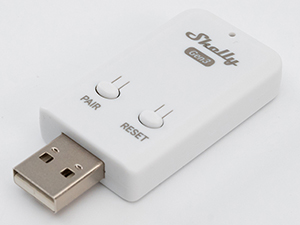
Device identification
-
Device name: Shelly BLU Gateway Gen3
-
Device model: S3GW-1DBT001
-
Device SSID: ShellyBluGwG3-XXXXXXXXXXXX
-
Device Bluetooth ID: 0x1817
Short description
Shelly BLU Gateway Gen3 is a smart Bluetooth-to-Wi-Fi gateway with a USB-A connector. It monitors and controls compatible Shelly Bluetooth devices, including the Shelly BLU TRV, and comes with an external button for easier pairing.
Main features
-
Controlling Blu TRV devices
-
Pairing easily with Bluetooth devices
Use cases
-
Monitor, Automate and control BLU TRV devices through Wi-Fi
-
Use scripting to automate/customize BLU TRV behavior
-
Pair up to 5 BLU TRVs
Main applications
-
Local and cloud control: Enables monitoring and control of Shelly BLU TRV locally or through the Shelly Cloud.
-
Multi-device pairing: Supports multiple Shelly BLU devices, including up to five Shelly BLU TRV devices.
-
Quick device pairing: Uses a built-in button for fast Bluetooth device connection.
-
LED status indication: Provides visual feedback for connection status, pairing, and OTA updates.
-
Compact USB-A design: Powered directly through a USB-A port for convenient installation.
-
Embedded Web Interface: Features an embedded web interface for monitoring, control, and adjustment of settings.
-
Cloud Control: Operate and monitor the device remotely from anywhere using the Shelly App or a third-party home automation system.
-
Wi-Fi: Connects to the local Wi-Fi network for local and remote control and monitoring via the Shelly app or compatible smart-home platforms.
-
Wi-Fi Range Extender: Extends the Wi-Fi network by receiving the existing signal and retransmitting it to widen coverage.
-
Bluetooth: Enables supported Bluetooth-based features and communication.
-
BLE Gateway: Acts as a bridge between Shelly BLU (Bluetooth) devices and the wider Shelly ecosystem, forwarding their signals to the cloud or the local network.
Connectivity
-
Wi-Fi
-
Bluetooth
User interface
Inputs
-
Reset button
-
Press and hold for 5 seconds: Enables the Device access point and Bluetooth connection.
-
Press and hold for 10 seconds: Resets the Device to factory settings.
-
-
Pairing button
-
Press briefly: Puts the Device in pairing mode.
-
Outputs
-
LED indication
-
Blue light: AP mode is enabled.
-
Red light: STA mode is active, but the Device is not connected to a Wi-Fi network.
-
Yellow light: STA mode is active, and the Device is connected to a Wi-Fi network but not to Shelly Cloud, or Shelly Cloud is disabled.
-
Green light: STA mode is active, and the Device is connected to both a Wi-Fi network and Shelly Cloud.
-
Flashing Red/Blue light: OTA update is in progress.
-
Flashing Purple light: The Device is in pairing mode for 30 seconds.
-
Rapidly flashing Green light: Pairing was successful.
-
Rapidly flashing Purple light: Pairing was not successful.
-
Specifications
|
Quantity |
Value |
|---|---|
|
Physical |
|
|
Size (HxWxD): |
60x27x11 mm / 2.36x1.06x0.43 in |
|
Weight: |
10 g / 0.35 oz |
|
Shell material: |
Plastic |
|
Shell color: |
White |
|
Environmental |
|
|
Ambient working temperature: |
-20 °C to 40 °C / -5 °F to 105 °F |
|
Storage temperature: |
-20 °C to 40 °C / -5 °F to 105 °F |
|
Humidity: |
30 % to 70 % RH |
|
Max. altitude: |
2000 m / 6562 ft |
|
Electrical |
|
|
Power supply: |
5 V⎓ (from USB Type-A port) |
|
Power consumption: |
< 1 W (up to 5 W peak) |
|
Sensors, meters |
|
|
Internal-temperature sensor: |
No |
|
Radio |
|
|
Wi-Fi |
|
|
Protocol: |
802.11 b/g/n |
|
RF band: |
2401 - 2483 МHz |
|
Max. RF power: |
< 20 dBm |
|
Range: |
Up to 30 m / 100 ft indoors and 50 m / 160 ft outdoors
|
|
Bluetooth |
|
|
Protocol: |
BLE 4.2 |
|
RF band: |
2402 - 2480 MHz |
|
Max. RF power: |
< 10 dBm |
|
Range: |
Up to 10 m / 33 ft indoors and 30 m / 100 ft outdoors
|
|
Microcontroller unit |
|
|
CPU: |
Shelly ESP32 C3 |
|
Flash: |
8 MB |
|
Firmware capabilities |
|
|
Schedules: |
20 |
|
Webhooks (URL actions): |
20 with 5 URLs per hook |
|
Scripting: |
Yes |
|
MQTT: |
Yes |
|
Encryption: |
Yes |
Shelly Smart Control
Shelly Web user interface
Components and APIs
Compliance and certification
-
Shelly Blu Gateway Gen3 multilingual EU declaration of conformity 2025-07-22.pdf
-
Shelly BLU Gateway Gen3 UK PSTI ACT Statement of compliance.pdf