
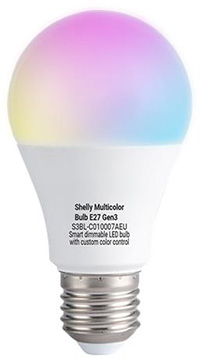
Device identification
-
Device name: Shelly Multicolor Bulb E27 Gen3
-
Device model: S3BL-C010007AEU
-
Device SSID: ShellyColorBlbG3-XXXXXXXXXXXX
-
BLE Model ID: 0x1815
Short description
Shelly Multicolor Bulb E27 Gen3 (the Device) is a smart Wi-Fi/Bluetooth-operated dimmable LED bulb with custom color control. It supports two modes - Color and White. In Color mode, full color support is provided, while in White mode, color temperature can be adjusted from 2700 K (warm) to 6500 K (cool). The Device can be connected like any other bulb and operated with a switch, but it can also be controlled through Bluetooth connection with a Shelly BLU device (remote control or button). The Device can also be connected to a local Wi-Fi network, where it can work standalone or be controlled remotely via the Shelly Smart Control app. It can also be seamlessly integrated with popular platforms like Home Assistant, Google Home, Amazon Alexa, and SmartThings for voice control and automation.
Shelly Multicolor Bulb E27 Gen3 offers two advanced features: “Wi-Fi range extender” and “BLE Gateway”. When “Wi-Fi range extender” is enabled, the device retransmits the Wi-Fi signal to extend its reach, allowing other Shelly devices to connect to it. With the “BLE Gateway” functionality, it facilitates communication between BLE- and Wi-Fi-enabled devices. The Device can be accessed, controlled, and monitored remotely from any location with internet connectivity, as long as it is connected to a Wi-Fi router and the Internet.
Shelly Multicolor Bulb E27 Gen3 has an embedded Web Interface that can be used to monitor and control the Device and adjust its settings.
Main features
-
Remote control: The Device can be controlled with Shelly BLU device (remote control or button)
-
Bluetooth: The Device complies the Bluetooth standard and can connect with other Bluetooth devices to exchange data in short range.
-
BLE Gateway: Facilitates communication between BLE and Wi-Fi-enabled devices.
-
Wi-Fi: The Device can connect to a wireless network.
-
Wi-Fi Range extender: Retransmits the Wi-Fi signal and extends its reach.
-
Scripting: Allows creating automation scenarios through scripts.
-
Basic Schedules: Supports weekly schedules and routines, including setting of brightness, transition duration, and flip value of the dimming signal.
-
Аdvanced Schedules: Supports detailed schedules and routines throughout the year with a broad range of time adjustments from seconds to months, including setting of brightness, transition duration, and flip value of the dimming signal.
-
Auto on/off timers: Enables auto on/off timer setting.
-
Local actions: Allows creating automation scenarios within the local Wi-Fi network, including setting of brightness, temperature, transition duration, and flip value of the light state.
-
Webhooks: Supports automation through lightweight, event-driven communication with other devices.
-
Compatibility: Highly compatible with 3rd Party home automation systems.
-
No need for hub: Ready for use locally or remotely via Shelly Smart Control or 3rd Party systems.
-
Activity log: Stores detailed history of events.
-
KVS (Key-value storage): KVS service provides a basic persistent storage of key-value pairs.
-
Power measurement: Information about consumption (W) is displayed.
-
Color and White modes: The users can choose between Color and White depending on their needs.
-
Night Mode: In different profiles specific brightness and color / color temperature can be set for the lights during nighttime. Depending on their needs, user can choose to keep brightness, color or color temperature
-
In Color profile: brightness and color to be applied during the night mode. Default is 50%, rgb(255,255,255). 1% is the minimum allowed value.
-
In White profile: brightness and color temperature to be applied during the night mode. Default is 50%, ct(2600). 1% is the minimum allowed value.
-
-
Transition duration: Controls the time between change from current brightness level to desired brightness level in request. Applied on color (in Color profile) and color temperature (in White profile) also.
-
Minimum brightness on toggle On: Brightness level (in percent) applied when there is a toggle On and current brightness is lower than 'Min brightness on toggle'. Default is 3%. Not applied when explicit (custom) transition is defined in Schedules and Actions.
-
Power on default mode (Action on power on): Default is “Turn on”.
-
Dynamic components: A special set of components that do not exist in the device initially and are created dynamically by the user.
Use cases
-
Simply replace your lights with Shelly Multicolor Bulb E27 Gen3 and continue using your existing lighting system.
-
Pair with Shelly BLU Remote Control ZB, Shelly BLU Wall Switch 4, Shelly BLU RC Button 4 US, or Shelly BLU Button Tough 1 for easy and simple control of your lights.
-
Create smart schedules that automatically adjust lights' brightness and color temperature throughout the day.
-
Sync your lights with sunrise and sunset times easily using smart schedules - use dimming/brightening functionalities to mimic the sunrise to gently wake you up with light, following your body's circadian rhythm.
-
Activate night mode for reduced brightness and smooth color during nighttime hours.
-
Integrate the Shelly Multicolor Bulb E27 Gen3 with third-party systems like Home Assistant, Google Home, Alexa, and SmartThings for expanded control options.
Main applications
-
Residential
-
MDU (Multi Dwelling Units - apartments, condominiums, hotels, etc.)…
-
Light commercial (small office buildings, small retail/restaurant/gas station, etc.)…
-
Industrial (factories, power plants, water processing, refineries, etc.)…
-
Government/municipal
-
University/college
-
Farming
Integrations
Amazon Alexa supported capabilities
Google Smart Home supported traits
Samsung SmartThings supported capabilities
AP and Bluetooth activation
This temporarily enables the bulb’s Wi-Fi Access Point and Bluetooth so you can connect to it.
-
Turn the light off if it is currently on.
-
Turn the light on and off 2 times, allowing 3 seconds between toggles.
-
Turn on the light.
In 3 seconds, the AP and the Bluetooth should be enabled.
AP and Bluetooth stay enabled for 15 min.
Factory reset
-
Turn the light off if it is currently on.
-
Turn the light on and off 4 times, allowing 3 seconds between toggles.
-
Turn on the light.
The bulb should light up with neutral white (4500 K) at 50% brightness to confirm it has been reset to factory defaults.
Connectivity
-
Wi-Fi
-
Bluetooth
Specifications
|
Quantity |
Value |
|---|---|
|
Physical |
|
|
Size (HxW): |
A60 (60 x 110 mm / 2.36 x 4.33 in) |
|
Weight: |
34 g / 1.20 oz |
|
Socket: |
E27 |
|
Features |
|
|
Dimming: |
Yes |
|
Brightness: |
Up to 806 lm |
|
Color temperature: |
2700 K - 6500 K |
|
Color: |
RGB |
|
Beam angle |
200° |
|
Filament |
LED SMT |
|
Glass/Coating |
PC frost cover |
|
Protection class |
IP20 |
|
Lifetime: |
15000 hours |
|
CRI |
>80 |
|
Environmental |
|
|
Ambient working temperature: |
-25 ºC to +40 ºC / -13 °F to 105 °F |
|
Humidity: |
30% to 70% RH |
|
Max. altitude: |
2000 m / 6562 ft |
|
Electrical |
|
|
Power supply: |
220-240 V~, 50/60 Hz |
|
Power consumption: |
8.5 W |
|
Device power consumption |
< 0.5 W, when only Bluetooth is enabled < 1 W, when WiFi and/or Access Point is enabled |
|
Sensors, meters |
|
|
Internal-temperature sensor: |
No |
|
Power measurement |
Yes |
|
Radio |
|
|
Wi-Fi |
|
|
Protocol: |
802.11 b/g/n |
|
RF band: |
2412 - 2472 МHz |
|
Max. RF power: |
< 20 dBm |
|
Range: |
Up to 30 m / 100 ft indoors and 50 m / 160 ft outdoors
|
|
Bluetooth |
|
|
Protocol: |
4.2 |
|
RF band: |
2402 - 2480 MHz |
|
Max. RF power: |
< 4 dBm |
|
Range: |
Up to 10 m / 33 ft indoors and 30 m / 100 ft outdoors
|
|
Microcontroller unit |
|
|
CPU: |
Shelly ESP C3 |
|
Clock frequency: |
40 MHz |
|
RAM: |
400 KB |
|
Flash: |
8 MB |
|
Firmware capabilities |
|
|
Schedules: |
20 |
|
Webhooks (URL actions): |
20 with 5 URLs per hook |
|
Scripting: |
Yes |
|
MQTT: |
Yes |
Components and APIs
Compliance
-
Shelly Multicolor Bulb E27 Gen3 multilingual EU declaration of conformity 284 2026-04-14.pdf
-
Shelly Multicolor Bulb E27 Gen3 UK PSTI ACT statement of compliance 284 2026-04-14.pdf
-
Shelly Multicolor Bulb E27 Gen3 UKCA declaration of conformity 284 2026-04-14.pdf
Printed user guide