
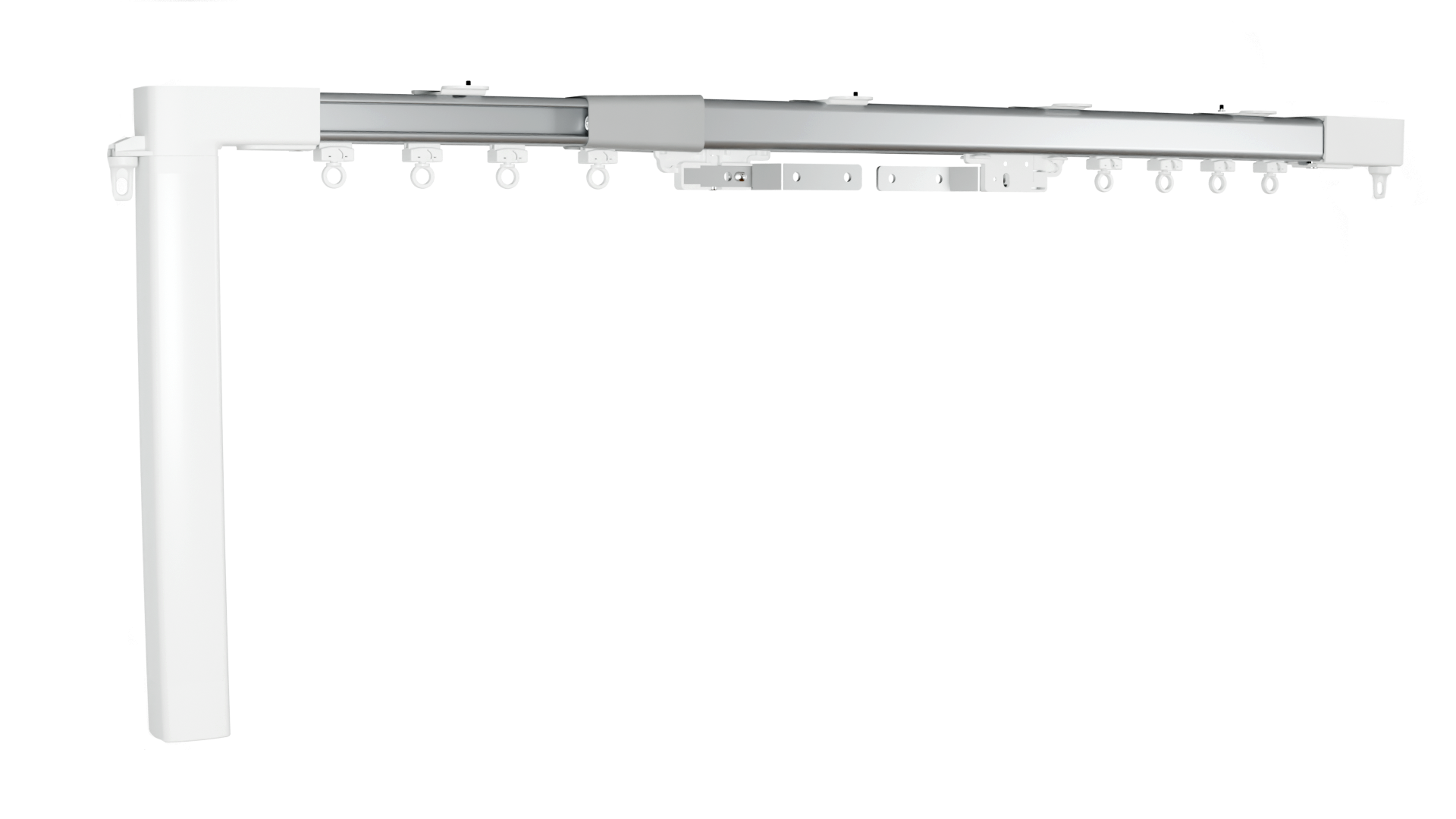
Components identification
1. Smart curtain motor
-
Device type: Smart curtain motor
-
Device model: MP46WIFI
2. Telescopic curtain track
-
Type: Telescopic curtain track
-
Model: P35
Short description
The smart curtain system brings effortless automation to your curtain rails, letting you open and close your curtains from anywhere using your smartphone - or simply by pressing a button on the wall.
Once installed, the motor connects to the Shelly Smart Control app, giving you full remote control over your curtains from your phone, whether you're at home or away. Prefer to keep things simple? You can also control it with a physical wall switch or the compact Shelly BLU Remote ZB wireless remote - no phone needed.
Main features
-
Ultra-quiet motor operation of <40 dB(A)
-
Precise positioning with custom preset selection
-
Pre-assembled ready to install curtain track with 2.3 - 4m range and center opening
-
Selectable motor speed 75-90-110 rpm
-
Reverse direction & Manual operation
-
Works with Shelly BLU remotes & External switches
-
Matter-certified
-
Works with Amazon Alexa & Google Home, SmartThings & HA
-
Supports schedules, scenes, local action & scripting
-
Open wire motor connection for adaptive power installation
Use cases
Home comfort and convenience - wake up to curtains that open automatically in the morning, or close them at sunset without leaving the couch. Especially useful for hard-to-reach windows or large, heavy curtains.
Privacy and security - schedule curtains to open and close while you're away, giving the impression the home is occupied. Useful for vacation homes or frequent travelers.
Energy efficiency - automate curtains to block direct sunlight during the hottest part of the day, reducing cooling costs, or open them in winter to let in warmth.
Home theater and media rooms - automatically close blackout curtains when a movie starts, triggered by a remote or a scene in a smart home system.
Accessibility - a significant benefit for elderly users or people with limited mobility who struggle to operate curtains manually.
Integrations
-
Amazon Alexa
-
Google Home
-
Home Assistant
-
Apple Home
External switch input:
-
RJ9 port, dry contact
Connectivity
-
Wi-Fi
-
Bluetooth
-
Matter over Wi-Fi
-
MQTT
User interface
-
Button:
-
Re-activate the Access point and Bluetooth connection:
-
Press the programming button 4 times quickly.
-
Press and hold the button for 3 seconds.
-
If the re-activation is successful, the LED indicator of the curtain motor will flash 10 times.
-
-
-
External switch:
-
Rocker switch: Press and hold one end of the switch to open the curtain, or the other end to close it. Releasing the switch will stop the movement.
-
Dual button mode: Press one button to open the curtain. Press either button to stop it.
-
Dual button reverse mode: Press one button to open the curtain and the other to close it. If the same button is pressed again during movement, the curtain stops. Pressing the opposite button reverses the direction of movement.
-
Triple-button mode: Use one button to open, one to stop, and one to close the curtain.
-
Specifications
Motor
|
Parameter |
Value |
|---|---|
|
Model |
MP46WIFI |
|
Rated voltage |
100 - 240 VAC |
|
Rated frequency |
50/60 Hz |
|
Rated torque |
1.0 Nm |
|
Rated speed |
110 rpm (75/90 adjustable speed) |
|
IP grade |
IP41 |
|
Insulation grade |
E |
|
Operating temperature |
0 to +50°C |
|
Storage temperature |
-20 to +70°C |
|
Control connector |
RJ9 |
|
Control method |
Dry contact |
|
Voltage in control line |
5 VDC |
|
Net weight |
597 g |
|
Size (H x L x W) |
39.4 x 320 x 39.4 mm |
|
Wi-Fi |
|
|
Protocol |
802.11 b/g/n |
|
RF band |
2412 - 2484 МHz |
|
Max. RF power |
< 20 dBm |
|
Range |
Up to 30 m / 100 ft indoors and 50 m / 160 ft outdoors (Depends on local conditions) |
|
Bluetooth |
|
|
Protocol |
5 |
|
RF band |
2402 - 2480 MHz |
|
Range |
Up to 10 m / 33 ft indoors and 30 m / 100 ft outdoors (Depends on local conditions) |
Curtain track
|
Parameter |
Value |
|---|---|
|
Length |
2.3 to 4.0 m |
|
Maximum curtain weight |
30 kg |
|
Operating environment |
Indoor use only |
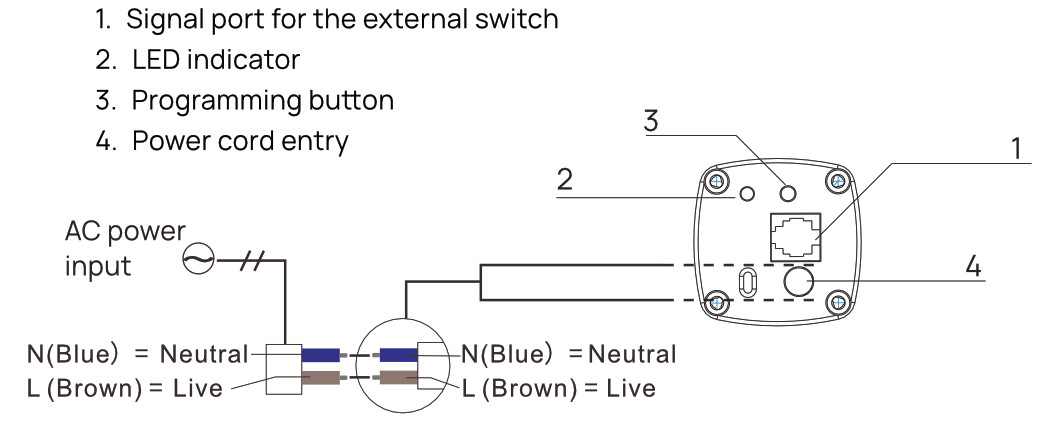
Motor wiring diagram
External switch wiring diagrams
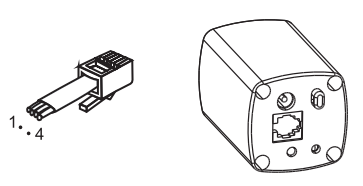
Rocker switch:
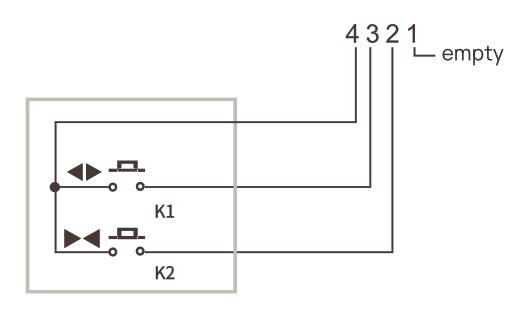
Dual button / Dual button reverse:
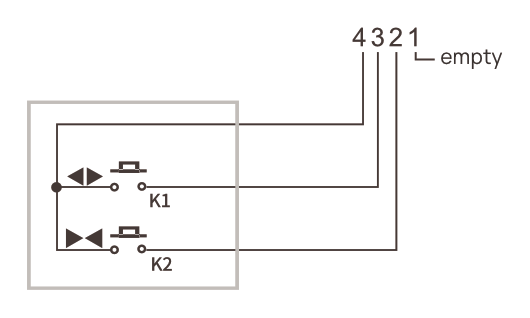
:Shelly_information: Note: Dual Button and Dual Button Reverse share identical wiring. The functional behavior is defined via the software configuration.
Triple button:
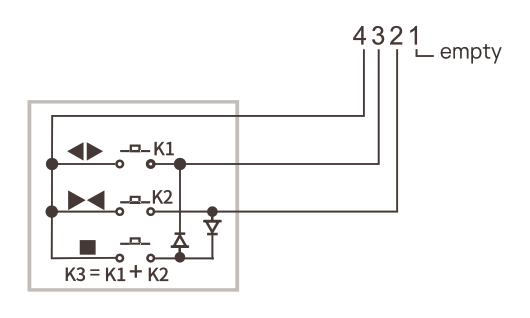
Note: In the local web interface, you may activate the pairing mode any time by clicking the Add remote button in Home => Config => Remote Control Configuration tab.
Shelly Smart Control app
Adding the device to Shelly Smart Control
Local web interface
Access point and Bluetooth re-activation
-
Press the programming button 4 times quickly.
-
Press and hold the button for 3 seconds.
-
If the re-activation is successful, the LED indicator of the curtain motor will flash 10 times.
Troubleshooting
|
Problem |
Possible cause |
Solution |
|---|---|---|
|
The motor does not respond |
Power supply issue |
Check that the AC power connection is secure and power is available. |
|
The curtain does not close completely |
The curtain moves in the opposite direction |
Use the remote control to send "Reverse" command to correct the direction. |
|
The curtain does not close completely |
Limits data error |
Turn off the system for 60 seconds. |
|
The external control button does not work |
Poor connection of the signal cable |
Ensure the signal cable is firmly connected and is not damaged. |
|
The remote control does not work |
The remote is not paired |
Re-pair the remote with the curtain motor. |
|
The remote control does not work |
The remote's battery is low |
Replace the battery with a new one. |
|
The remote control does not work |
The distance is too long |
Move closer to the receiver. |
|
The curtain stops before reaching the limit |
Limit is not properly set |
Recalibrate the motor. |
|
The curtain stops before reaching the limit |
The curtain is heavy |
Refer to these instructions or your curtain track's user manual to ensure the curtain weight is within the specified limits. |
|
The curtain stops before reaching the limit |
Curtain is blocked by an obstacle |
Check the track and the accessories for obstructions. |
|
Other |
— |
Turn off the system and wait for 1 minute before turning it back on. If the problem persists, contact your dealer for assistance. |
Compliance
RAEX MP46 multilingual EU Declaration of Conformity.pdf
RAEX P35 multilingual EU Declaration of Conformity.pdf
Printed user guide
MP46-WIFI printed user guide.pdf
MP46WIFI Ръководство за употреба.pdf
Installation guide
Attaching the motor to the curtain track
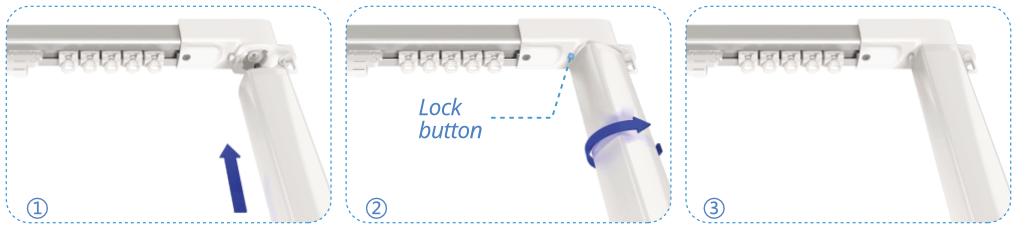
-
Align the motor connector with the drive unit, then push the motor into place.
-
When the lock button pops up, rotate the motor 90° to secure it.
-
After you hear a click indicating the lock has engaged, release the motor. The motor is now installed.
Detaching the motor from the curtain track
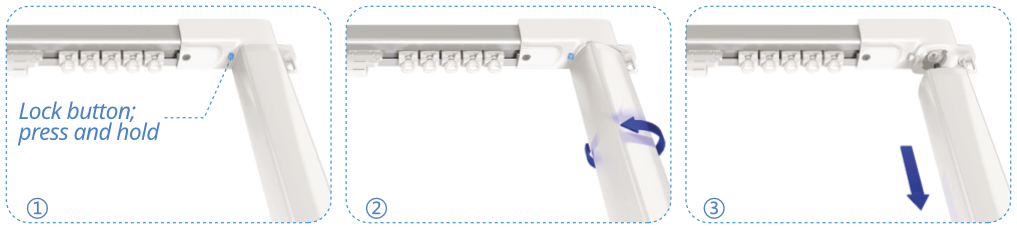
-
Press and hold the lock button.
-
While holding the lock button, rotate the motor at 90°.
-
Gently remove the motor.
Motor calibration
To adjust the smart curtain motor to your curtain railing length fully open and close the curtains once.
Pairing with Shelly BLU Remote ZB device
-
When powered on, the curtain motor enters pairing mode for 1 minute, indicated by curtain moving once.
-
Put the Shelly BLU remote in pairing mode as described in its user manual.
-
After the curtain motor detects the remote, the curtain will move twice.
-
Press one of the remote's buttons to confirm the pairing.
-
Successful pairing is indicated by the curtain moving three times.
-
Your Shelly BLU Remote is now paired with the curtain motor and ready for use.
Disposal and recycling
Do not dispose of the product in household waste. Recycle the product to prevent environmental and health damage and to promote resource conservation. Dispose of the product at an appropriate waste collection point at your own responsibility.
Resellers, from which the Device was purchased, are required to accept Waste Electrical and Electronic Equipment (WEEE) free of charge for proper disposal.
Some electronic products may store personal data. The user is responsible for deleting this data before disposing of the Device. For deletion, reset the device to its factory settings.
Manufacturer
Guangdong RAEX Intelligent Technology Co., Ltd
No. 6 Lianxin South Road, Yundonghai Street, Sanshui District, Foshan, Guangdong,
China 528133
Importer
RAEX BULGARIA EOOD
Address: Apartment 8, Floor 3, Entrance A Block 136, Hadzhi Dimitar Residential Complex,
Poduyane District,
1510 Sofia, Bulgaria