
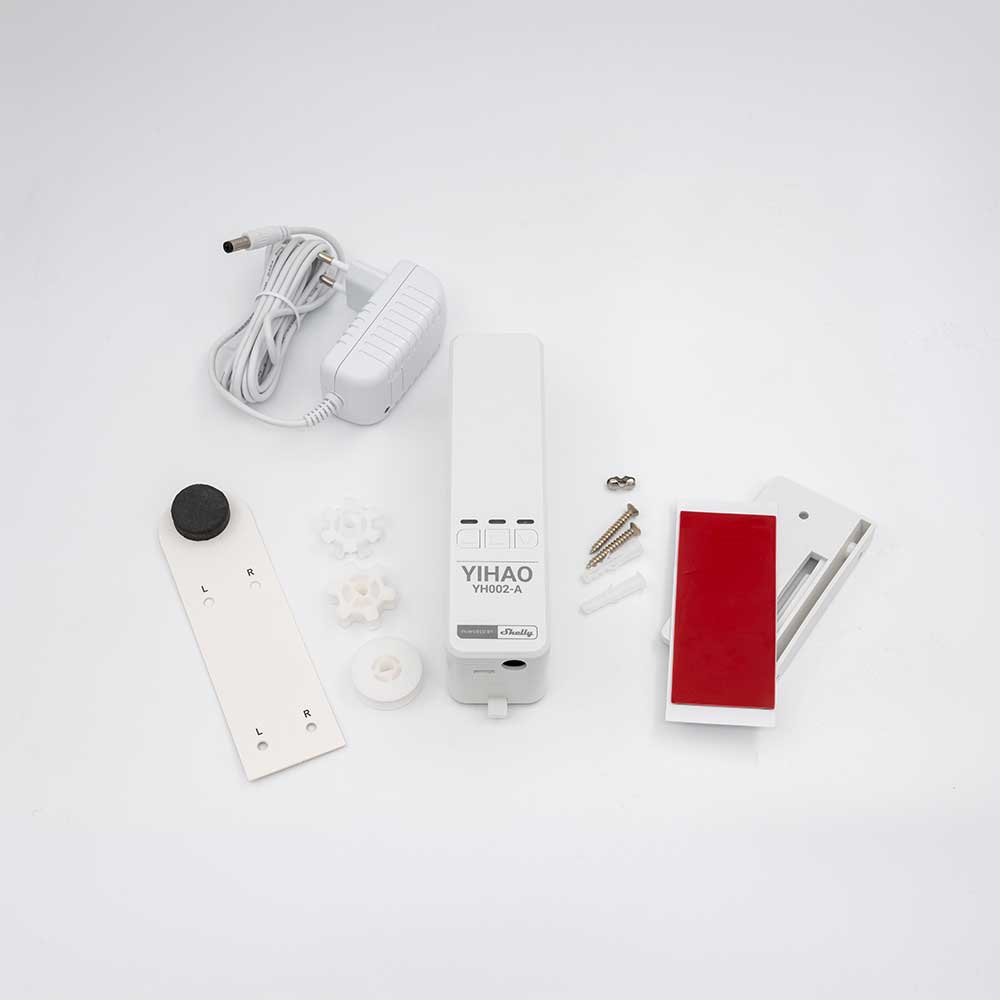
Device identification
Device type: Blinds chain controller
Device model: YH002-A
Main features
-
Retrofit design - motorize existing chain-operated blinds in minutes with no replacement needed
-
Wide compatibility - works with roller blinds, Roman blinds, zebra blinds, vertical blinds, and Venetian blinds
-
Adjustable limit positions - Set upper and lower limits, saved on power loss
-
Maximum blinds size: 2.5 × 3.5 m (8 × 12 ft) and up to 10 kg (22 lbs)
-
Works with Shelly BLU Remote series for multiple control options beyond the app
-
No hub required - Wi-Fi and Bluetooth connectivity built in
-
Wi-Fi range extender & BLE gateway - extends your Shelly network
-
Schedules, Scenes, Local Actions & scripting - full Shelly automation capabilities
-
AC/DC adapter included (100–240 VAC / 12.6 VDC)
Connectivity
-
Wi-Fi
-
Bluetooth
User interface
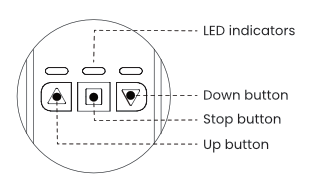
Motor calibration
Before you start: Make sure the device's control direction matches the blinds' movement.
-
Fully open the blinds.
-
Press and hold the Stop button for 10 seconds until the red LED indicator starts flashing.
-
Press the Down button.
-
The blinds will start closing.
-
When the final position is reached, press the Stop button again.
-
A successful calibration is indicated by the blue and green LED indicators flashing simultaneously.
Note: The calibration can be done following the same steps and starting from the fully closed blinds instead. In that case the Up button should be pressed in step 3.
Re-activate AP and Bluetooth
-
Press and hold the Up and Down buttons simultaneously until you see the following LED sequence twice in a row: first red, then green and blue together, and then red again.
-
Press the Stop button.
Note: After the AP and Bluetooth are re-activated, the device should be re-calibrated.
Specifications
|
Parameter |
Value |
|---|---|
|
Device type |
Blinds controller |
|
Model |
YH002-A |
|
Motor voltage |
12 VDC |
|
Torque |
1.35 Nm |
|
Speed |
50 rpm |
|
Motor current |
1.2 A |
|
Control methods |
Smartphone / Shelly BLU remote control |
|
Adapter input |
100-240 VAC, 50/60 Hz |
|
Adapter output |
12.6 V DC, 1.2 A, 15.12 W |
|
Blinds maximum size |
2.5 x 3.5 m (8 x 12 ft) |
|
Blinds maximum weight |
10 kg (22 lbs) |
|
Operating temperature |
-5°C to +40°C |
|
Operating humidity |
30% to 80%, Non-condensing |
|
Operating environment |
Indoor use only |
|
Wi-Fi |
|
|
Protocol |
802.11 b/g/n |
|
RF band |
2412 - 2484 MHz |
|
Max. RF power |
< 20 dBm |
|
Range |
Up to 30 m / 100 ft indoors and 50 m / 160 ft outdoors (Depends on local conditions) |
|
Bluetooth |
|
|
Protocol |
5 |
|
RF band |
2402 - 2480 MHz |
|
Range |
Up to 10 m / 33 ft indoors and 30 m / 100 ft outdoors (Depends on local conditions) |
|
Size ( W x H x L ) |
42 x 47 x 162 mm |
|
Weight |
237 g |
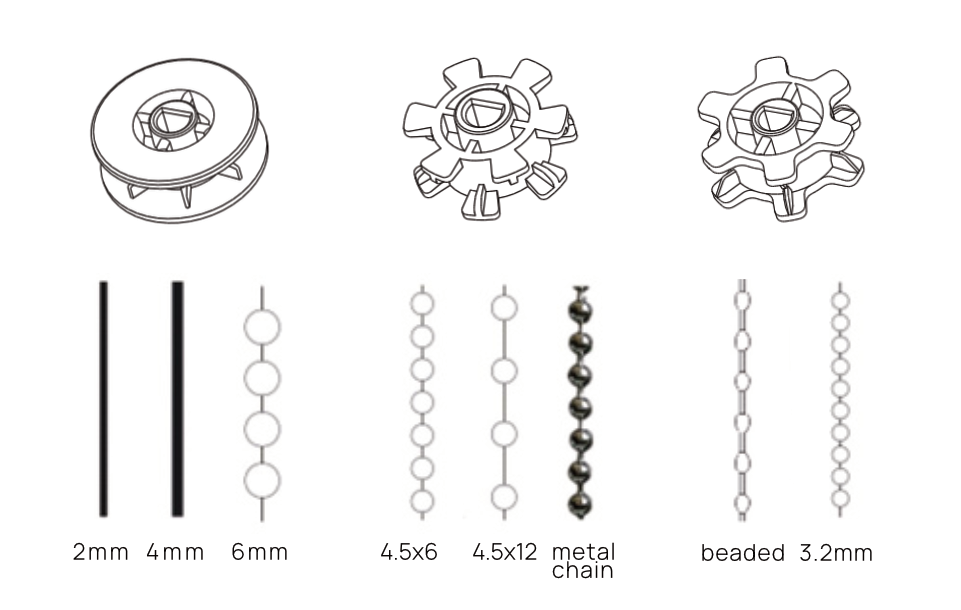
Compatible wheels and chains
Shelly Smart Control
Adding the device to Shelly Smart Control
Shelly Web user interface
Compliance
YH002-A multilingual EU declaration of conformity.pdf
Printed user guide
Installation guides
1. Using the included 3M adhesive pad
Mount using the included 3M adhesive pad. For best results, attach the mounting bracket firmly to the surface and allow the adhesive to set for at least 12 hours before operating the motor.
2. Using screws
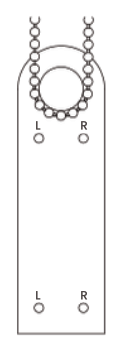
Close the blinds and hang the included marking template on the bottom of the chain.
Make sure the chain hangs straight and tight. Depending on the chain position, mark the "L" or "R" hole.
Ensure the template is aligned outside the outermost edge of the blinds.
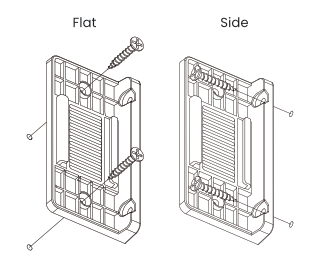
Replace the marking template with the mounting bracket. Align the holes on the bracket with the positions you marked earlier, and fix the bracket using the supplied screws.
You can install the motor in two orientations: flat (parallel to the blinds) or side(perpendicular to the blinds),depending on your setup.
Disposal and recycling
Do not dispose of the product in household waste. Recycle the product to prevent environmental and health damage and to promote resource conservation. Dispose of the product at an appropriate waste collection point at your own responsibility.
Resellers, from which the Device was purchased, are required to accept Waste Electrical and Electronic Equipment (WEEE) free of charge for proper disposal.
Some electronic products may store personal data. The user is responsible for deleting this data before disposing of the Device. For deletion, reset the device to its factory settings.
Manufacturer
NINGBO YIHAO BLINDSCO., LTD
Address: No.237-3 Jiushufang Road, Luotuo Industry Zone, Ningbo China 315202
Website: http://www.yhblinds.com
Importer
Shelly Europe Ltd.
Address: 51 Cherni Vrah Blvd., bldg. 3, fl. 2-3, Sofia 1407, Bulgaria,
Email: support@shelly.cloud
Website: https://www.shelly.com