
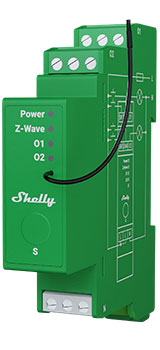
Device identification
Device: Shelly Wave Pro Dimmer 2PM (AU)
ANZ Part number/Ordering Code: QPDM-0A2P01AU
Z-Wave Product type ID: 0x0001
Z-Wave Product ID: 0x0082
Z-Wave Manufacturer: Shelly Europe
Z-Wave Manufacturer ID: 0x0460
Terminology
Short description
The Device is a DIN-rail mountable , two-channel smart dimmer. It can work as a standalone or it can also be operated through Z-Wave® home automation. The Device can be accessed, controlled, and monitored remotely from any place where the User has internet connectivity, provided that the module is connected to a Z-Wave Gateway with internet access. It is compatible with switches and push-buttons (default).
Basic Functions
Main applications
-
Residential
-
MDU (Multi Dwelling Units - apartments, condominiums, hotels, etc.)…
-
Light commercial (small office buildings, small retail/restaurant/gas station, etc.)…
-
Government/municipal
-
University/college
Integrations
Shelly Wave devices are developed on the world's leading technology for smart homes – Z-Wave.
This means Shelly Wave works with all certified gateways supporting Z-Wave communication protocol.
To make sure the functions of Shelly Wave products are supported on your gateway, we are regularly executing compatibility tests of our devices with different Z-Wave gateways.
Simplified internal schematics
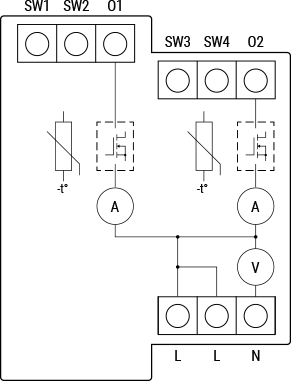
Device electrical interfaces
Inputs
4 switch/push-button inputs on screw terminal
3 power supply inputs on screw terminals: N, 2 L
Outputs
-
2 outputs
Connectivity
Z-Wave - Unsecure, S0 Security, S2 Unauthenticated Security, S2 Authenticated Security
Safety features
Protection
Overheat Protection
Overcurrent Protection
Overvoltage Protection
Supported load types
Dimmable LED lamps: up to 200W per channel
Incandescent bulbs: up to 200W per channel
Halogen lamps: up to 200W per channel
Iron-core transformer with low-voltage incandescent lamps: up to 200VA per channel
Dimmable electronic transformers: 200W per channel
User interface
S button and operating modesSettings mode:Is required to start the desired procedure, for example: adding (inclusion (*not available for Long Range devices)), removing (exclusion), factory reset, etc. It has a limited operating time. After completing the procedure in Setting mode, the Device automatically switches to Normal mode. Entering Setting mode:Press and hold the S button on the Device until the LED turns solid blue.An additional quick press on the S button changes the menu in an infinite loop.The Menu LED status has a timeout of 10s before entering again into Normal mode.
S button’s functionsManually adding the Device to a Z-Wave network (*not available for Long Range inclusion)Manually removing the Device from a Z-Wave networkFactory Reset the Device
-
Calibration
LED Signalisation
Click to hide/unhide
General rulesSwitching between Normal and Settings mode is done by press and hold the S button.Solid LED means that you are in the Settings mode (this is not valid for Plugs). Once in settings mode, switch to normal mode goes automatically after 10s.If the LED is not in Alarm mode, it will turn off after a timeout of 30min. Pressing the S button or power cycling the Device will wake the LED for 30min.During module boot up LED will blink in mode 5 (0,2s On blue/0,2s On red) for 4-5 s.Normal mode LED status: Normal mode is defined by stable device function that can remain for an infinite time.
LED type: RGB dimmable
Normal mode
Removed/Excluded not calibratedThe LED will be blinking blue and yellow in Mode 1 for 30min after every power cycle and 10min after S button pressed. 
Added/Included not calibratedThe LED will be blinking green and yellow in Mode 1 for 10min after every power cycle and 10min after S button pressed. 
Removed/Excluded & calibrated
The LED will be blinking blue and green in Mode 1 for 30min after every power cycle and 10min after S button pressed.

Added/Included & calibratedThe LED will be blinking green in Mode 1 for 30min after every power cycle and 10min after S button pressed. 
Settings in progress
Factory reset and rebootDuring factory reset, the LED will turn solid green for approx. 1sec, then the blue and red LED will be blinking 0,1s On / 0,1s Off for about 2sec.
Adding / RemovingDuring adding or removing, the LED will be blinking blue in Mode 2. 
OTA firmware updatingDuring the OTA update, the LED will be blinking blue and red in Mode 2. 
Checking AC or DC voltage power supplyDuring checking the power supply, the LED will be blinking blue and red in Mode 5. 
Load calibrationDuring the calibration, the LED will be blinking yellow in Mode 2. 
Settings mode with S button
Adding / Removing menu selected (*adding not available for Long Range inclusion)When the menu is selected the LED will be on blue, for maximum of 10 seconds.
Adding / Removing menu - while pressing S- button - Add/Remove process selected (*adding not available for Long Range inclusion)When the menu is executing the LED will be blinking blue in Mode 3. 
Factory reset menu selectedWhen the menu is selected the LED will be on red, for maximum of 10 seconds.
Factory reset - while pressing S - button - Factory reset process selectedWhen the menu is executing the LED will be blinking red in Mode 3. 
Calibration menu selectedWhen the menu is selected the LED will be on yellow, for maximum of 10 seconds.
Calibration - while pressing S- button - Calibration process selectedWhen the menu is executing the LED will be blinking yellow in Mode 3. 
Alarm Mode
Overheat detected The LED will be blinking red in Mode 4 
Overcurrent detected O1The LED will be blinking red in Mode 4 
Overcurrent detected O2The LED will be blinking red in Mode 4 
Overvoltage detectedThe LED will be blinking red in Mode 4 
LED blinking modes
Specifications
|
Power supply |
110 - 240 V ̴ 50/60 Hz |
|
Power consumption |
< 0.3 W |
|
External protection |
10 A, tripping characteristic B or C,
|
|
Dimming type |
Trailing edge |
|
Power measurement [W] |
Yes |
|
Max. output power |
200 W per channel |
|
Overheating protection |
Yes |
|
Overcurrent protection |
Yes |
|
Overvoltage protection |
Yes |
|
Distance |
Up to 40 m indoors (131 ft.) (depends on local condition) |
|
Z-Wave® repeater: |
Yes |
|
CPU |
Z-Wave® S800 |
|
Z-Wave® frequency bands |
919.8 MHz |
|
Maximum radio frequency power transmitted in frequency band(s) |
< 25 mW |
|
Size (H x W x D) |
94x19x69 ± 0.5 mm / 3.70x0.75x2.71 ± 0.02 in |
|
Weight |
75 g / 2.7 oz |
|
Mounting |
DIN rail |
|
Screw terminals max. torque |
0.4 Nm / 3.54 lbin |
|
Conductor cross section |
0.5 to 2.5 mm² / 20 to 14 AWG (green connector)
|
|
Conductor stripped length |
6 to 7 mm / 0.24 to 0.28 in (green connector)
|
|
Shell material |
Plastic |
|
Color |
Lime |
|
Ambient temperature |
-20°C to 40°C / -5°F to 105°F |
|
Humidity |
30% to 70% RH |
|
Max. altitude |
2000 m / 6562 ft. |
Basic wiring diagram
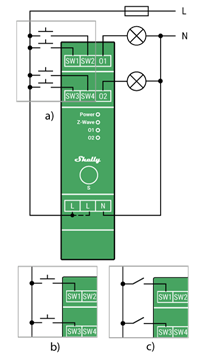
Fig.1
Legend
Device terminals:
-
N: Neutral terminal
-
L: Live terminal(s) (110-240 V AC)
-
SW (SW1): Switch/push-button input terminal (controlling O (O1))
-
SW2: Switch/push-button input terminal
-
SW3: Switch/push-button input terminal (controlling O2)
-
SW4: Switch/push-button input terminal
-
O (O1): Load circuit (1) output terminal
-
O2: Load circuit 2 output terminal
Wires: -
N: Neutral wire
-
L: Live wire (110-240 V AC)
Button: -
S: S button
About Z-Wave®
Adding and removing the Device to a Z-Wave® network
Z-Wave® Security and Device Specific Key (DSK)
Click to hide/unhide
Z-Wave® Security 2 and Device Specific Key (DSK)
The Device supports the latest Security 2 (S2) feature. S2 is handled by the strong AES 128 Encryption protocol, which means that the S2 makes Z-Wave® the most secure IoT (Internet of Things) security platform out there. To fully utilize the product and its Security 2 feature, a Security 2-enabled Z-Wave® gateway must be used.
Authenticated Control
-
Out-Of-Band DSK for adding (inclusion)
-
May be used by most implementations
The Device also supports Security 2 Authenticated, Unauthenticated, and Unsecure adding (inclusion).
Note! When adding the Device to a Z-Wave® network with a gateway supporting Security 2 (S2), the PIN Code of the Z-Wave® Device Specific Key (DSK) is required. You can find it on the label on the side of the Device and a copy is inserted in the packaging, which must not be lost. Do not remove the Z-Wave® DSK label from the Device. As a backup measure, use the label in the packaging.
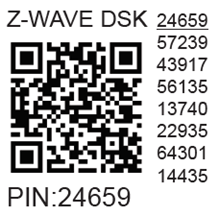
The first five digits of the key are highlighted or underlined to help the user identify the PIN Code part of the DSK text. The DSK is additionally represented with a QR Code as shown on the image.
Z-Wave® DSK label and QR code (example)
A joining node requesting to join the S2 Access Control Class or the S2 Authenticated Class will obfuscate its Public Key by setting the bytes 1..2 to zeros (0x00) before transferring its key via RF.
The DSK may be used for out-of-band (OOB) authentication.
-
The including gateway may use a QR code scanning device to read the entire DSK of the joining device and match it with the obfuscated public key received via RF from the joining device.
ⓘ NOTE: This Device must be used in conjunction with a Security Enabled Z-Wave® gateway to fully utilize all implemented functions.
ⓘ NOTE: This Device is a security enabled Z-Wave Plus® product that can use encrypted Z-Wave Plus® messages to communicate to other security enabled Z-Wave Plus® products.
ⓘ NOTE: DSK access via UI gateways, which implement the S2 and SmartStart security feature, display an input dialog box, with a full or partial DSK key. Most of them display a partial DSK (they do not show the PIN code) when the Device is added with the S2-Authenticated security scheme. When added with the S2-Unauthenticated, some gateways show the complete DSK while others perform the complete adding (inclusion) process without prompting the user with the dialogue.
Z-Wave® Parameters
Z-Wave® Command Classes
Z-Wave® Notifications Command Class
Z-Wave® Associations
Z-Wave® Important disclaimer
Z-Wave® wireless communication may not always be 100% reliable. This Device should not be used in situations in which life and/or valuables are solely dependent on its functioning. If the Device is not recognized by your gateway or appears incorrectly, you may need to change the Device type manually and ensure that your gateway supports Z-Wave Plus™ multi-level devices.
Troubleshooting
For troubleshooting please visit our support portal: Support
Compatibility
|
Wave PRO Dimmer 2PM |
functions - reports |
||||||||||||
|
Gateway |
Dimming 1 |
Dimming 3 |
SW Dimming 1 |
SW Dimming 3 |
D Control 1 |
D Control 2 |
D Control 3 |
D Control 4 |
D Binary 1 |
D Binary2 |
D Binary 3 |
D Binary 4 |
Notes |
|
Home Assistant |
|
|
|
|
|
|
|
|
|
|
|
|
|
|
Fibaro - HC 3 / Wave engine 3 |
|
|
|
|
|
|
|
|
|
|
|
|
|
|
Homey |
|
|
|
|
❌ |
❌ |
❌ |
❌ |
|
|
|
|
*H |
|
Homee Gen 7 |
|
|
|
|
|
|
❌ |
❌ |
|
|
|
|
*1 |
|
Homee Gen 5 |
P *2 |
P *2 |
P *2 |
P *2 |
❌ |
❌ |
❌ |
❌ |
TBD |
TBD |
TBD |
TBD |
*2 |
|
Smart Things |
|
|
|
|
❌ |
❌ |
❌ |
❌ |
❌ |
❌ |
❌ |
❌ |
*3 |
|
Vera Ezlo |
|
|
|
|
❌ |
❌ |
❌ |
❌ |
❌ |
❌ |
❌ |
❌ |
*3 |
|
Cozify |
TBD |
TBD |
TBD |
TBD |
TBD |
TBD |
TBD |
TBD |
TBD |
TBD |
TBD |
TBD |
|
|
Notes |
*H Troubles with reports can be solved with this solution. The central scene is not supported.
|
||||||||||||
|
Function |
Meaning / tested |
|---|---|
|
On/Off |
if device respond to the app UI On/Off command |
|
SW On/Off |
if device reports On/Off changes by SW input |
|
Dimming |
if device respond to app UI dimming command |
|
SW Dimming |
if device report dimming state change by SW input |
|
Watts |
if Watts are reported (unsolicited) |
|
kWh |
if kWh are reported (unsolicited) |
|
Up/Down |
if device respond to the app UI Up/Down command |
|
SW Up/Down |
if device reports Up/Down changes by SW input |
|
Slats |
if the slats respond to the app UI command |
|
SW Slats |
if the slats report the changes done by SW |
|
D control |
detached mode if device reports scene commands single press, double press,… |
|
D Binary |
detached mode if the device reports binary On/Off by SW input |
|
Sensor # |
Is the sensor report visualized in the gateway, type of sensor in the notes. |
|
Legend |
||||
|
Symbol |
State |
|||
|
|
Working / Possible |
|||
|
❌ |
Not Working / Not Possible |
|||
|
P |
Partially |
|||
|
N/T |
Not Tested |
|||
|
TBD |
To be done |
|||
Gateway guides
You may find useful guides on gateways in the Z-Wave Shelly Knowledge base.
Printed User Guide
Shelly_Wave_Pro_Dimmer_2PM_ANZ_V1_E_B2439.pdf