
Device image
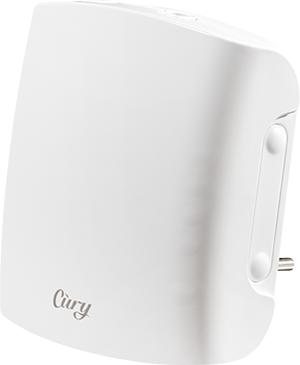
Device identification
-
Device name: Cury
-
Device model: S4PB-00CU000002
-
Device SSID: Cury-XXXXXXXXXXXX
-
BLE ID: 0x1111
Short description
Cury is a compact, modern scent diffuser designed to help you shape the atmosphere in any space with automated, heating-based diffusion and fine-grained intensity control. It can be used to create consistent fragrance routines throughout the day without constant manual adjustments. With dual wireless connectivity, Cury can be controlled remotely and fits smoothly into smart home setups for coordinated automations. It can run independently when you simply want reliable scent scheduling, or become part of broader scenes and routines for a more connected experience.
Main features
-
Compact, modern design – Blends seamlessly into any home or commercial space with a minimalist appearance.
-
Dual wireless connectivity - Built-in Wi-Fi and Bluetooth for flexible setup, integration, and reliable connection.
-
Dynamic diffusion technology – Adjusts fragrance intensity to deliver consistent, optimal scent distribution.
-
Smart vial recognition – Each vial includes a unique smart label that the device reads instantly to identify aroma type.
-
Heating-based diffusion – Gently warms a cotton-fiber wick inside the vial to release fragrance or mosquito-repellent liquid safely and efficiently.
-
Customizable lighting – Built-in ambient lighting offers multiple colors and intensity levels to match your mood or environment.
-
Automated scent scheduling – Program daily or weekly diffusion routines with pre-set or your own custom schedules to maintain the perfect atmosphere 24/7.
-
Instant alerts - Receive notifications with thumbnail previews directly in the Cury and/or Shelly App.
-
Remote control – Start, stop, or adjust scent diffusion from anywhere using the Cury and/or Shelly App.
-
Personalized intensity control – Choose any diffusion intensity from 0% to 100%.
-
Predefined operating profiles - Ready-made Home and Office profiles, each with built-in schedules for specific rooms (Bedroom, Living Room, Lavatory Room, Reception, Hall, Workplace).
-
Smart home integration - Fully supports the Shelly ecosystem with scripts, scenes, and local actions.
-
Wide compatibility - Works with Alexa, Smart Home, Smart Things & Home Assistant.
-
Independent operation - Supports local automation and third-party systems without requiring a constant cloud connection.
-
Safe and energy-efficient – Designed with temperature safeguards and optimized heating cycles to minimize energy consumption and ensure safe use.
Use cases
-
Atmosphere enhancement
Ideal for creating a personalized scent environment, allowing users to schedule different fragrances for various times of day while complementing the ambiance with adjustable lighting. -
Smart mosquito repellent system
Functions as an automated, app-controlled mosquito deterrent by dispersing repellent liquid at optimal times, adjusting intensity through smart home routines, and notifying users when the vial needs replacement. -
Scent branding in commercial spaces
Perfect for businesses that want to establish a signature aroma, offering reliable diffusion schedules, vial usage tracking, and seamless integration with Shelly automation systems to maintain a consistent customer experience.
Main applications
-
Residential
-
MDU (Multi Dwelling Units - apartments, condominiums, hotels, etc.)…
-
Light commercial (small office buildings, small retail/restaurant/gas station, etc.)…
-
Government/municipal
-
University/college
Integrations
Amazon Alexa supported capabilities
-
Voice control for turning each vial on/off.
-
Voice control for fragrance intensity level.
-
Voice control for turning ambient light on/off.
-
Voice control for dim up/down ambient light.
-
Voice control for color of ambient light.
Google Smart Home supported traits
-
Voice control for turning each vial on/off.
-
Voice control for turning ambient light on/off.
-
Voice control for dim up/down ambient light.
-
Voice control for color of ambient light.
Samsung SmartThings supported capabilities
Home Assistant supported capabilities
-
Full and extended capabilities
Connectivity
-
Wi-Fi
-
Bluetooth
Safety function
-
Overheating protection
-
Auto-shutdown in case of malfunction
-
Orientation sensor (prevents heating if the device is placed rounded or tilted)
User interface
Inputs
-
Internal button
-
Press and hold for 5 seconds to enable Device access point and Bluetooth connection.
-
Press and hold for 10 seconds to factory reset the Device.
-
-
Side buttons
-
Press any of the side buttons to activate First-level adjustment mode (Scent intensity mode).
-
Hold any of the side buttons longer than 1 second to sequentially adjust the scent intensity.
-
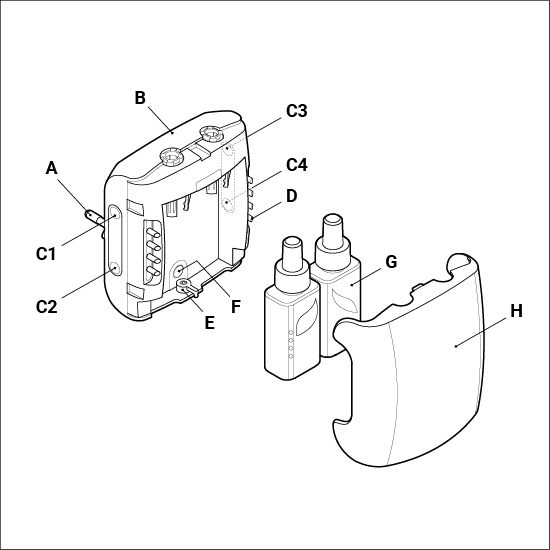
Press the upper buttons (C1 or C3) to increase scent intensity for the corresponding vial.
-
Press the lower buttons (C2 or C4) to decrease scent intensity for the corresponding vial.
-
Simultaneously press both lower buttons (C2 and C4) to turn the Ambient light off/on.
-
-
Simultaneously press both upper buttons (C1 and C3) to enter Second-level adjustment mode.
-
Press the right side buttons (C3 or C4) to change the Ambient light color.
-
Press the left side buttons (C1 or C2) to change the Ambient light color brightness.
-
Simultaneously press both lower buttons (C2 and C4) to turn the Ambient light off/on.
-
-
Outputs
-
Status LED lights indications
-
75-100%: Top LED dims from 100% to 0% as the liquid level decreases from 100% to 75%.
-
50-75%: Second LED dims from 100% to 0% as the liquid level decreases from 75% to 50%.
-
25-50%: Third LED dims from 100% to 0% as the liquid level decreases from 50% to 25%.
-
0-25%: Bottom LED dims from 100% to 0% as the liquid level decreases below 25%. When the vial is less than 10%, the bottom LED starts blinking in corresponding color. At 0% starts blinking red until vial removal.
-
-
Ambient light indications
-
AP enabled & Wi-Fi disabled:
-
Red, 1 sec ON / 1 sec OFF, 5% intensity, 5 sec duration.
-
Guidance: Connect to AP for Wi-Fi configuration.
-
-
Wi-Fi enabled, not connected:
-
Blue, 1 sec ON / 3 sec OFF, 100% intensity, timeout 30 sec.
-
Guidance: Verify Wi-Fi settings.
-
-
Connected to Wi-Fi:
-
Green, Constantly ON, 100% intensity, 5 sec duration.
-
-
OTA update:
-
White, ½ sec ON / ½ sec OFF, active during update.
-
Guidance: Do not disconnect during update.
-
-
Internal button held (5 sec):
-
Red, ½ sec ON / ½ sec OFF, 100% intensity, 5 sec duration.
-
Guidance: Release to reset Wi-Fi and BLE.
-
-
Internal button held (>10 sec):
-
Red, ¼ sec ON / ¼ sec OFF, 100% intensity while held.
-
Guidance: Release for factory reset.
-
-
Self-test indication:
-
Green, 500ms ON/OFF, maximum intensity, until completion.
-
-
Vial check result:
-
Valid vial: GREEN, blink all slot LEDs (3x500ms).
-
Fake/Error: All LEDs blink Red (3x500ms).
-
Empty vial: Lowest LED blinking Red continuously (500ms ON/OFF).
-
-
Error indication:
-
Red, all LEDs 250ms ON/OFF, max intensity, persists until resolved.
-
Guidance: Error, take action.
-
-
Implementation Notes
-
Visibility Control: Users can disable Front LEDs via device web page or mobile app.
-
State Visibility: Device status indicators are only visible for 1 minute, ensuring minimal distraction.
-
Priority: Liquid level indicators take precedence after 5seconds (by default).
Modes of operation
Cury comes with ready-made Home and Office profiles that automatically manage fragrance intensity and vial switching. Each profile is designed to keep spaces consistently fresh, extend vial life, and adapt to daily routines without you lifting a finger.
Specifications
|
Physical |
|
|
Size (HxWxD): |
80x90x41 (WxHxD)mm / 3.15x3.54x1.61 inch |
|
Weight: |
155 g (without vials) |
|
Compatible plugs: |
Type F, Type C, Type E |
|
Compatible sockets: |
CEE 7/7, CEE 7/3, CEE 7/5 |
|
Mounting: |
Direct socket plug |
|
Shell material: |
Plastic |
|
Shell color: |
White |
|
Environmental |
|
|
Ambient working temperature: |
10 °C to 40 °C / 50 °F to 105 °F |
|
Humidity: |
30 % to 90 % RH |
|
Max. altitude: |
2000 m / 6562 ft |
|
Electrical |
|
|
Power supply: |
110 - 230 V~ 50/60 Hz |
|
Power consumption: |
max. 11 W |
|
External protection: |
…, tripping characteristic B or C,
|
|
Sensors, meters |
|
|
Internal-temperature sensor: |
Yes |
|
Accelerometer: |
Yes |
|
Radio |
|
|
Wi-Fi |
|
|
Protocol: |
802.11 b/g/n |
|
RF band: |
2412 - 2472 МHz |
|
Max. RF power: |
< 10 dBm |
|
Range: |
Up to 50 m / 164 ft outdoors, up to 30 m / 98 ft indoors (depending on local conditions) |
|
Bluetooth |
|
|
Protocol: |
5.0 |
|
RF band: |
2402 - 2480 MHz |
|
Max. RF power: |
< 4 dBm |
|
Range: |
Up to 10 m / 33 ft indoors and 30 m / 100 ft outdoors
|
|
NFC |
|
|
Frequency: |
13.56 MHz |
|
Max. RF power: |
< 23 dBm |
|
Data transmission rate: |
Up to 848 kbit/s |
|
Microcontroller unit |
|
|
CPU: |
ESP-Shelly-C6 IC RF TXRX BLE 40QFN |
|
Flash: |
8 MB |
|
Firmware capabilities |
|
|
Schedules: |
Yes |
|
Webhooks (URL actions): |
20 with 5 URLs per hook |
|
Scripting: |
Yes |
|
MQTT: |
Yes |
|
Encryption: |
Yes |
|
Physical (Cury box) |
|
|
Size (HxWxD): |
123x91x91 (WxHxD)mm / 4.84x3.56x3.56 inch |
|
Weight: |
135 g (empty) |
|
Weight: |
335 g (device & 2 fragrances) |
|
Physical (Cury fragrance) |
|
|
Size (HxWxD): |
76x21x29 (WxHxD)mm / 3.00x0.82x1.14 inch (box) |
|
Weight: |
25 g (fragrance & box) |
Installation instructions
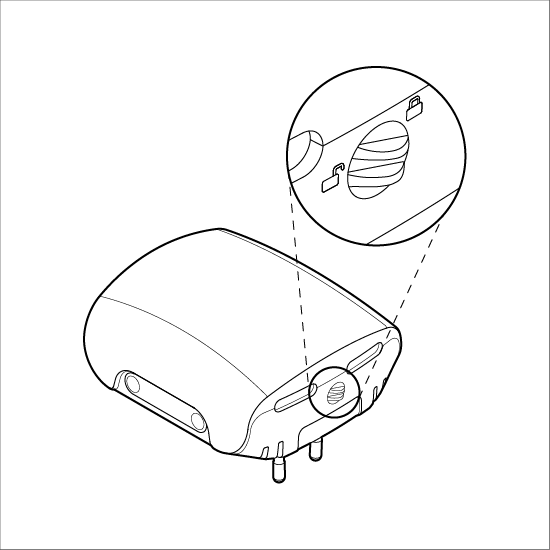
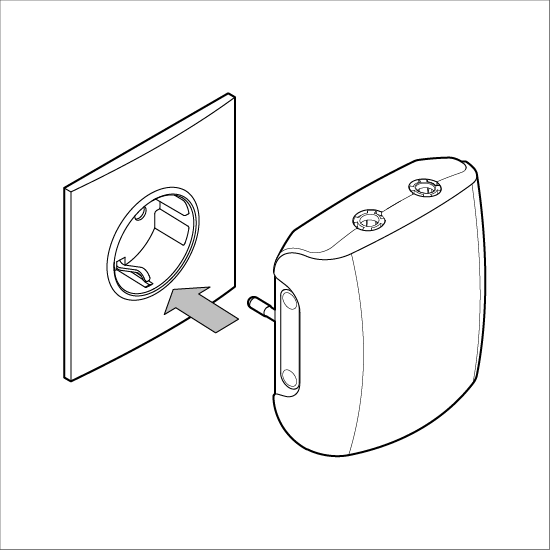
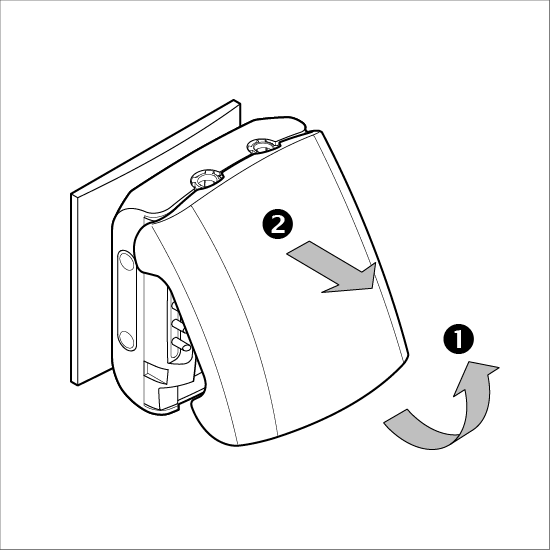
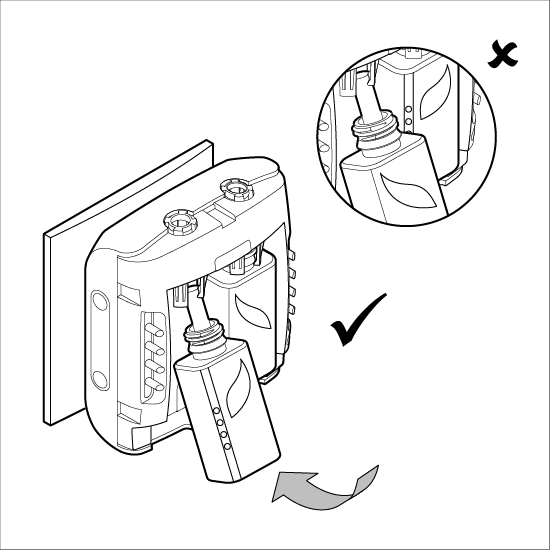
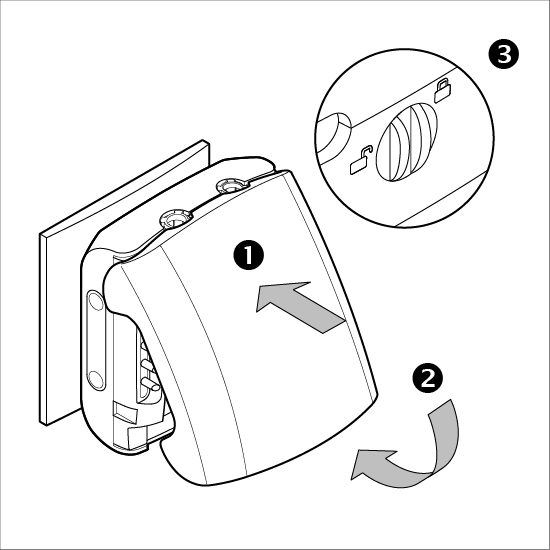
Troubleshooting
-
Device not powering on
-
Symptoms: No LED activity or response.
-
Steps to Resolve:
-
Verify the power supply and try a different outlet.
-
Check for loose connections.
-
Perform a factory reset via the System Button.
-
-
Device not connecting to Wi-Fi
-
Symptoms: Blue LED blinks (1 second ON / 3 seconds OFF).
-
Steps to Resolve:
-
Ensure the device is in Wi-Fi range.
-
Double-check SSID and password.
-
Restart your Wi-Fi router.
-
Enable Access Point mode (hold the System Button for 5 seconds).
-
-
LEDs not displaying correctly
-
Symptoms: LEDs show incorrect colors or don’t light up.
-
Steps to Resolve:
-
Check LED settings via the app.
-
Inspect for physical damage to the LEDs.
-
Restart the device or perform a reset.
-
-
Liquid level not displayed accurately
-
Symptoms: Incorrect or static liquid level indication.
-
Steps to Resolve:
-
Ensure vials are correctly seated.
-
Clean the device and vials.
-
-
Device overheating
-
Symptoms: Hot surface, intermittent operation.
-
Steps to Resolve:
-
Avoid use in high-temperature conditions.
-
-
Factory reset not working
-
Symptoms: Reset process fails.
-
Steps to Resolve:
-
Confirm you’re holding the System Button for 10 seconds within 60 seconds of powering on.
-
Repeat the procedure with accurate timing.
-
-
General instability (random On/Off, connectivity loss)
-
Symptoms: Unstable performance or random reboots.
-
Steps to Resolve:
-
Verify stable power supply.
-
Monitor Wi-Fi signal strength and network stability.
-
Ensure firmware is up to date.
-
FAQs
Customization Options
-
How do I adjust LED brightness?
-
Use the mobile app or web interface to modify LED brightness.
-
Brightness can also be turned off for minimal light during nighttime use.
-
Can I customize LED colors?
-
Yes, you can set LED colors via the apps, web interface or using the buttons on the device.
-
What are the ambient/mood light options?
-
You can choose to use the via-defined or fully customizable color light and intensity from the app or using the buttons on the device.
Vials & Vaporization
-
How many vials can the device hold?
Cury supports two vial slots. These can contain:
-
Two perfumes.
-
One perfume and one mosquito-repellent liquid.
-
How is the vial liquid level displayed?
-
Each vial’s level is shown using 4 LEDs, where each LED represents 25%.
-
When the level falls below 10%, the first LED blinks red as an alert.
-
The exact remaining level is displayed in the app as a percentage.
-
When a vial is empty, the app displays a “No liquid in vial” message beneath the vial illustration.
-
How can I control vaporization intensity?
-
Use UP/DOWN buttons to increase or decrease intensity.
-
LEDs indicate the current vaporization level 5 seconds after set.
-
Take full control through the app by adjusting the intensity from 25% up to 100% whenever you like.
-
You have a “Boost” mode that allows you to use the selected vial (or both vials simultaneously) at full capacity. The Boost mode is pre-configured to run for 30 minutes, after which the intensity automatically returns to the previously set level.
-
Can I use Cury with one vial only?
-
Yes, Cury can operate perfectly with only one vial inserted.
-
Even though the device features two vial slots, you can choose to use only one at a time and select which of the inserted vials is active through the mobile app.
-
Can I schedule vial usage and diffusion times?
-
Yes, Cury allows you to schedule fragrance or repellent diffusion through the app.
-
Create daily or weekly schedules to define when diffusion starts, stops, and at what intensity.
-
Select which vial is active during each scheduled period, allowing different aromas or functions at different times of the day.
-
Use pre-configured Home and Office profiles or create custom schedules to match your routine from the Shelly app.
-
Combine scheduling with smart home automation and Shelly scenes for fully automated operation.
-
Can I switch between vials automatically?
-
Yes, vial switching can be automated through schedules, profiles, or smart home scenes.
-
What happens if I insert an unsupported or incorrect vial?
-
If a vial is invalid or not recognized, Cury alerts you via red LED indicators and through the apps.
Device and Setup
-
Can I rename my Cury device in the app?
-
Yes, you can rename each device in the app to easily identify it when managing multiple units or rooms.
-
What happens if Cury loses its internet connection?
-
Cury continues operating using its last active settings and schedules.
-
Local controls and automations remain functional without a constant cloud connection.
-
Does Cury require an app to work?
-
No. Cury can be operated using the physical buttons on the device.
-
The app is only required for advanced features such as scheduling, automation, and remote access.
App and Control
-
Can multiple users control the same device?
-
Yes, access can be shared so multiple users can control and monitor the same Cury device.
-
Can I control multiple Cury devices from one app?
-
Yes, the app supports managing multiple devices from a single interface.
-
Does the app show usage history or statistics?
-
The app provides vial status, remaining liquid levels, and usage-related information to help optimize performance and replacement timing.
-
Can Cury work with sensors or triggers?
-
Yes, when integrated with Shelly or Home Assistant, Cury can respond to motion sensors, schedules, scenes, or other smart triggers.
-
Can I include Cury in existing smart home scenes?
-
Yes, Cury can be added to scenes alongside lighting, climate, or security automations.
Safety and Compliance Information
1. Is Cury safe to use?
Yes, Cury is a safe and compliant product. Here’s why:
-
IFRA Conformity: The liquids comply with the 51st Amendment to the IFRA Code of Practice, ensuring they meet global safety standards for fragrances and aromatherapy.
-
EU Regulation Compliance: The ingredients adhere to EU Regulation (EC) No 1223/2009, meaning they are free from harmful substances and allergens.
-
No Harmful Ingredients: The liquids do not contain:
-
Regulated fragrance allergens (the 26 substances listed in EU regulations).
-
CMR substances (Carcinogenic, Mutagenic, or Reprotoxic).
-
Phthalates, nitromusks, halogenorganic compounds, or substances of animal origin.
-
2. What should I do if the liquid spills or leaks?
While the liquids are safe, it’s best to handle spills promptly. Here’s what to do:
-
Unplug it to prevent electrical issues.
-
Use a clean cloth or paper towel to absorb the liquid.
-
Wash the affected surface with soap and water.
-
Ensure the vial is properly seated and not damaged. Replace if necessary.
3. What if the liquid comes into contact with skin or eyes?
The liquids are safe, but:
-
In case of skin contact, rinse the area with soap and water. No further action is needed unless irritation occurs.
-
In case of eye contact, rinse the eyes with clean water for 15 minutes. If irritation persists, consult a doctor.
4. Can I use Cury around children or pets?
Yes, but with caution:
-
Keep the device and liquids out of reach of children.
-
Avoid directly exposing pets to vaporized liquids, as pets may be more sensitive to fragrances.
5. What liquids can I use in Cury?
Only use manufacturer-approved liquids designed for the Cury device.
6. What if I have allergies or sensitivities?
While the liquids are formulated in compliance with relevant safety standards, if you have specific sensitivities:
-
Review the ingredient list (available on the packaging or website).
-
Test the device in a small area before prolonged use.
-
Discontinue use if you experience discomfort and consult a doctor.
7. How should I store Cury liquids?
-
Store in a cool, dry place away from direct sunlight.
-
Keep vials tightly closed when not in use.
-
Ensure liquids are out of reach of children and pets.
-
Does Cury require regular cleaning?
-
Minimal maintenance is required.
-
Occasional cleaning of the vial area is recommended if spills occur.
-
Is Cury suitable for continuous operation in offices or public spaces?
-
Yes, Cury is designed for 24/7 operation with optimized heating cycles and safety protections.
Components and APIs
Compliance
Printed user guide