
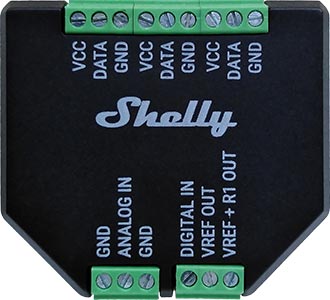
Device identification
-
Device name: Shelly Plus Add-on
Short description
Shelly Plus Add-on (the Device) is a galvanically isolated sensor interface to the Shelly Plus and Gen3 devices.
Main applications
-
Residential
-
MDU (Multi Dwelling Units - apartments, condominiums, hotels, etc.)
-
Light commercial (small office buildings, small retail/restaurant/gas station, etc.)
-
Agricultural (greenhouses, hotbed, nurseries, ranches, etc. )
-
Government/municipal
-
University/college
Future integrations
-
Google
-
Amazon
-
Samsung SmartThings
Device electrical interfaces
Inputs
-
1 analog input: ANALOG IN
-
1 digital input: DIGITAL IN
Output
-
1 reference voltage output: VREF OUT
-
1 reference voltage through a pull-up resistor output: VREF + R1 OUT
-
2 ground terminals: GND*
1-Wire interface
-
3 sensor power supply outputs (connected to the same PCB track): VCC
-
3 sensor data terminals (connected to the same PCB track): DATA
-
3 ground terminals: GND*
-
Connected to the same PCB ground layer.
Add-on interface
-
Shelly proprietary serial interface to connect to a Shelly Plus device
Supported sensors
-
Up to 5 DS18B20
-
Single DHT22
-
NTC resistors with 10 kΩ nominal resistance and β=4000 K
-
Photoresistors
-
PIR sensors
-
Soil moisture sensors
-
Ultrasonic proximity sensors
-
Capacitive liquid level sensors
-
Sound detectors
-
Other analog sensors with 0 to 10 V output voltage
Specifications
|
Type |
Value |
|---|---|
|
Physical |
|
|
Size (HxWxD): |
37x42x15 ±0.5 mm / 1.46 x 1.65 x 0.59 ±0.02 in |
|
Weigh: |
105 g / 3.70 oz |
|
Shell material: |
Plastic |
|
Screw terminals max torque: |
0.1 Nm / 0.89 lbIn |
|
Conductor cross section: |
max. 1 mm² / 17 AWG |
|
Conductor stripped length: |
4.5 mm / 0.18 in |
|
Color: |
Black |
|
Environmental |
|
|
Ambient temperature: |
-20 °C to 40 °C / -5 °F to 105 °F |
|
Humidity |
30 % to 70 % RH |
|
Max. altitude |
2000 m / 6562 ft |
|
Electrical |
|
|
Power supply voltage AC: |
N/A |
|
Power supply voltage DC: |
3.3 V (from Shelly plus device) |
|
Power consumption: |
< 0.5 W (without sensors) |
|
Output circuits ratings |
|
|
VCC max. current: |
10 mA |
|
VREF OUT max. current: |
1 mA |
|
VREF+R1 OUT resistor |
10 kΩ |
|
Shelly Plus device firmware capabilities |
|
|
Shelly Plus Addon supporting devices: |
Shelly Plus devices:
|
|
Shelly Gen3 devices:
|
|
|
Shelly Gen4 devices:
|
|
|
Temperature reading: |
Depends on the DS18B20 or DHT22 sensors |
|
Humidity reading: |
Depends on the DHT22 sensor |
|
Digital input: |
-15 V to 0.5 V (True) / 2.5 V to 15 V (False)* |
|
Analog input range: |
0 to 100% |
|
Analog input report threshold: |
1%** |
|
Voltmeter range: |
0 to 10 V |
|
Voltmeter report threshold: |
0.1 V** |
|
Analog input / Voltmeter accuracy |
Better than ±5% |
* Logic can be inverted in the digital input settings
** Can be configured in the analog input / voltmeter settings
Basic wiring diagrams
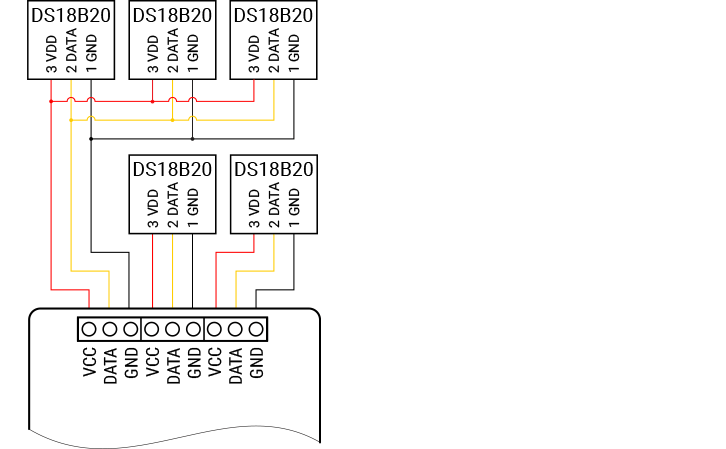
|
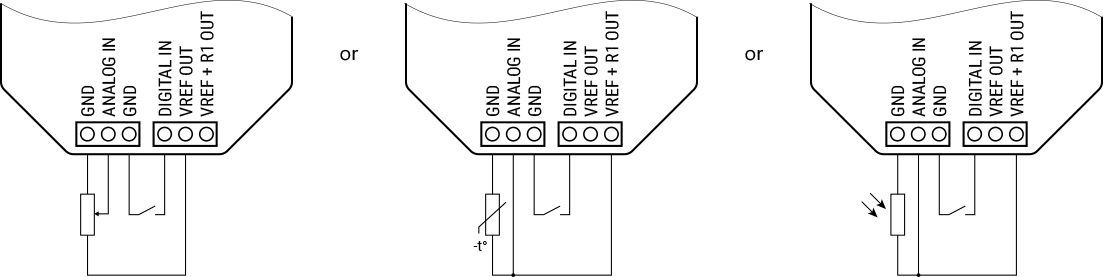
|
Legend
|
Terminals |
External sensor pins |
||
|---|---|---|---|
|
VCC |
Sensor power supply terminals |
VCC/VDD |
Sensor power supply pins |
|
DATA |
1-wire data terminals |
DATA/DQ |
Sensor data pins |
|
GND |
Ground terminals |
GND |
Ground pins |
|
ANALOG IN |
Analog input |
|
|
|
DIGITAL IN |
Digital input |
|
|
|
VREF OUT |
Reference voltage output |
|
|
|
VREF+R1 OUT |
Reference voltage through a pull-up resistor* output |
|
|
|
*For passive devices that need it to form a voltage divider. |
|
|
|
Troubleshooting
...
Components and APIs
Printed user guide
Compliance
Installation guides
- Use Shelly Plus 2PM and Add-on with a wind sensor to retract your motorized awning in high winds
- Using Shelly Plus Add-on to measure soil moisture with a capacitive sensor
- Using Shelly Plus Add-on with a capacitive liquid detection sensor
- Using Shelly Plus Add-on with a LDR (photoresistor) to control lights