
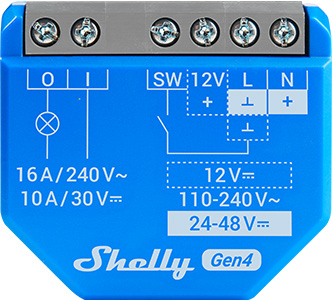
Device identification
-
Device name: Shelly 1 Gen4
-
Device model: S4SW-001X16EU
-
Device SSID: Shelly1G4-XXXXXXXXXXXX
-
Device Bluetooth ID: 0x1028
Short description
Shelly 1 Gen4 is a small form factor smart switch with potential-free contacts, which allows remote control of electric appliances through a mobile phone, tablet, PC, or home automation system. It can work standalone in a local Wi-Fi network or it can also be operated through cloud home automation services.
Shelly 1 Gen4 can be accessed, controlled and monitored remotely from any place where the User has internet connectivity, as long as the device is connected to a Wi-Fi router and the Internet.
It can be retrofitted into standard electrical wall boxes, behind power sockets and light switches or other places with limited space.
Shelly 1 Gen4 has embedded Web Interface, which can be used to monitor and control the device, as well as adjust its settings.
The device has multi-protocol wireless MCU which provides Zigbee and Bluetooth connectivity, ensuring a secure connection.
This device is compatible with Matter.
Main features
-
Wi-Fi Connectivity: The device can connect to your home Wi-Fi network, allowing you to remotely monitor humidity and temperature data through a smartphone app or other compatible devices.
-
Integration with Smart Home Platforms: You can integrate the Shelly 1 Gen4 with popular smart home platforms, including Google, Alexa, and Samsung SmartThings. This enables voice control and automation capabilities through these platforms.
-
Local and Cloud Control: Can function independently in a local Wi-Fi network and can also be operated through cloud home automation services.
-
Bluetooth Connectivity: Bluetooth and BLE gateways are available for inclusion purposes, which may be useful during the setup process.
-
Zigbee Connectivity: Zigbee is available for inclusion purposes, which may be useful during the setup process.
-
User-Friendly Interface: The device provides a user-friendly interface with a reset button for manual interactions.
-
Improved Processor: Upgraded with an improved processor and support for Zigbee connectivity.
-
Embedded Web Interface: Features an embedded web interface for monitoring, control, and adjustment of settings.
-
Wireless Connectivity: The device supports Wi-Fi (802.11 b/g/n/ax) and Bluetooth 5.0 protocols with specified indoor and outdoor range capabilities.
-
Dry Contact: Allows switching on and off of lower voltage devices.
-
BLE Gateway: Bridge between your Shelly BLU devices and the wider Shelly ecosystem. It receives Bluetooth signals and sends them to the cloud or locally to another non-Bluetooth device.
-
Wi-Fi Range extender for IoT devices: A Wi-Fi extender is employed to expand the reach of your Wi-Fi network by receiving your current Wi-Fi signal, enhancing its strength, and then transmitting the enhanced signal over a wider area.
-
Zigbee Range extender for IoT devices: A Zigbee extender is employed to expand the reach of your Zigbee network by receiving your Zigbee signal, enhancing its strength, and then transmitting the enhanced signal over a wider area.
-
Scripting: https://shelly-api-docs.shelly.cloud/gen2/ComponentsAndServices/Script
-
Wide range of integrations: The device can be integrated with 3rd party home systems, documented HTTP API, MQTT(s), Web Hooks over HTTP and HTTPS, UDP
-
Schedules: Allows scheduling of complex operations to be executed in predefined time window. Users can specify time windows based on date, time of day, weekdays, hours, minutes and seconds.
-
Virtual Components: https://shelly-api-docs.shelly.cloud/gen2/DynamicComponents/Virtual/
-
KNX net/IP support: https://shelly-api-docs.shelly.cloud/gen2/Integrations/KNX/
Use cases
-
Remote Appliance Control: Turn on or off electric appliances remotely using your mobile phone, tablet, PC, or home automation system.
-
Internet-Connected Convenience: Access аnd control devices from anywhere with internet connectivity, as long as the Shelly 1 Gen4 is connected to a Wi-Fi router.
-
Home Automation: Shelly 1 Gen4 enables automatic control of power appliances for more relaxing and enjoyable experience.
Home Automation Use Cases
Light Control
-
Remote control of standard lights (LED, incandescent, halogen).
-
Set timers or schedules for lights (e.g., porch lights on at sunset).
-
Use with motion sensors (for example Shelly BLU Motion) for occupancy-based lighting.
Garage Door Automation
-
Act as a smart trigger to open/close garage doors.
-
Monitor door status with a sensor input i.e using Shelly Plus Add-on.
-
Integrate with voice assistants for hands-free control.
Fan or Ventilation Control
-
Automate bathroom or kitchen fans based on humidity sensors (like Shelly BLU H&T).
-
Turn on ventilation during specific times of day or based on occupancy.
Heater or Towel Rail Switching
-
Control electric towel warmers or heaters (Max. switching current: 16A).
-
Schedule operation or link to temperature thresholds via sensors (like Shelly BLU H&T).
Commercial Applications
Lighting Automation in Small Offices or Shops
-
Control light zones based on business hours.
-
Use with motion detectors (for example Shelly BLU Motion) for energy savings.
Meeting Room Occupancy
-
Enable or disable equipment like projectors depending on occupancy.
Security and Access Systems
-
Remotely unlock gates or doors for deliveries.
-
Monitor open/close state of access points.
Industrial/Utility Use Cases
Equipment Monitoring & Control
-
Power cycling routers, modems, or network switches.
Pump or Motor Control
-
Automate irrigation pumps in greenhouses or fields (Max. switching current: 16A).
-
Remotely control or valves (i.e. Shelly Add-On Mechanical Manipulator).
Main applications
-
Residential
-
MDU (Multi Dwelling Units - apartments, condominiums, hotels, etc.)
-
Light commercial (small office buildings, small retail/restaurant/gas station, etc.)
-
Government/municipal
-
University/college
Integrations
Amazon Alexa supported capabilities
Google Smart Home supported traits
Samsung SmartThings supported capabilities
Simplified internal schematics
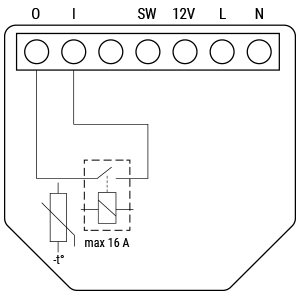
Device electrical interfaces
Inputs
-
1 switch/button input on screw terminal
-
1 potential-free contacts relay input on screw terminal
-
2 power supply inputs on screw terminals: N and L
Outputs
-
1 potential-free contacts relay output on screw terminal
Connectivity
-
Wi-Fi
-
Bluetooth
-
Zigbee
Safety function
-
Overheating protection
Supported load types
-
Resistive (incandescent bulbs, heating appliances)
-
Capacitive (capacitor banks, electronic equipment, motor starting capacitors)
-
Inductive with RC Snubber (LED light drivers, transformers, fans, refrigerators, air-conditioners, washing machines, tumble dryers)
User interface
Inputs
-
One (Control) button
-
Press and hold for 5 seconds to enable Device access point and Bluetooth connection.
-
Press and hold for 10 seconds to factory reset the Device.
-
Press the button 5 times to switch the Device from Matter (default) to Zigbee profile. The Device enters inclusion mode for 3 minutes. Include the Device following the instructions of your Zigbee home automation system.
-
Press the button 3 times to restart the inclusion mode for another 3 minutes if you missed the previous 3-minute window.
-
Outputs
-
LED (monocolor) indication
-
AP (Access Point) enabled and Wi-Fi disabled:
1 secondON/ 1 secondOFF -
Wi-Fi enabled, but not connected to a Wi-Fi network:
1 secondON/ 3 secondsOFF -
Connected to a Wi-Fi network:
ConstantlyON -
Cloud is enabled, but not connected:
1 secondON/5 secondsOFF -
Connected to Shelly Cloud:
ConstantlyON -
OTA (Over the Air Update):
½ secON/ ½ secondOFF -
Button pressed and held for 5 seconds:
½ secondON/ ½ secondOFF -
Button pressed and held for 10 seconds:
¼ secondON/ ¼ secondOFF
-
The list above starts with the initial device status and the lowest priority. Every next state cancels the previous one.
Specifications
|
Quantity |
Value |
|---|---|
|
Physical |
|
|
Size (HxWxD): |
37x42x16 mm / 1.46x1.65x0.63 inch |
|
Weight: |
26 g / 0.92 oz |
|
Screw terminals max torque: |
0.4 Nm / 3.5 lbin |
|
Conductor cross section: |
0.5 to 4 mm² / 20 to 11 AWG (solid, stranded, and bootlace ferrules) |
|
Conductor stripped length: |
6 to 7 mm / 0.24 to 0.28 in |
|
Mounting: |
Wall console |
|
Shell material: |
Plastic |
|
Shell color: |
Blue |
|
Terminals color: |
Grey |
|
Environmental |
|
|
Ambient working temperature: |
-20 °C to 40 °C / -5 °F to 105 °F |
|
Humidity: |
30 % to 70 % RH |
|
Max. altitude: |
2000 m / 6562 ft |
|
Electrical |
|
|
Power supply: |
|
|
Power consumption: |
< 1 W |
|
Neutral not needed: |
No |
|
External protection: |
Cable protection switch in accordance with EN60898-1 (tripping characteristic B or C, max. 16 A rated current, min. 6 kA interrupting rating, energy limiting class 3) |
|
Output circuits ratings |
|
|
Max. switching voltage: |
|
|
Max. switching current: |
|
|
Sensors, meters |
|
|
Internal-temperature sensor: |
Yes |
|
Radio |
|
|
Wi-Fi |
|
|
Protocol: |
802.11 b/g/n/ax |
|
RF band: |
2401 - 2483 МHz |
|
Max. RF power: |
< 20 dBm |
|
Range: |
Up to 50 m / 164 ft outdoors, up to 30 m / 98 ft indoors (depending on local conditions) |
|
Bluetooth |
|
|
Protocol: |
5 (LE) |
|
RF band: |
2402 - 2480 MHz |
|
Max. RF power: |
< 20 dBm |
|
Range: |
Up to 30 m / 98 ft outdoors, up to 10 m / 33 ft indoors (depending on local conditions) |
|
Zigbee |
|
|
Protocol: |
3.0 |
|
Zigbee repeater: |
Yes |
|
RF bands: |
2405 - 2480 MHz |
|
Max. RF power: |
< 20 dBm |
|
Range: |
Up to 300 m / 984 ft outdoors, up to 100 m / 328 ft indoors (depending on local conditions) |
|
Microcontroller unit |
|
|
CPU: |
ESP-Shelly-C68F |
|
Flash: |
8MB |
|
Firmware capabilities |
|
|
Schedules: |
20 |
|
Webhooks (URL actions): |
20 with 5 URLs per hook |
|
Scripting: |
Yes |
|
MQTT: |
Yes |
Basic wiring diagrams
|
|
|
|
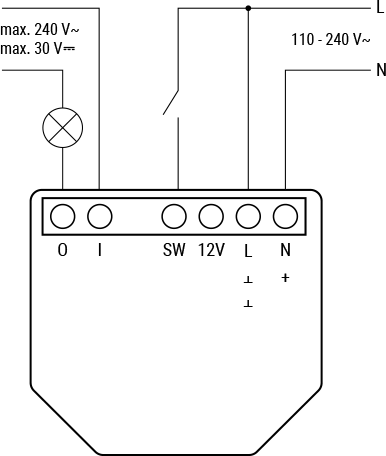
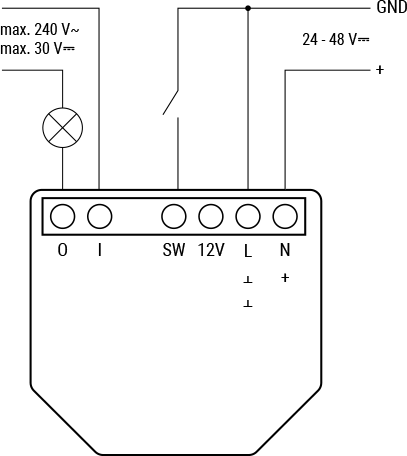
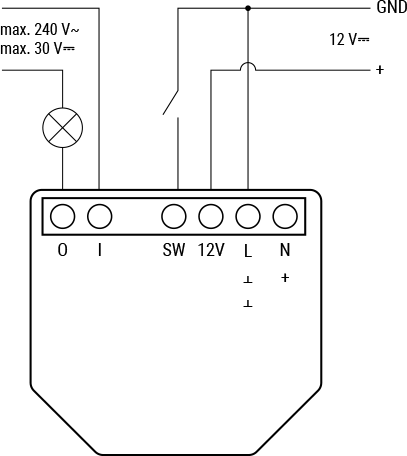
Legend
|
Terminals |
|
Wires |
|
|---|---|---|---|
|
I |
Load circuit input terminal |
L |
Live wire (110-240 V~) |
|
O |
Load circuit output terminal |
N |
Neutral wire |
|
SW |
Switch (controlling O) input terminal |
+ |
12/24-48V ⎓ positive wire |
|
+12V |
12 V⎓ positive terminal |
GND |
12/24-48V⎓ ground wire |
|
L |
Live terminal (110-240 V~) |
|
|
|
N |
Neutral terminal |
|
|
|
+ |
24-48 V⎓ positive terminal |
|
|
|
Ʇ |
12/24-48V⎓ ground terminal |
|
|
Shelly Smart Control
Shelly Web user interface
Components and APIs
Compliance
-
Shelly 1 Gen4 multilingual EU declaration of conformity 267 2026-03-13.pdf
-
Shelly 1 Gen4 UK PSTI ACT statement of compliance 267 2026-03-13.pdf
-
Shelly 1 Gen4 UKCA declaration of conformity 267 2026-03-13.pdf
Printed user guide
Installation guides