
Device image
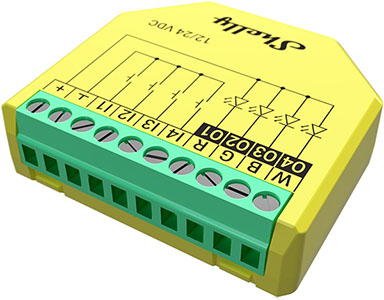
Device identification
-
Device name: Shelly Plus RGBW PM
-
Device model: SNDC-0D4P10WW
-
Device SSID: ShellyPlusRGBWPM-XXXXXXXXXXXX
-
Device Bluetooth ID: 0x1009
Short description
Shelly Plus RGBW PM is a Wi-Fi/Bluetooth-operated RGBW controller. It can be connected like any LED controller and allows the lighting to be controlled directly from a mobile device or tablet. It supports 3 profiles - rgbw, rgb and light. In the light profile, different LED strips (groups of lights) can be controlled independently. Power measurement functionality allows real-time tracking of the voltage, current, and power consumption.
Main features
-
BLE Gateway: Facilitates communication between BLE and Wi-Fi-enabled devices.
-
Wi-Fi Range extender: Retransmits the Wi-Fi signal and extends its reach.
-
Scripting: Allows creating automation scenarios through scripts.
-
Basic Schedules: Supports weekly schedules and routines, including setting of brightness, transition duration, and flip value of the dimming signal.
-
Аdvanced Schedules: Supports detailed schedules and routines throughout the year with a broad range of time adjustments from seconds to months, including setting of brightness, transition duration, and flip value of the dimming signal.
-
Shelly Plus Add-On compatible: The Device supports connection with the sensor interface to Shelly Plus devices.
-
Auto on/off timers: Enables auto on/off timer setting.
-
Local actions: Allows creating automation scenarios within the local Wi-Fi network, including setting of brightness, transition duration, and flip value of the dimming signal.
-
Webhooks: Supports automation through lightweight, event-driven communication with other devices.
-
Independent control for each output (channel) in light profile: Provides separate control for each output for maximum flexibility.
-
Calibration (in light profile): On successful calibration, detailed information about voltage, current, and power is displayed for each channel.
-
Power measurement: Precise monitoring of energy consumption.
-
High frequency mode: Users can choose to increase PWM frequency to 22kHz to reduce the acoustic noise from the DC driver. This might cause non-precise colors in rgb/rgbw profiles when running at low brightness. Default frequency: 833 Hz.
-
Independent control for RGB and White: Color brightness and white brightness can now be controlled independently with dimming up/down.
-
Night Mode: Enables setting a specific brightness of input lights during nighttime.
-
Switch/Button/Analog input mode: Allows flexible input control through switches, buttons or potentiometers (10kΩ analog input is recommended).
-
Min/Max brightness: Reframes the range of the dimming signal to get more precise brightness control on the output. Affects RGB in rgbw and rgb; brightness in light.
-
Button fade rate: Controls how quickly the output brightness changes while holding the button(s).
Use cases
-
Power monitoring: Monitor power consumption of all connected lights in real-time. This is useful for understanding energy usage patterns and promoting energy efficiency.
-
Space-efficient retrofitting: Install one of the smallest devices on the market into standard electrical wall boxes, behind power sockets, light switches, or other locations with limited space.
-
Wake-up and sleep routines: Use a wide range of color and brightness levels in Night mode to simulate sunrise or sunset by gradually changing the color and brightness. Implement circadian lighting, promoting better sleep-wake cycles and supporting overall well-being by adjusting light color and intensity throughout the day.
-
Child-friendly night lights: Create a comforting and child-friendly environment. Adjust colors to provide a soothing ambiance for children during bedtime.
-
Seasonal or entertainment decoration: Decorate homes or commercial spaces for different seasons or holidays by adjusting the RGBW lighting. For example, use warm tones for autumn and festive colors during holidays. Set dynamic and vibrant lighting patterns for parties, gatherings, or entertainment events.
-
Smart presence simulation: Set customized color and brightness levels at at any given time or based on sunrise/sunset. Enhance home security by simulating presence and turning lights on and off in a natural pattern.
-
Retail and commercial displays: Use the Device for visual merchandising in retail spaces. Showcase products with dynamic lighting to attract attention and create visually appealing displays.
-
Enhanced lighting control options: Integrate the Device with most of the frequently used home automation systems like Home Assistant, Google Home, Alexa, and SmartThings for expanded control options.
-
Dynamic art installations: Integrate the Device into art installations or exhibitions to add dynamic and interactive lighting effects, enhancing the visual impact and engagement.
Integrations
Amazon Alexa supported capabilities
-
Brightness Controller
Google Smart Home supported traits
-
Brightness
Samsung SmartThings supported capabilities
-
Color Control
Simplified internal schematics
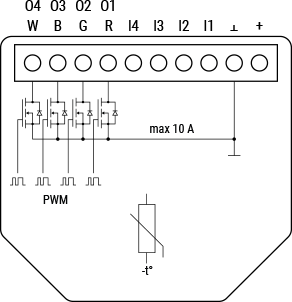
Device electrical interfaces
Inputs
-
4 switch/button inputs on screw terminals: I1 and I4
-
2 power supply inputs on screw terminals: (+) and (Ʇ)
Outputs
-
4 outputs on screw terminals: O1, O2, O3 and O4. Same are used for R, G, B and W
Connectivity
-
Wi-Fi
-
Bluetooth
Safety function
-
Overheating protection
-
Overcurrent protection
Supported load types
-
12/24 V mono-color LED strips
-
12/24 V RGB LED strips
-
12/24 V RGBW LED strips
User interface
Inputs
Specifications
|
Quantity |
Value |
|---|---|
|
Physical |
|
|
Size (HxWxD): |
42x37x12 ±0.5 mm / 1.65x1.46x0.66 ±0.02 in |
|
Weight: |
17 g / 0.60 oz |
|
Screw terminals max torque: |
0.2 Nm / 1.8 lbin |
|
Conductor cross section: |
0.1 to 1 mm² / 30 to 16 AWG (solid, stranded, and bootlace ferrules) |
|
Conductor stripped length: |
6 mm / 0.24 in |
|
Mounting: |
In-wall |
|
Shell material: |
Plastic |
|
Shell color: |
Yellow |
|
Connectors color: |
Green |
|
Environmental |
|
|
Ambient working temperature: |
-20 °C to 40 °C / -5 °F to 105 °F |
|
Humidity: |
30 % to 70 % RH |
|
Electrical |
|
|
Power supply: |
12/24 VDC |
|
Power consumption: |
< 1.2 W |
|
Output circuits ratings |
|
|
Max. control voltage: |
24 VDC |
|
Max. control current: |
4 A per channel (10 A total) |
|
PWM frequency |
833 Hz |
|
Sensors, meters |
|
|
Voltmeter: |
0-24 V |
|
Voltmeter accuracy: |
± 5% |
|
Ammeter: |
0-10 A |
|
Ammeter accuracy: |
± 10% |
|
Power and energy meters: |
Power measurement |
|
No load threshold: |
0.5 VA per channel |
|
Internal-temperature sensor: |
Yes |
|
Radio |
|
|
Wi-Fi |
|
|
RF band: |
|
|
Max. RF power: |
< 20 dBm |
|
Range: |
Up to 30 m / 100 ft indoors and 50 m / 160 ft outdoors
|
|
Bluetooth |
|
|
Protocol: |
4.2 |
|
RF band: |
2400 - 2483.5 MHz |
|
Max. RF power: |
< 4 dBm |
|
Range: |
Up to 10 m / 33 ft indoors and 30 m / 100 ft outdoors
|
|
Microcontroller unit |
|
|
CPU: |
ESP-Shelly C38F |
|
Clock frequency: |
160 Mhz |
|
RAM: |
400 KB |
|
Flash: |
4 MB |
|
Firmware capabilities |
|
|
Schedules: |
20 |
|
Webhooks (URL actions): |
20 with 5 URLs per hook |
|
Scripting: |
Yes |
|
MQTT: |
Yes |
|
Scripting: |
Yes |
Basic wiring diagrams
|
|
|
|
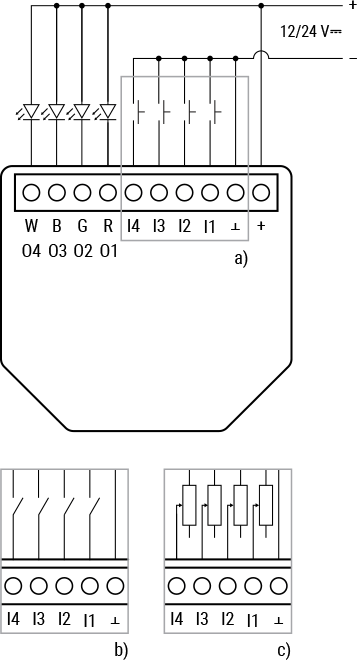
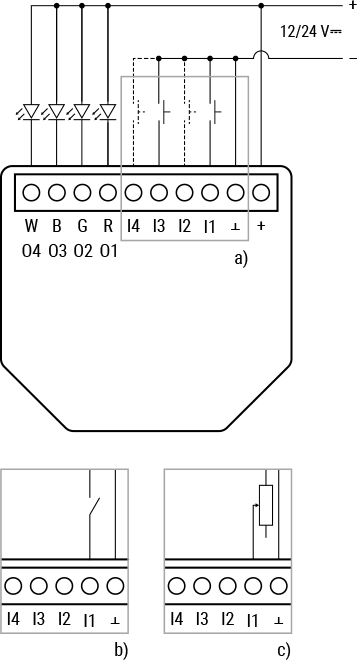
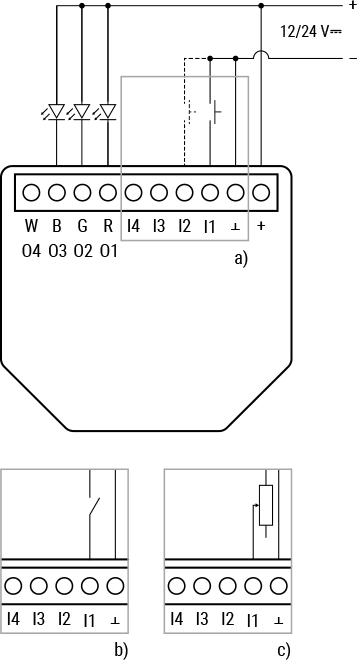
Legend
|
Terminals |
Wires |
||
|---|---|---|---|
|
+ |
12/24 VDC positive terminal |
+ |
Positive wire |
|
⊥ |
12/24 VDC negative terminal |
- |
Negative wire |
|
I1, I2, I3, I4 |
Switch/button/potentiometer input terminals for light control |
|
|
|
R, G, B |
Red, Green, and Blue channel outputs (when in rgb or rgbw mode) |
|
|
|
W |
White channel output (when in rgbw mode) |
|
|
|
O1, O2, O3, O4 |
Light outputs (when in light mode) |
|
|
Shelly Smart Control
Components and APIs
Compliance and certification
-
Shelly Plus RGBW PM multilingual EU declaration of conformity 275 2026-03-13.pdf
-
Shelly Plus RGBW PM UK PSTI ACT statement of compliance 275 2026-03-13.pdf
-
Shelly Plus RGBW PM UKCA declaration of conformity 275 2026-03-13.pdf
Printed user guide