
PowerTrack 500
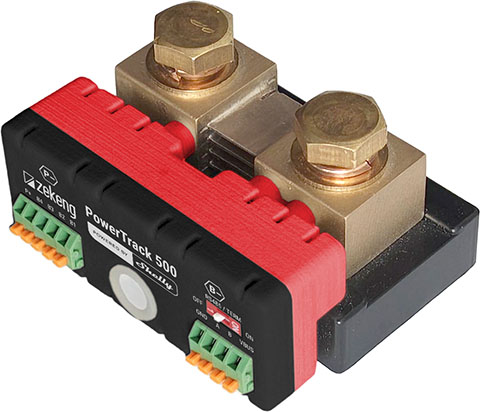
Device identification
Device name: PowerTrack 500 (Powered by Shelly)
Device model: S4PB-00C0187105
Device SSID: PowerTrack500-XXXXXXXXXXX
BLE Model ID: 0x1125
Short description
PowerTrack 500 is a battery monitoring device designed to track a single battery or complete battery strings across common pack configurations (from 6–48 V nominal systems). It measures up to 500 A DC and calculates State of Charge and State of Health for supported chemistries including Lead-Acid, SLA/VRLA, and LiFePO4—making it suitable for everything from backup banks to off-grid installations.
Beyond core electrical measurements, it adds practical safety and diagnostics tools: a built-in temperature sensor for shunt overheating detection plus four combined auxiliary inputs for additional voltage and temperature measurements. With Wi-Fi communication and platform-friendly connectivity, it’s built to feed battery data into automations, dashboards, and alerts.
Main features
Monitors single battery or battery strings (4×12 V, 3×12 V, 2×12 V, 1×12 V, or 1×48 V packs)
State of Charge (SoC) and State of Health (SoH) for Lead‑Acid, SLA, VRLA, and LiFePO4 batteries
DC current measurement up to 500 A
Nominal battery pack voltage support: 6 – 48 V⎓
Wide power supply range (P+ terminal): 6 – 70 V⎓
4 combined auxiliary voltage/temperature measurement inputs
RS485 Modbus (non-isolated) interface with optional power back-up
Built-in temperature sensor for shunt overheating detection
Use cases
Off-grid solar battery bank supervision and alerts: Use the 500 A direct current measurement together with SoC to understand real charging performance and overnight consumption. Send low-SoC warnings or abnormal current events to your automation platform via MQTT or HTTP/HTTPS webhooks to prompt corrective action.
Remote site backup battery monitoring over Modbus: Connect PowerTrack 500 to an existing RS485 Modbus monitoring stack to pull pack voltage, current, and health indicators into a central dashboard. When SoH drops or charging behavior changes, automate maintenance tickets or escalation messages through your monitoring system.
RV or boat battery protection with temperature-aware safety: Use the built-in shunt overheating detection plus auxiliary temperature inputs to watch for rising temperatures during heavy loads or charging. When temperature thresholds are reached, trigger an automation notification (via MQTT/webhooks) so you can reduce load or adjust charging behavior.
Battery room visibility with expanded sensing points: Use the four auxiliary voltage/temperature inputs to monitor additional points such as separate battery segments or ambient temperature alongside the main pack measurements. Combine those readings with SoC/SoH data to automate “battery room abnormal condition” alerts when temperature and electrical behavior drift outside expected ranges.
Main applications
Photovoltaic battery systems
Recreational vehicles
Marine energy management
Off-grid systems
Integrations
Amazon Alexa supported capabilities
--- LIST THEM HERE ---
Google Smart Home supported traits
--- LIST THEM HERE ---
Samsung SmartThings supported capabilities
--- LIST THEM HERE ---
Simplified internal schematics
Device electrical interfaces
Shunt I/O terminals
Power supply voltage (6 - 70 V⎓)
OneWire interface for external optional temperature sensor (DS18B20)
Connectivity and protocols
Wi-Fi
Bluetooth
Safety function
Overheating protection
Overvoltage protection
Overcurrent protection
Supported load types
Any load types are supported.
User interface
Inputs
System button
Press and hold for 5 seconds to enable Device access point and Bluetooth connection.
Press and hold for 10 seconds to factory reset the Device.
Outputs
LED (monocolor) indication
AP (Access Point) enabled and Wi-Fi disabled:
1 secondON/ 1 secondOFFWi-Fi enabled, but not connected to a Wi-Fi network:
1 secondON/ 3 secondsOFFConnected to a Wi-Fi network:
ConstantlyONCloud is enabled, but not connected:
1 secondON/5 secondsOFFConnected to Shelly Cloud:
ConstantlyONOTA (Over the Air Update):
½ secON/ ½ secondOFFButton pressed and held for 5 seconds:
½ secondON/ ½ secondOFFButton pressed and held for 10 seconds:
¼ secondON/ ¼ secondOFF
The list above starts with the initial device status and the lowest priority. Every next state cancels the previous one.
Specifications
…
Basic wiring diagrams
Conceptual conncetion
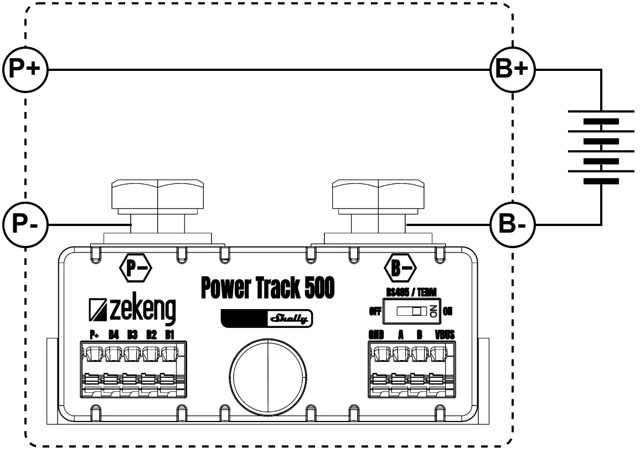
Single battery monitoring
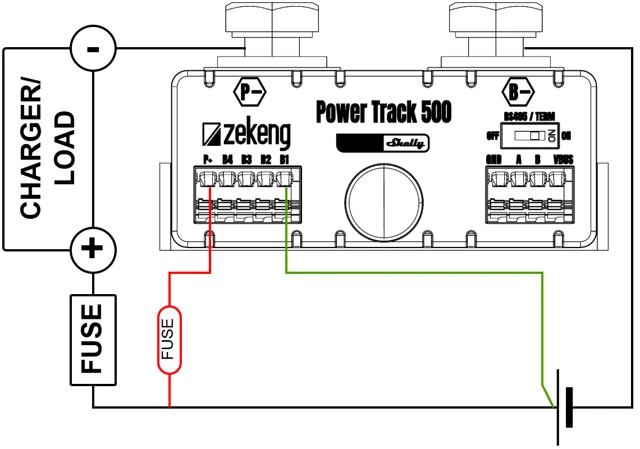
Battery string monitoring - 2 batteries
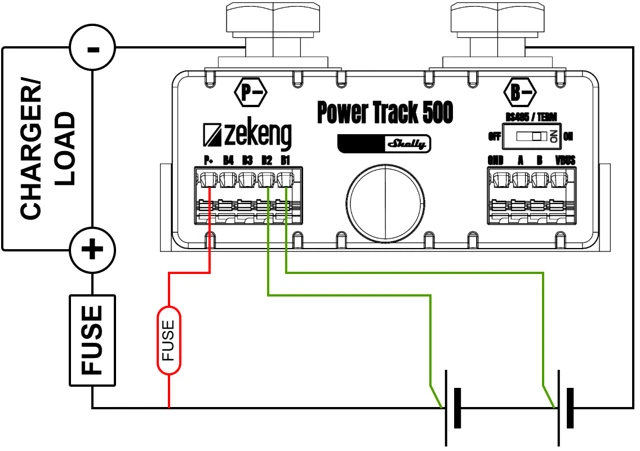
Battery string monitoring - 3 batteries
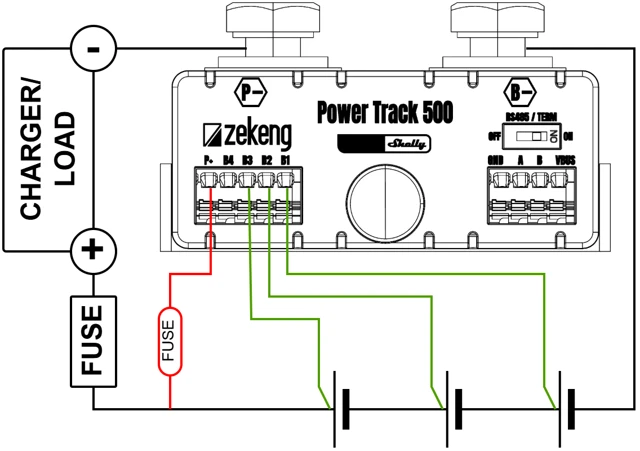
Battery string monitoring - 4 batteries
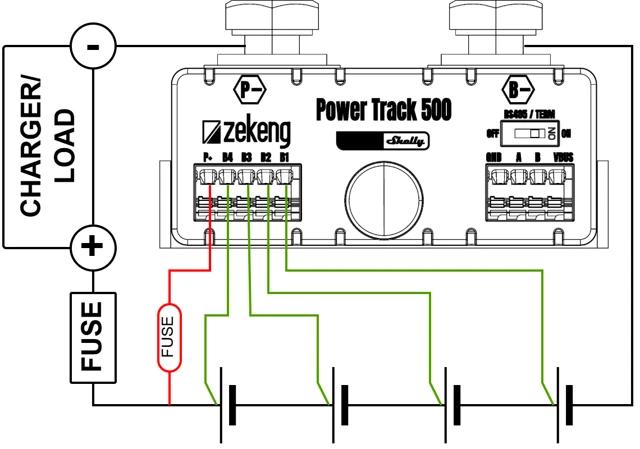
Legend
Terminals | |||
|---|---|---|---|
P+ | |||
B1 | 1st battery positive connection | ||
B2 | 2nd battery positive connection | ||
B3 | 3rd battery positive connection | ||
B4 | 4th battery positive connection |
Components and APIs
Compliance
…
Printed user guide
…